
Mobile ID and Microsoft Entra ID: Stronger MFA with External Authentication
What Is Microsoft Entra External MFA?
Microsoft Entra ID is the central identity and access management platform for enterprises using Microsoft 365, Azure and thousands of connected applications. When users sign in, Entra ID evaluates Conditional Access policies to decide whether additional verification is needed and which method to use.
Entra ID already ships with several built-in MFA methods: Authenticator app, FIDO2 security keys, SMS and phone calls. For organizations that needed to bring in a third-party authentication provider, the only option was a legacy mechanism called Custom Controls. Custom Controls allowed redirecting users to an external provider, but with significant limitations. The external authentication was not fully recognized as MFA by Entra ID, which limited its use in Conditional Access policies and grant controls.
External MFA changes this. Launched in public preview in May 2024 and generally available since March 2026, External MFA lets an external provider satisfy Entra ID's MFA requirement through a standards-based provider integration. In practice, it can satisfy the Conditional Access grant control Require multifactor authentication and is managed alongside other authentication methods in Entra ID.
That does not make it identical to every built-in Entra method. Microsoft currently does not support External MFA with Authentication Strengths. The important point is narrower and more precise: External MFA is a supported way to fulfill Entra ID's MFA requirement with a third-party provider.
The integration uses OpenID Connect (OIDC) between Entra ID and the external provider. For Microsoft Entra External MFA, this is the provider pattern documented by Microsoft, not a relying party using Mobile ID's normal authorization code flow.
INFO
External MFA replaces Custom Controls, which Microsoft plans to deprecate on September 30, 2026. Organizations still using Custom Controls should plan their migration now.
How Does External MFA Work?
The flow is straightforward for the end user, but technically it is not the same as a relying party's normal Mobile ID authorization code integration. In the External MFA scenario, Microsoft Entra ID calls the provider's OIDC authorization endpoint using its external-provider implicit-flow pattern, including parameters such as response_type=id_token, response_mode=form_post, and an id_token_hint that identifies the user and tenant.
Mobile ID validates the Entra context, performs the provider-side second-factor journey, and returns a signed id_token to Entra ID. Entra ID validates that token and checks whether the MFA requirement is satisfied.
Entra ID remains the identity control plane throughout the process: policy evaluation, access decisions, token issuance and session management. Mobile ID handles the authentication step itself.
That separation matters. Entra decides when MFA is required and consumes the provider result. Mobile ID decides how the user authenticates inside the provider journey. Entra does not need to understand whether Mobile ID fulfilled the second factor with SIM, App, or Passkey.
Why Mobile ID as Your External MFA Provider?
Most external MFA providers offer app-based push notifications. Mobile ID goes further with a combination of authentication methods that covers scenarios other providers simply cannot address.
Across the broader Mobile ID ecosystem, there are now three strong methods: SIM, App, and Passkeys. For Entra External MFA, the important point is not that Entra chooses between them; it does not. Mobile ID runs the provider-side journey and Entra consumes the successful outcome.
SIM-Based Authentication: No App Required
Mobile ID's SIM method uses the SIM card (or eSIM) as a tamper-proof hardware token, certified at EAL5+ (ISO/IEC 15408). Over 6 million Swiss SIM cards from Swisscom, Sunrise and Salt are Mobile ID enabled.
For Entra ID deployments, this means MFA works on any mobile device, including basic phones without a smartphone operating system. No app to install, no app store dependency, no data connection needed during authentication. For organizations with field workers, industrial environments, or employees who do not carry smartphones, this is a critical differentiator.
The two factors are the physical SIM card (possession) and the personal Mobile ID PIN (knowledge). Authentication runs over a separate encrypted channel, independent of the internet connection.
App-Based Authentication: Beyond Simple Push
The Mobile ID App for iOS and Android goes well beyond standard push notifications. Users can authenticate with fingerprint or face recognition. Number matching and transaction signing are available with both Mobile ID SIM and Mobile ID App. On the App, these capabilities are combined with smartphone-native UX and biometrics. App-based geofencing uses GPS-based location determination plus built-in jailbreak and mock-service detection, which makes GPS spoofing more difficult. In supported Swisscom SIM scenarios, geofencing is also possible via the mobile-network location mechanism.
The app is built on technology from Futurae, an ETH Zurich spin-off, and stores keys in the device's Trusted Execution Environment (TEE).
Passkey Authentication: Phishing-Resistant Browser Capability
Beyond SIM and App, Mobile ID now also supports FIDO2 passkeys across its OIDC ecosystem. Passkeys are cryptographically bound to the domain, which makes them immune to URL spoofing. Users register their passkeys on mobileid.ch and can use them across connected relying parties that are configured for Mobile ID passkeys.
For direct Mobile ID OIDC integrations, passkeys can be combined with Mobile ID-specific controls such as passkey-oriented ACR values and keyringId handling. Those controls belong to the standard Mobile ID relying-party integration, not to the Entra External MFA admin surface.
INFO
In the Entra ID External MFA context, Entra still consumes only the result of the Mobile ID provider flow. It does not distinguish SIM, App, or Passkey as separate Mobile ID methods. If passkeys are enabled for the Mobile ID provider configuration behind an Entra integration, they remain a Mobile ID-side method choice rather than an Entra-side setting. For broader passkey details, see the companion article: Mobile ID Passkeys: Phishing-Resistant Authentication for Browser Scenarios.
Swiss Operation and Data Residency
Mobile ID is operated by Swisscom from Switzerland. Organizations with data residency requirements or a preference for European-operated security services can be confident that authentication data stays within Swiss jurisdiction.
Where Mobile ID Adds Value Beyond Native MFA
Microsoft Authenticator is a solid default for organizations that only need app-based push and TOTP. Mobile ID adds clear value when requirements go beyond that baseline:
- Parts of the workforce do not use smartphones.
- Authentication must be restricted to a defined geographic area.
- Users need to confirm transaction details explicitly on their device.
- One MFA provider should cover Entra ID, custom applications, VPN and RADIUS.
These are scenarios where an app-only approach hits its limits.
Enterprise Use Cases
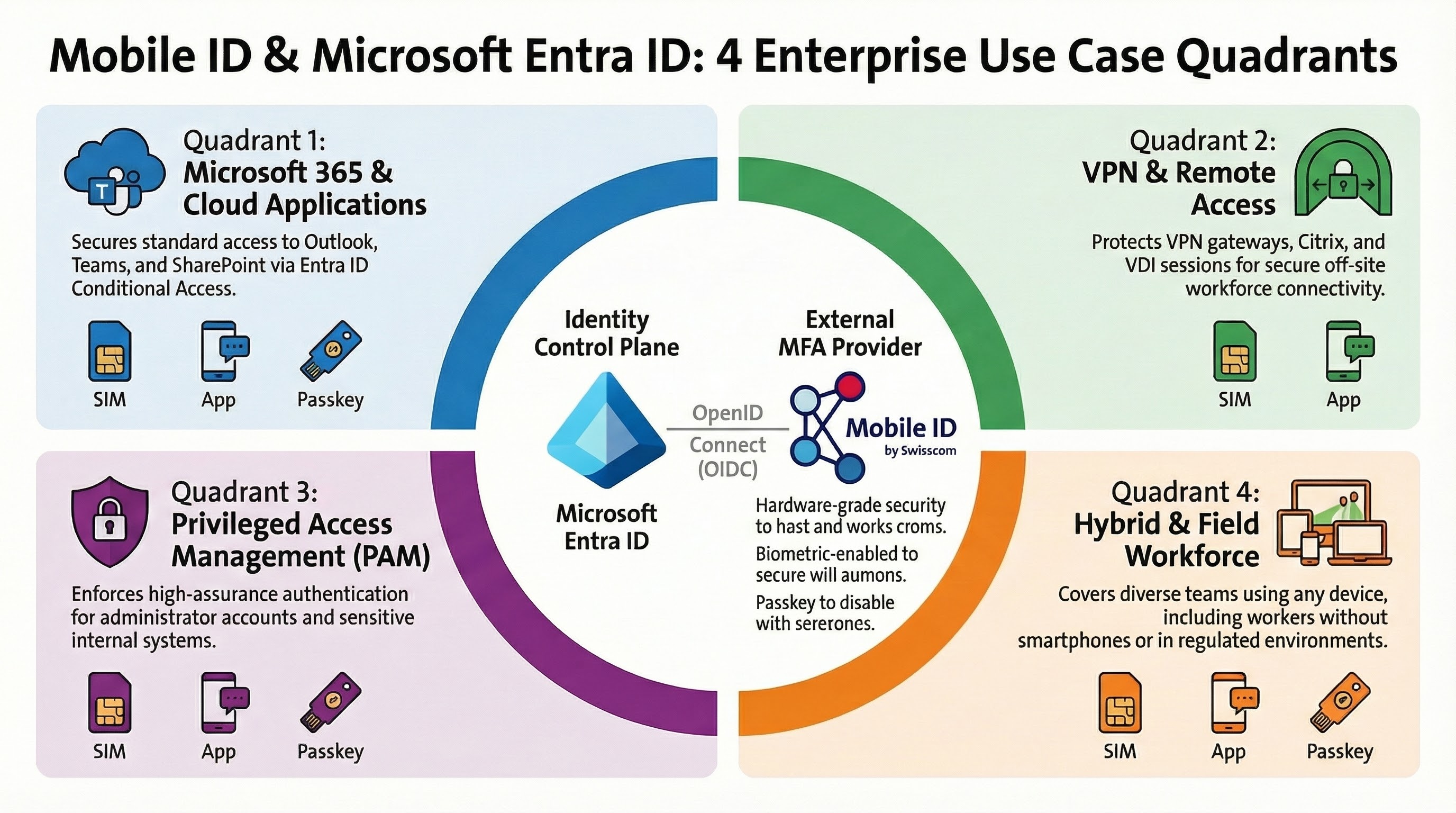
Mobile ID covers a wide range of enterprise scenarios through different integration models. SIM and App cover the broadest out-of-band enterprise journeys. Passkeys complement browser-centric journeys where WebAuthn support is available end to end.
Microsoft 365 MFA for Employees
The most common scenario: securing access to Outlook, Teams, SharePoint and other Microsoft 365 applications. When a Conditional Access policy requires MFA, employees authenticate through Mobile ID instead of, or alongside, Microsoft Authenticator.
This is particularly valuable for organizations that want a single MFA provider across all applications, not just Microsoft services. Mobile ID authentication methods — SIM, App and Passkeys — are available across different integration models: as an Entra External MFA provider, through standard OIDC for custom web applications, and via the RADIUS Interface Gateway for VPN and network access.
VPN and Remote Access
For VPN gateways, Citrix environments, VDI sessions and remote desktop access, Mobile ID provides MFA through the RADIUS Interface Gateway or directly via OIDC. Both SIM and App fit well for these out-of-band scenarios because neither depends on Bluetooth to a hardware key. They remain practical even when the protected session itself is remote or client-driven.
Passkeys can still complement browser-centric remote-access journeys where WebAuthn is supported end to end, but they are often less convenient in VDI, RDP or client-based VPN flows because browser/WebAuthn support and cross-device handoff are not consistently available there.
Privileged Access Management
Admin accounts and access to sensitive systems require the highest level of assurance. Entra ID Conditional Access policies can target specific admin roles and sensitive applications to require External MFA via Mobile ID. What Entra controls is when the extra factor is required. Which Mobile ID method is used inside the provider journey is a Mobile ID concern.
Method-specific controls such as Mobile ID passkey-only ACRs, keyringId, or other direct method-steering rules belong to direct Mobile ID OIDC integrations outside the Entra External MFA admin surface.
Hybrid and Field Workforce
Not every employee carries a smartphone. Field workers, production staff, or employees in regulated environments may only have a basic mobile phone. With Mobile ID SIM, these users get strong MFA without any app installation. Office-based staff can use the Mobile ID App with biometrics for a smoother experience. One provider covers every device type.
The Migration Path: From Custom Controls to External MFA
Microsoft has set a clear timeline. Organizations still using Custom Controls for third-party MFA should migrate to External MFA before the deprecation deadline.
The migration can happen gradually. Microsoft supports running Custom Controls and External MFA in parallel during the transition period. A recommended approach:
Configure Mobile ID in Entra ID. Set up Mobile ID as your External MFA method in the Entra admin center by following the configuration guide.
Create a parallel Conditional Access policy. Target a defined test group first so the new flow can be introduced without affecting the full workforce immediately.
Validate the authentication flow with that group. Confirm that policy evaluation, the redirect to Mobile ID and the successful MFA return all work as expected.
Roll out broadly and retire the legacy policy. Expand the policy to all intended users and then disable the old Custom Controls configuration.
TIP
If you are new to Mobile ID and considering it as your External MFA provider, Swisscom handles the client onboarding process. You will receive the Application ID, Client ID and Discovery URL needed to configure External MFA in Entra ID.
How to Get Started
Setting up Mobile ID as an External MFA provider in Entra ID requires three prerequisites:
Complete the Mobile ID onboarding. Contact Swisscom to receive your integration credentials and complete the onboarding process via getting started.
Use an Entra ID P1 or P2 subscription. Conditional Access must be enabled, and the relevant users must have the required licenses.
Prepare an Entra ID admin account. Configuring the external MFA method and Conditional Access policies requires at least the Authentication Policy Administrator role. Granting admin consent for the provider application requires at least the Privileged Role Administrator role.
The step-by-step configuration is documented in the Cloud Integration Guide, including Conditional Access policy setup, admin consent, and optional steps to prioritize Mobile ID over Microsoft Authenticator.
Conclusion
With External MFA now generally available in Microsoft Entra ID, organizations no longer have to choose between centralized identity management and specialized authentication. Entra ID stays the policy engine. Mobile ID delivers the provider-side second factor across SIM, App, and the broader passkey-capable Mobile ID ecosystem, while Entra consumes only the external MFA result.
In practice, this gives organizations one MFA provider for Entra ID, web applications, VPN and RADIUS environments while covering device types from basic phones to modern passkey-capable platforms. SIM and App remain especially strong for out-of-band enterprise journeys, and passkeys extend the Mobile ID portfolio for phishing-resistant browser scenarios where the provider configuration and platform support allow it. Swiss-operated infrastructure and standards-based OIDC integration create a future-ready path as External MFA replaces deprecated Custom Controls and Mobile ID continues to evolve with new capabilities such as the Passkey Vault.
For questions about Mobile ID integrations, reach out to Backoffice.Security@swisscom.com. For general information about the service, visit mobileid.ch.