
Getting Started
Before you can integrate and use Mobile ID OpenID Connect sign-in, the client on-boarding process must have been completed by Swisscom.
For the technical on-boarding, you will be asked to provide Swisscom with the following information:
| What | Quick Description | Ref. |
|---|---|---|
| Client Display Name | Your client's name, which is displayed by the authorization server. Example value: iDemo Online Shop | |
| Redirect URI(s) | Redirection URI(s) to which the response will be sent. Note that TLS (https) is always required and the localhost URI is not allowed. Example value: https://app01.idemo-company.ch/oauth2/authresphttps://app02.idemo-company.ch/oauth2/authresp | OIDC spec |
| Default ACR | Your default ACR. Must be a value that is available for your selected Mobile ID contract. Example value: mid_al3_any | Section Auth Code Request |
| Client Auth Mode | Your client's authentication method, either basic or post. Example value: client_secret_post | Section Access Token Request |
| Always Prompt For Consent | The Mobile ID server default behavior is to skip the consent step, provided such is already recorded for the given end-user and client. Default: false | |
| MFA Number Matching | Enable MFA number matching feature for Mobile ID SIM and Mobile ID App authentication. When a user responds to an MFA notification using Mobile ID SIM or Mobile ID App, they'll be presented with a number on their mobile. They need to select that number in the sign-in prompt to complete the approval. Default: false | Video |
| LDAP Settings | Optional. Mobile ID server can connect to an LDAP(S) to validate user credentials and/or retrieve user attributes from the LDAP, such as: - MFA mobile number attribute - Mobile ID Serialnumber attribute (required for ACR mid_al4) - User password attribute | |
| CNAME Record | Optional. Mobile ID server can use a custom domain instead of the default m.mobileid.ch. Custom Domains are only relevant if prompt=login is used. We will need your record name (e.g. mobileid.acme.com) that routes the traffic to m.mobileid.ch. |
You will get a unique OIDC client identifier and client secret from Swisscom. If you did not receive your client credentials, it means that your on-boarding process is not finished yet.
TIP
Check the state with your commercial contact or via Backoffice.Security@swisscom.com.
Endpoint URIs
A default Mobile ID OpenID Provider configuration is published on the OIDC discovery endpoint, which allows a client to discover the OAuth 2.0 and OpenID Connect endpoints, capabilities, supported cryptographic algorithms and features.
INFO
It is recommended to host a local copy of the discovery document when your application relies on constant availability of this endpoint data.
| Endpoint | URL |
|---|---|
| Discovery | https://openid.mobileid.ch/.well-known/openid-configuration |
Additional Endpoint URIs:
| Endpoint | URL |
|---|---|
| Authorization | https://m.mobileid.ch/oidc/authorize |
| Token | https://openid.mobileid.ch/token |
| User Info | https://openid.mobileid.ch/userinfo |
| Pushed Authorization Requests | https://openid.mobileid.ch/par |
Authorization Code Request
The authorization code can be obtained by performing a simple HTTP GET request towards the Authorization endpoint of the Mobile ID OP. The client secret is not involved yet.
| Endpoint | URL |
|---|---|
| Authorization | https://m.mobileid.ch/oidc/authorize |
The Relying Party may trigger the authorization code flow by calling the authorization link (including required request parameters), for example:
<a href="https://m.mobileid.ch/oidc/authorize?response_type=code&scope=openid&client_id=s6BhdRkqt3&state=af0ifjsldkj&redirect_uri=https%3A%2F%2Fcompany.ch%2Fcb" rel="noreferrer">MobileID-sign-in-button</a>WARNING
For data privacy reasons, it is highly recommended that the Relying Party does not fill in the HTTP referrer header. Typically, the referrer header is populated with the address of the page where the request originated. The HTML hyperlinks should have the rel attribute set to noreferrer, as shown in the example above.
A button could look like this example:

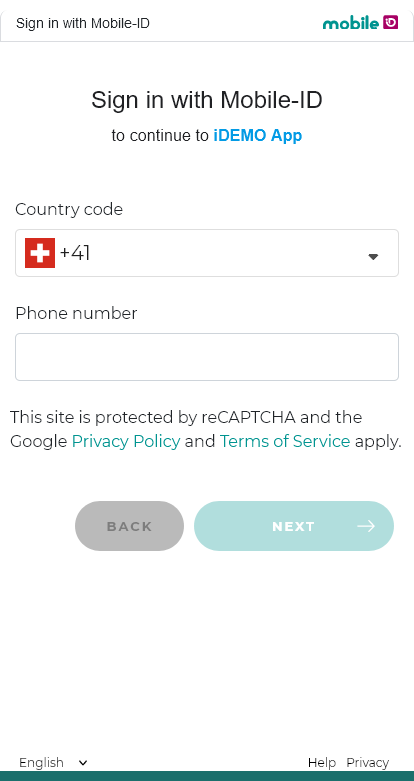
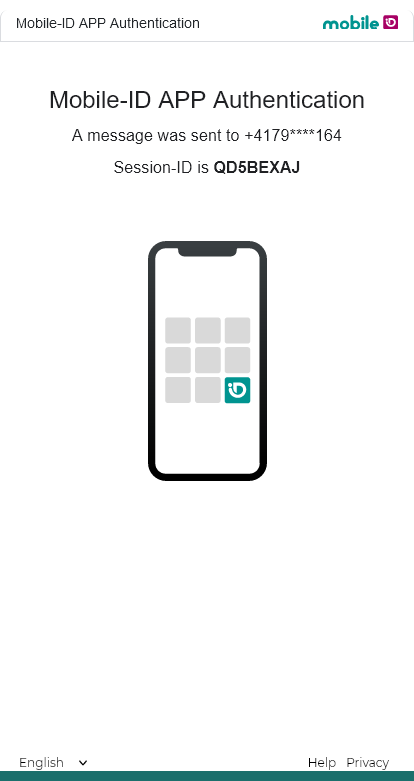
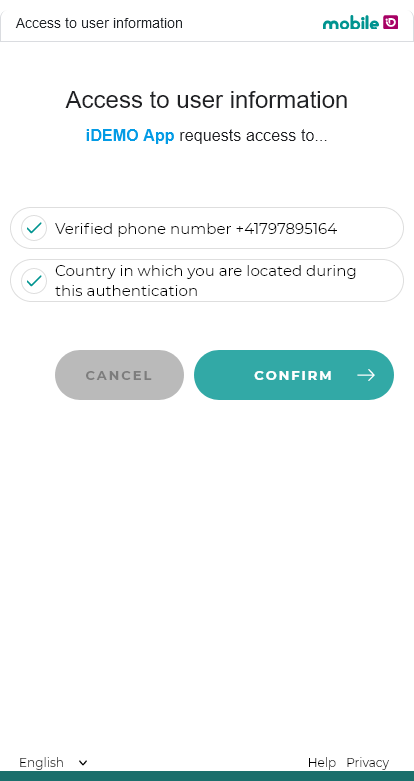
A click on the button will redirect the user to the mobileid.ch domain, where they can complete the authorization code flow. In the example screenshots below, the user enters the phone number, authenticates with the Mobile ID App and consents to the user information (phone number, current location) that was requested by the Relying Party "iDemo App". Finally, the user is redirected back to the Relying Party's domain.
The following request query string parameters are supported:
| Parameter | Value | Remarks |
|---|---|---|
scope | MUST contain the value openid | Optionally, the client may request additional scopes as specified in Scopes and Claims |
response_type | MUST be the value code | |
client_id | MUST be your client ID | |
redirect_uri | MUST be (one of) your redirect URI(s) | |
state | MUST be an opaque value | Used to maintain state between the request and the callback |
nonce | MUST be a nonce value | |
acr_values | CAN be set to overwrite the client's default ACR | Authentication Level (AL) required by the client (see ACR) |
response_mode | SHALL NOT be used | |
display | SHALL NOT be used | |
prompt | CAN be set to login | |
max_age | SHALL NOT be used | |
ui_locales | CAN be set to provide the user's preferred language | Supported values are en, de, fr and it |
id_token_hint | SHALL NOT be used | |
claims | SHALL NOT be used | |
login_hint | CAN be set to provide a login hint to the authorization server about the end-user's phone number(s) or LDAP username. Must be in a JSON format. | See Login Hint Examples below. |
dtbd | CAN be set to overwrite the default authentication message displayed to the end-user if the authentication method is either Mobile ID SIM or Mobile ID App. Supports plain string, JSON object, or mixed JSON array. | See DTBD Parameter below and Message Formats. |
Login Hint Examples
Standard login hints:
{"enableManualInput": true, "hints": [{"msisdn":"+41765XXXXXX"}]}

{"enableManualInput": true, "hints": [{"msisdn":"+41765XXXXXX", "default":true}]}

{"enableManualInput": true, "hints": [{"msisdn":"+41765XXXXXX", "sn":"+574XXXXXX"}]}

{"enableManualInput": true, "hints": [{"msisdn":"+41765YYYYYY"},{"msisdn":"+41765XXXXXX", "default":true}]}
If an LDAP has been configured for your OIDC client, you can use the following login hints:
{"useLDAP": true, "hints": [{"userName":"johndoe"}]}

{"useLDAP": true, "hints": [{"userName":"john.doe@acme.com", "userPassword":"plain-secret", "isHashed": false}]}

{"useLDAP": true, "hints": [{"userName":"john.doe@acme.com", "userPassword":"hashed-secret", "isHashed": true}]}
You can use the following login hint in combination with the prompt=login parameter:
{"useLDAP": true}If passkeys are enabled for your account, you can include the keyringId field in the login hint:
{"hints": [{"msisdn":"+41765XXXXXX", "keyringId":"MIDPKXXXXXXXXXX"}]}INFO
The sn parameter is optional and only required for ACR mid_al4. The keyringId is required for mid_al4_passkey and mid_al4_any (when passkeys are enabled). See Passkey Authentication for details.
DTBD Parameter
The dtbd message should include these keywords:
#SESSION#— A unique transaction number. In case MFA Number Matching is enabled, this keyword will be replaced with the matching number.#CLIENT#— Relying Party Display Name.
For requests using _any ACR values (for example mid_al2_any or mid_al3_any), the final method can be resolved at runtime. In this case, you can send mixed dtbd (JSON array with one Classic string and one Transaction Approval object) so SIM and App are both covered in one request. See Message Formats.
The default authentication message is:
| Language | Message |
|---|---|
| English | Do you want to login to #CLIENT#? Transaction number #SESSION# |
| German | Möchten Sie sich bei #CLIENT# anmelden? Transaktion Nummer #SESSION# |
| French | Voulez-vous vous connecter à #CLIENT# ? Transaction numéro #SESSION# |
| Italian | Vuoi accedere a #CLIENT#? Transazione numero #SESSION# |
Scopes and Claims
Given below is the list of supported scopes that can be requested during the authorization code request.
| Scope | Claim | Type | Example Value | Description |
|---|---|---|---|---|
openid | sub | string | 3246d772d2edb208... | Subject identifier (unique, pairwise per client) |
offline_access | — | — | — | Requests a refresh token |
profile | name | string | +41791234567 | User's display name |
phone | phone_number | string | +41791234567 | Phone number in E.164 format |
phone_number_verified | boolean | true | Whether the phone number has been verified | |
mid_location | mid_geo_accuracy | number | 0 | GPS accuracy in meters |
mid_geo_country | string | CH | ISO country code of the device | |
mid_geo_device_confidence | number | 1.0 | Device confidence score | |
mid_geo_location_confidence | number | 1.0 | Location confidence score | |
mid_geo_timestamp | string | 2022-03-17T05:49:03+01:00 | Timestamp of the geolocation measurement | |
mid_profile | mid_profile_recovery_code_status | boolean | true | Whether a recovery code has been set |
mid_profile_serial | string | MIDCHEYUD1YE4QB1 | Mobile ID serial number | |
mid_pk_keyringid | string | MIDPK123A567B90 | Passkey keyring identifier | |
mid_profile_signer_cert_chain | string[] | ["MIIF...","MIIE..."] | Signer certificate chain (Base64-encoded DER certificates) | |
mid_profile_sim_status | string | active | SIM card activation status | |
mid_profile_sim_pin_status | string | active | SIM PIN status | |
mid_profile_sim_mcc | string | 228 | Mobile Country Code | |
mid_profile_sim_mnc | string | 01 | Mobile Network Code | |
mid_profile_sim_network | string | Swisscom | Mobile network operator name | |
mid_profile_app_status | string | active | Mobile ID App activation status | |
mid_profile_sscds | string | — | Secure signature creation device descriptor | |
mid_profile_alias | string | John | User-defined alias | |
mid_cms | mid_cms_content | string | — | CMS signed data (Base64-encoded) |
mid_esign_basic | mid_esign_basic_assurance_level | string | basic | E-signature assurance level |
mid_esign_basic_jurisdictions | string | CH | Applicable jurisdictions | |
mid_esign_basic_has_valid_evidence | boolean | true | Whether valid identity evidence exists | |
mid_passkey | mid_pk_keyringid | string | MIDPK123A567B90 | Passkey keyring identifier |
mid_pk_binding | string | device-bound | syncable | Whether the passkey is device-bound or synced | |
mid_pk_cert_level | string | FIPS140-2 | CommonCriteria | Certification level of the authenticator | |
mid_pk_created_ts | number | 1717584000 | Credential creation timestamp (Unix epoch) | |
mid_pk_last_used_ts | number | 1717591234 | Last usage timestamp (Unix epoch) | |
mid_pk_aaguid | string | 2fc0579f-8113-... | FIDO MDS authenticator identifier | |
mid_pk_cred_fingerprint | string | pQECAyYgASFY... | SHA-256 of the credential public key (COSE) | |
mid_pk_auth_attachment | string | platform | cross-platform | Authenticator attachment modality | |
mid_pk_os_family | string | iOS | Android | Windows | OS family of the authenticator platform | |
mid_pk_aal3 | boolean | true | Whether the passkey authenticator used in the transaction is NIST AAL3-compliant |
TIP
A Relying Party should always respect the user's privacy and keep the requested claims down to the very essential. For example, using scope openid only, the user sign-in will be anonymous. Neither the phone number nor any other user information will be passed on to the Relying Party's application.
Example claim values, retrieved from the UserInfo endpoint:
{
  "mid_geo_accuracy": 0,
  "mid_geo_country": "CH",
  "mid_geo_device_confidence": "1.0",
  "mid_geo_location_confidence": "1.0",
  "mid_geo_timestamp": "2022-03-17T05:49:03.597+01:00",
  "mid_profile_recovery_code_status": true,
  "mid_profile_serial": "MIDCHEYUD1YE4QB1",
  "name": "+41791234567",
  "phone_number": "+41791234567",
  "phone_number_verified": true,
  "sub": "3246d772d2edb20797fe9359cb3d07da6d01df7db2642e14554d241aef1d1d84"
}
Authentication Context Class Reference (ACR)
Below is an overview of all authentication means offered and supported by Mobile ID OP. The ACR can be requested with an authorization request parameter — or, if the request does not contain such parameter, the client's default ACR is selected.
An ACR can include one or several different authentication methods. The Mobile ID OP will check the user's authentication possibilities and will select an authentication method that complies with the ACR.
 Included
 Excluded
 Included, if 'Passkeys' feature is enabled for the client account
| acr_values | Authentication Method | Additional Checks | NIST-AAL3 | Remarks | ||||
|---|---|---|---|---|---|---|---|---|
 SIM |  App |  OTP |  Passkey |  CH |  KeyRing | |||
mid_al2_any | | | | | | | | Passkey-preferred, if passkeys_enabled:true for the client account.User can select a fallback method if Passkey Auth fails. Use this AL if UX is more important than security. Optional login_hint to provide MSISDN:{"enableManualInput": false, "hints": [{"msisdn":"+41765XXXXXX"}]} |
mid_al3_any | | | | | | | | See note [1] |
mid_al3_any_ch | | | | | | | | |
mid_al3_simcard | | | | | | | | |
mid_al3_mobileapp | | | | | | | | |
mid_al4_any | | | | | | | | Passkey-preferred, if passkeys_enabled:true for the client account.User can select a fallback method if Passkey Auth fails. Use this AL if security is important and phishing risk is acceptable. RP must provide SN and KeyRingId (if Passkey is enabled) in login_hint:{"enableManualInput": false, "hints": [{"msisdn":"+41765XXXXXX", "sn":"+574XXXXXX", "keyringId":"MIDPKXXXXXXXXXX"}]} |
mid_al4_any_ch | | | | | | | | |
mid_al4_simcard | | | | | | | | |
mid_al4_mobileapp | | | | | | | | |
mid_al4_passkey | | | | | | | | Passkey-only & phishing-resistant. Use this AL if security and phishing-resistance is important, with a trade-off that only Passkeys can be used. Optionally, this scenario may be used to comply with NIST AAL3, which requires the user to have a FIPS 140-2 certified authenticator (passkey) registered. RP must provide KeyRingId in login_hint:{"hints": [{"msisdn":"+41765XXXXXX", "keyringId":"MIDPKXXXXXXXXXX"}]} |
[1] Passkeys are only supported with AL2 or AL4. There is no support for Passkeys with AL3. See Passkey Authentication for detailed passkey ACR documentation.
If a user has more than one authentication method available that comply with the requested ACR, the Mobile ID OP will use the following preference (note, all authentication methods are equally billed):
| Prio | Condition (User Mobile ID Account Status) | AL "any" choice |
|---|---|---|
| 1 | Active Mobile ID SIM card | Mobile ID SIM |
| 2 | Inactive Mobile ID SIM card & Inactive Mobile ID App | Mobile ID SIM (Account Recovery) |
| 3 | Unknown SIM card & Active Mobile ID App | Mobile ID App |
| 4 | Unknown SIM card & Inactive Mobile ID App | AL2: One-Time-Password SMS AL3: Mobile ID App (Account Recovery) AL4: Mobile ID App (Account Recovery) |
WARNING
If your client attempts to request an ACR that is not available with your current Mobile ID contract, an OIDC error mid_sec_2020 ("unauthorized acr_values used in request", see Error Scheme) is returned.
Please check with your commercial contact or via Backoffice.Security@swisscom.com if you are interested in ACR values that are listed in the table above but currently not configured for your Mobile ID OIDC account.
MID SN Check – AL4 Guide
Using an ACR value of Authentication Level 4 will provide the highest and most secure authentication level.
The use of such ACR will require the Relying Party to always provide the Mobile ID's serial number via the login_hint authorization request parameter, if there is no LDAP configured. If an LDAP is configured, the Mobile ID server will lookup the user's serial number on the LDAP. The Mobile ID authorization server will compare the serial number with the serial number of the authentication response.
The authentication will be successful if the serial numbers match. A serial number mismatch will result in an authentication failure.
An account recovery (e.g., activate Mobile ID App) is supported and will result in a successful authentication if a valid user restore option was available and used during the recovery process.
INFO
The Relying Party must implement its own Mobile ID user registration process to fetch and store the user's current Mobile ID serial number value. Technically, the best way to retrieve the user's current Mobile ID serial number is by starting an authorization request using authentication level 3 (for example mid_al3_any) and scope mid_profile, so that the Relying Party will retrieve the claim mid_profile_serial.
Example Authorization Code Request
HTTP/1.1 302 Found
Location: https://m.mobileid.ch/oidc/authorize?
          response_type=code
          &scope=openid%20auth_basic
          &client_id=s6BhdRkqt3
          &state=af0ifjsldkj
          &redirect_uri=https%3A%2F%2Fclient.example.org%2Fcb
Authorization Code Response
The response to the authorize request will be an HTTP redirect that results in an HTTP GET request to the redirect_uri that was provided for the authorization code request with the following parameters:
| Parameter | Value |
|---|---|
code | WILL contain the authorization code |
state | WILL contain the state |
iss | WILL contain the issuer of the authorization code: https://openid.mobileid.ch |
WARNING
The authorization code is by default only valid for 10 seconds after it has been issued.
Example Authorization Code Response
HTTP/1.1 302 Found
Location: https://client.example.org/cb?
          code=SplxlOBeZQQYbYS6WxSbIA
          &iss=https%3A%2F%2Fopenid.mobileid.ch
          &state=af0ifjsldkj
Access Token Request
The obtained authorization code (see here) can be used to receive an access token. This chapter describes how to format the access token request and which data is returned from the access token endpoint.
The OpenID Connect RFC states that there are 4 possible client authentication methods (used by clients to authenticate to the Authorization Server when using the Token Endpoint).
Mobile ID OP supports client_secret_basic or client_secret_post as client authentication method.
The access token can be obtained by performing an HTTP POST request towards the Token endpoint of the Mobile ID OP.
| Endpoint | URL |
|---|---|
| Token | https://openid.mobileid.ch/token |
The following query string parameters need to be embedded in the request:
| Parameter | Value |
|---|---|
grant_type | MUST be the value authorization_code |
code | MUST be the authorization code you received from Mobile ID (see Authorization Code Response) |
redirect_uri | MUST be the same redirect URI used in the authorization code request |
| Headers | Value |
|---|---|
Authorization | Client ID and client secret encoded according to the HTTP Basic authentication scheme |
Content-Type | MUST be the value application/x-www-form-urlencoded |
Example Access Token Request
In this example, basic authentication is used to authenticate the client to the Mobile ID server.
POST /token HTTP/1.1
Host: openid.mobileid.ch
Content-Type: application/x-www-form-urlencoded
Authorization: Basic czZCaGRSa3F0MzpnWDFmQmF0M2JW
grant_type=authorization_code
 &code=SplxlOBeZQQYbYS6WxSbIA
 &redirect_uri=https%3A%2F%2Fclient.example.org%2Fcb
Access Token Response
After receiving and validating a valid and authorized token request from the client, the Authorization Server returns a successful response that includes:
- Access Token
- ID Token
The response is returned in the application/json media type.
The ID token is a JWT and is created (and thus signed, RS256 by default) by the Authorization Server itself.
Authentication Method Reference (AMR)
Authentication Method Reference (AMR) is an attribute within the OpenID Connect Identity Token. The AMR claim makes statements about the authentication method that was used (including additional factors such as geolocation).
Included Excluded| amr_values | Authentication Method | Remarks | |||
|---|---|---|---|---|---|
SIM | App | OTP | Passkey | ||
mid_app | | | | | |
mid_geo | | | | | Only returned when an ACR with the _ch suffix was used (mid_al3_any_ch, mid_al4_any_ch), indicating that geolocation was verified to be in Switzerland (CH). |
mid_otp | | | | | |
mid_sim | | | | | |
mid_sms | | | | | |
phr | | | | | Standard AMR "Phishing-Resistant". Only for ACR mid_al4_passkey. |
hwk | | | | | Standard AMR RFC 8176 "Hardware Key" |
INFO
The AMR can be helpful in case the client requests an ACR with an "any" value, such as mid_al3_any (see section ACR). Since there are multiple authentication methods that comply with such ACR, the client will know from the AMR what authentication method the user actually used for the sign-in.
Passkey-specific AMR values: phr (Phishing-Resistant, only for mid_al4_passkey) and hwk (Hardware Key, RFC 8176). The mid_hwk AMR has been deprecated in favor of the standard hwk value. See Passkey Authentication for details.
Example Access Token Response
HTTP/1.1 200 OK
Content-Type: application/json
{
  "access_token": "eyJraWQiOiJDWHVwIiwidH",
  "scope": "phone openid profile mid_location",
  "id_token": "eyJraWQiOiJDWHVwIiwiYWxnIj",
  "token_type": "Bearer",
  "expires_in": 600
}
TIP
The content of the access token is meant for consumption by the /userinfo endpoint where the client can give the token to get the user consented claim values. The access token is not meant to convey information to the client or be peeked into by the client, only to the accessed protected resources.
User Info Request
The /userinfo endpoint is an OAuth 2.0 protected resource of the Mobile ID server where client applications can retrieve consented claims, or assertions, about the logged in end-user.
Clients must present a valid access token (of type bearer) to retrieve the UserInfo claims. Only those claims that are scoped by the token will be made available to the client.
The user info can be obtained by performing an HTTP GET or HTTP POST request towards the User Info endpoint of the Mobile ID server.
| Endpoint | URL |
|---|---|
| User Info | https://openid.mobileid.ch/userinfo |
The following parameters should be added:
| Headers | Value |
|---|---|
Authorization | MUST contain the Bearer 'Access-Token' |
Example User Info Request
GET /userinfo HTTP/1.1
Host: openid.mobileid.ch
Authorization: Bearer sa7Aebo6Ookoo0oh
Refresh Request
A request to the Token Endpoint can also use a Refresh Token by using the grant_type value refresh_token.
To refresh an Access Token, the Client MUST authenticate to the Token Endpoint using the authentication method registered for its client_id. The Client sends the parameters via HTTP POST to the Token Endpoint using Form Serialization.
| Endpoint | URL |
|---|---|
| Token | https://openid.mobileid.ch/token |
The following query string parameters need to be embedded in the request:
| Parameter | Value |
|---|---|
grant_type | MUST be the value refresh_token |
client_secret | MUST be your client secret |
refresh_token | MUST be your refresh token |
scope | MUST be the scope |
| Headers | Value |
|---|---|
Content-Type | MUST be the value application/x-www-form-urlencoded |
Example Refresh Request
POST /token HTTP/1.1
Host: openid.mobileid.ch
Content-Type: application/x-www-form-urlencoded

client_id=s6BhdRkqt3
 &client_secret=some_secret12345
 &grant_type=refresh_token
 &refresh_token=8xLOxBtZp8
Refresh Response
Upon successful validation of the Refresh Token, the response body is the Token Response.
Example Refresh Response
HTTP/1.1 200 OK
Content-Type: application/json
Cache-Control: no-store
Pragma: no-cache

{
 "access_token": "TlBN45jURg",
 "token_type": "Bearer",
 "refresh_token": "9yNOxJtZa5",
 "expires_in": 3600
}
Error Scheme
The Mobile ID authorization service implements an error code scheme, in which various errors are reported back to the Relying Party (client) together with a human-friendly message, a unique error code and the trace-id of the session.
All fault responses contain an errorCode-field and a description-field. The description contains a structure as follows:
mid_<Category><Code><Trace> - <Message>Example fault response:
{
  "errorCode" : "unauthorized_client",
  "description" : "mid_sec_2010_A9W1GLUM - Unauthorized scopes used in request"
}
Description of the structure details:
| Component | Description |
|---|---|
mid | Schema prefix for codes that belong to Mobile ID |
<Category> | One of: • req = issues with request validation • sec = security issues with the request • auth = issues with user authentication or activation • sys = system-related issues such as internal errors |
<Code> | An error code specifically related to the category |
<Trace> | The trace/session ID uniquely created for that authentication flow. This value is the same as the one printed on all internal log messages + the same ID as the one shown on user interaction (e.g., Session-ID in the authentication message). |
<Message> | The human-friendly message explaining the problem |
Error Code Table
This table presents all the error codes that are currently implemented.
| OIDC error | Code | Human-friendly text / Description |
|---|---|---|
invalid_request | mid_req_1010 | Invalid acr_values parameter, expected one single value |
invalid_request | mid_req_1020 | Invalid value received for acr_values |
invalid_request | mid_req_1030 | Invalid ui_locales parameter, expected one single value |
invalid_request | mid_req_1040 | Invalid value received for ui_locales |
invalid_request | mid_req_1050 | Invalid login_hint, empty hits are not allowed |
invalid_request | mid_req_1060 | Invalid login_hint, AL4 cannot be used with enabled manual MSISDN input |
invalid_request | mid_req_1070 | Invalid MSISDN value in login_hint |
invalid_request | mid_req_1080 | Duplicated MSISDN value in login_hint |
invalid_request | mid_req_1090 | Invalid SN value in login_hint |
invalid_request | mid_req_1100 | Invalid login_hint JSON content |
invalid_scope | mid_req_1110 | Invalid scopes in request |
invalid_request | mid_req_1120 | AL4 requested but login_hint is empty |
invalid_request | mid_req_1130 | Invalid request, missing query string |
invalid_request | mid_req_1140 | Invalid keyring ID in login_hint |
invalid_request | mid_req_1150 | Invalid login_hint, AL4 passkey requested but keyring ID is empty |
invalid_request | mid_req_1900 | Invalid client request, check request parameters |
unauthorized_client | mid_sec_2010 | Unauthorized scopes used in request |
unauthorized_client | mid_sec_2020 | Unauthorized acr_values used in request |
unauthorized_client | mid_sec_2030 | Unauthorized parameters used in request |
access_denied | mid_auth_3010 | Authentication rejected by resource owner or authorization server |
access_denied | mid_auth_3011 | Authentication rejected by resource owner or authorization server. (1) Number-Matching successful and (2) MID request cancelled by the user |
access_denied | mid_auth_3012 | Authentication failed as user did not respond. (1) Number-Matching successful and (2) MID requested timed out |
access_denied | mid_auth_3013 | Authentication failed due to number mismatch. (1) Number-Matching failed and (2) MID request successful |
access_denied | mid_auth_3014 | Authentication rejected by resource owner or authorization server. (1) Number-Matching failed and (2) MID request cancelled by the user |
access_denied | mid_auth_3015 | Authentication failed as user did not respond. (1) Number-Matching failed and (2) MID request timed out |
access_denied | mid_auth_3020 | Claims sharing rejected by resource owner or authorization server |
access_denied | mid_auth_3025 | Signature CMS data validation failed |
access_denied | mid_auth_3030 | Mobile ID serial number validation failed |
access_denied | mid_auth_3040 | Country (geo-location) validation failed |
access_denied | mid_auth_3050 | MSISDN ownership verification failed |
access_denied | mid_auth_3060 | Mobile ID account activation failed |
access_denied | mid_auth_3065 | Mobile ID app account activation not completed in time |
access_denied | mid_auth_3070 | Mobile ID SIM card required for this authentication |
access_denied | mid_auth_3080 | No authentication method available |
access_denied | mid_auth_3090 | Authentication via SMS OTP failed |
access_denied | mid_auth_3100 | Geo accuracy limit validation failed |
access_denied | mid_auth_3110 | Geo device confidence score limit validation failed |
access_denied | mid_auth_3120 | Geo location confidence score limit validation failed |
access_denied | mid_auth_3125 | Geofencing policy violated for referenced AP ID |
access_denied | mid_auth_3300 | Authentication failed; user did not respond |
access_denied | mid_auth_3310 | Authentication failed; user is busy with another authentication |
access_denied | mid_auth_3320 | Authentication failed; provided LDAP credentials were invalid |
access_denied | mid_auth_3330 | Authentication failed; mandatory LDAP attribute is missing |
access_denied | mid_auth_3340 | Authentication failed; LDAP server communication exception |
access_denied | mid_auth_3350 | Authentication failed; LDAP (OIDC) account is time locked |
access_denied | mid_auth_3400 | Authentication failed; generic LDAP exception |
access_denied | mid_auth_3500 | Authentication failed; passkey keyring mismatch |
access_denied | mid_auth_3900 | Authentication failed for other reasons |
invalid_request | mid_auth_4000 | Invalid dtbd parameter used in request |
server_error | mid_sys_9900 | Internal server error |
Tokens
This table provides details on OIDC and OAUTH tokens and how the Relying Party should manage them.
| Token | Type | TTL | Revocable | Refreshable | Validation | Storable | Usage |
|---|---|---|---|---|---|---|---|
| Access Token | bearer | 60 min | no | yes | yes | no | for calling userinfo |
| Authorization Code | string | 2 min | no | no | no | no | For obtaining the access_token, the id_token and refresh_token |
| ID Token | JWT | 60 min | no | yes | yes | no | Proof of IdP's authentication. Expired ID tokens should never be accepted for processing |
| Refresh Token | bearer | configurable per client | yes | yes | no | yes | for obtaining new valid refresh_token, access_token and id_token |