
Message Formats on the Mobile ID App
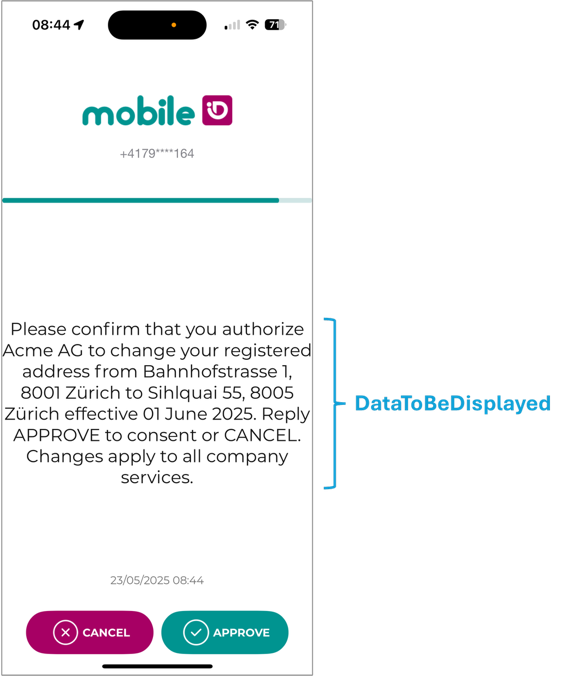
Mobile ID supports three request variants for the Data-To-Be-Displayed (DTBD): Classic, Transaction Approval, and a mixed format that contains both.
TIP
Use Classic DTBD for short confirmations and when you must support SIM users. Keep messages concise and always include the "DTBD Prefix".
Use Transaction Approval when readability matters (e.g., PSD2 payments, contract consent, step up login verification). Force the App method with Device LoA4, keep within byte limits, and generate the escaped JSON programmatically.
Classic DTBD (single text line) uses a plain UTF-8 string that is also signed (DTBS).
Supported by SIM and App methods.
Length limited and no formatting options.
Transaction Approval (key/value pairs) is a structured App-only format that renders a title (type) and one or more key and value rows for improved readability.
Approve/Cancel becomes active only after the user scrolls to the end if content exceeds one screen.
RPs request this by sending a JSON object in the
dtbdauthorization parameter.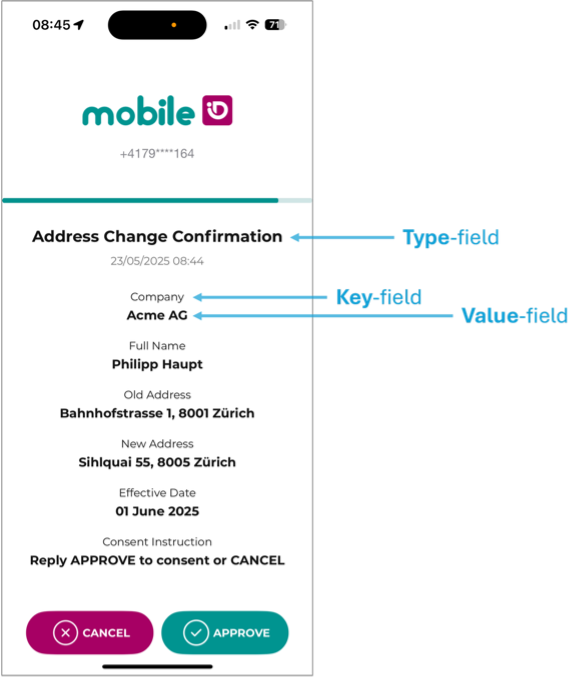
Mixed DTBD (JSON array with Classic + Transaction Approval) lets the RP send both representations in one request.
This is useful with
_anyACR values (for examplemid_al3_any) where the final method is resolved at runtime.
Classic DTBD
A single UTF-8 string shown on the device. The classic DTBD must include the AP-specific DTBD prefix (e.g., Bank ACME:) and is supported by both SIM and App methods.
WARNING
Keep the DTBD short. Maximum 239 characters; if any character falls outside the GSM 03.38 set, effective maximum is 119 characters.
Parameter: dtbd with a plain string. The OP renders the classic one-line message.
Typical request excerpt:
...&dtbd=Please%20confirm%20your%20login%20to%20MyBank%20eBankingTransaction Approval
A structured DTBD that the Mobile ID App renders as a title and rows of key/value pairs. If content overflows, the user must scroll to the bottom; only then are Approve/Cancel enabled.
WARNING
SIM does not support this format. Always select an App ACR (e.g., mid_al3_mobileapp).
How to request it: Send a JSON object via the dtbd authorization request parameter; the value must be URL-encoded (percent-encoding). If the decoded value starts with { and validates against the schema/limits below and the user has an active App, the OP renders the key/value screen.
{
  "type": "<ascii>",
  "dtbd": [
    { "key": "<ascii>", "value": "<ascii>" }
    /* up to 20 pairs */
  ]
}
Limits (in bytes):
type≤ 100- ≤ 20 pairs
- each
key≤ 100, eachvalue≤ 2000 - sum(keys+values) ≤ 2000 (bytes; non-ASCII uses 2–4 bytes)
- DTBD Prefix (required): your configured prefix must be in the value of the first pair e.g.,
{"key":"Company","value":"Acme AG: ..."}
Mixed DTBD (Classic + Transaction Approval)
Send a JSON array in dtbd that contains:
- exactly one Classic DTBD string
- exactly one Transaction Approval object
The order does not matter. The OP detects element types by JSON type (string vs object).
[
  "MobileID: Confirm sign in to MyBank? Ref: #SESSION#",
  {
    "type": "MyBank Login",
    "dtbd": [
      { "key": "Username", "value": "MobileID: Nora Keller" },
      { "key": "IP Address", "value": "185.45.16.238" },
      { "key": "City", "value": "Basel" },
      { "key": "Agent", "value": "Apple iPhone" },
      { "key": "Reference ID", "value": "LOGIN-VRFY-XZ1" }
    ]
  }
]
Selection behavior:
- SIM resolved: Classic DTBD is used.
- App resolved: Transaction Approval is used when present.
- Passkey resolved:
dtbdis ignored (existing behavior).
Validation notes:
- The
dtbdarray must contain one string and one object (max two elements). - Empty arrays, duplicate types, malformed JSON, or unsupported element types are rejected with
mid_auth_4000. - Existing Classic and Transaction Approval limits apply unchanged inside the array.
Transaction Approval Example
Pretty JSON
Build this first.
{
  "type": "Address Change Confirmation",
  "dtbd": [
    { "key": "Company",             "value": "Acme AG" },
    { "key": "Full Name",           "value": "Philipp Haupt" },
    { "key": "Old Address",         "value": "Bahnhofstrasse 1, 8001 Zürich" },
    { "key": "New Address",         "value": "Sihlquai 55, 8005 Zürich" },
    { "key": "Effective Date",      "value": "01 June 2025" },
    { "key": "Consent Instruction", "value": "Reply APPROVE to consent or CANCEL" }
  ]
}
Single-line
What you URL-encode as dtbd=
{"type":"Address Change Confirmation","dtbd":[{"key":"Company","value":"Acme AG"},{"key":"Full Name","value":"Philipp Haupt"},{"key":"Old Address","value":"Bahnhofstrasse 1, 8001 Zürich"},{"key":"New Address","value":"Sihlquai 55, 8005 Zürich"},{"key":"Effective Date","value":"01 June 2025"},{"key":"Consent Instruction","value":"Reply APPROVE to consent or CANCEL"}]}Below is another example that includes the keywords #CLIENT# and #SESSION#, as described in section DTBD Parameter.
{"type":"LOGIN","dtbd":[{"key":"Company","value":"#CLIENT#"},{"key":"Session","value":"#SESSION#"}]}Authorization request (excerpt)
TIP
Use PAR to avoid URL length limits and keep parameters confidential.
Or pass dtbd directly on the authorize URL:
GET /oidc/authorize?
  response_type=code
  &scope=openid
  &client_id=YOUR_CLIENT_ID
  &state=...
  &redirect_uri=https%3A%2F%2Fclient.example%2Fcb
  &acr_values=mid_al3_mobileapp
  &dtbd=%7B%22type%22%3A%22Address%20Change%20Confirmation%22%2C%22dtbd%22%3A%5B%7B%22key%22%3A%22Company%22%2C%22value%22%3A%22Acme%20AG%22%7D%2C...%5D%7D
WARNING
Request an App ACR (e.g., mid_al3_mobileapp) if you want to ensure the App method is selected.
Signed Data Comparison
Classic DTBD: the service signs the visible text string.
Transaction Approval: the App signs a normalized JSON object of the form:
{"format_version":1,"content_string":"[{\"key\":\"Company\",\"value\":\"Test\"}]"}i.e., the dtbd array only; the type label is not part of the signed bytes.
Mixed DTBD: only the representation selected for the resolved method is signed (Classic text for SIM, Transaction Approval normalized content for App).
Best practices
INFO
- Build → URL-encode → send: generate the JSON with your library, then URL-encode as
dtbd. Avoid hand-crafted strings. (Use PAR for large payloads/confidentiality.) - Use mixed format for
_anyACRs: when method resolution may end on SIM or App, send both representations in one array. - Select App method: use
acr_values(e.g.,mid_al3_mobileapp) when you want to ensure App UX. - Prefix rule: include your DTBD prefix in the value of the first pair.
- Respect byte limits: limits are in bytes, not characters; UTF-8 non-ASCII uses 2–4 bytes.
- Number-matching & keywords:
#SESSION#and#CLIENT#keywords are supported intype,key, orvalueand can be used to implement number matching.