
Introduction
The RIG (RADIUS Interface Gateway) application is an API Gateway for Mobile ID, exposing a RADIUS interface towards the clients and using the Mobile ID API at mobileid.swisscom.com for translating the requests of the RADIUS clients into requests for the Mobile ID service.
The Mobile ID solution protects access to your company data and applications with a comprehensive end-to-end solution for strong multi-factor authentication (MFA). Please visit mobileid.ch for further information. Do not hesitate to contact us in case of any questions.
The RIG application is the ideal solution in a setup where an existing RADIUS-based network transitions from single-factor authentication (User-Name + User-Password) or two-factor authentication (User-Name + User-Password plus a security device challenge) to Multi-Factor Authentication, by customizing the authentication flow of a RADIUS session and introducing a new step that uses Mobile ID strong authentication.
During authentication via RADIUS, an extra step requires users to confirm the access to the service on their mobile phones.
Some clients might decide to move from 1FA (one-factor authentication) to 2FA: username + password and Mobile ID. Other clients might decide to stick with 2FA but replace the existing combination of username + password and security device challenge with username + password plus Mobile ID as additional MFA.
RADIUS users are typically defined in the format user@domain. However, Mobile ID requires the phone number (MSISDN) of the user. Therefore, the phone number of the target user should be provided with one of the following options:
- RIG connects to a customer's Directory Service (LDAP) to retrieve user attributes such as phone number (MSISDN) or other optional attributes such as User-Language, MobileID serial number, or the user's preferred authentication method.
- The RADIUS client provides the MSISDN as part of the User-Name (e.g.
4179xxxxxxx@mydomain.com).
RIG Feature List
Features Available
- Multitenancy — configure one or multiple customers, each with their own AP_ID, RADIUS shared secret, LDAP settings, and MFA preferences
- Cloud-native microservice architecture — horizontal scalability with Redis-based cluster synchronization
- Single-node deployment — run without Redis for SIM/APP-only setups (no OTP); ideal for smaller deployments and proof-of-concept environments
- Authentication methods — Mobile ID SIM digital signature, Mobile ID App digital signature, OTP via Text SMS
- Automatic authentication fallback with configurable method priority per customer
- MFA method selection via LDAP — per-user method assignment via LDAP attribute or group membership (
memberOf) - MFA method "None" — temporarily disable MFA per user or group
- Geofencing — whitelist/blacklist country configuration, LDAP group-based geofencing, configurable device and location confidence scores
- LDAP(S) integration — retrieve
userPassword,mobile,preferredLanguage, serial number, and preferred MFA method; supports primary/secondary/tertiary host failover - LDAP search scope and referral configuration
- Flexible LDAP search filters with
{username},{domain}, and{userdn}placeholders - LDAP authentication without admin/service user — authenticate using the client's own credentials
- User Account Control attribute support (Active Directory)
- Mobile ID serial number validation — optionally validate the user's Mobile ID serial number against an LDAP attribute
- RADIUS Accounting with optional webhook forwarding to external systems
- RADIUS Class attribute in Access-Accept responses, mapped from LDAP group membership
- Custom RADIUS Reply Messages for Access-Reject packets, with I18N support (German, French, Italian, English)
- Custom Text SMS notifications for specific error events (e.g., serial number mismatch, geofencing errors)
- SMS notifications for inactive Mobile ID users — notify users to activate their Mobile ID account after a fallback authentication
- Fortinet Vendor Specific Attributes (VSA) — map LDAP groups to Fortinet group names and access profiles
- Duplicate packet handling — configurable deduplication to prevent redundant authentication sessions
- Docker secrets support via
_FILEenvironment variables - Health check endpoint — HTTP
/healthendpoint for container orchestration - BlastRADIUS mitigation — Message-Authenticator support (CVE-2024-3596)
Features Planned
- RADIUS Dynamic Fields: Allow RADIUS clients to provide custom MSISDN, DTBD, and Auth-Method
- Advanced RADIUS encryption (EAP-TLS, EAP-TTLS, PEAP, EAP-MD5, LEAP)
- RADIUS Proxy Mode (forward Access-Request after successful MFA to another third-party RADIUS server)
Service Architecture
The RADIUS Interface Gateway (RIG) service is developed as a cloud-native microservice application. As is the norm with this type of application, RIG is both vertically and horizontally scalable. For the latter capability, the service is designed to work well in a cluster setup, with multiple RIG nodes synchronizing between them and serving client requests. This helps with load balancing and ensures high availability in production.
The following diagram shows a cluster setup for RIG:
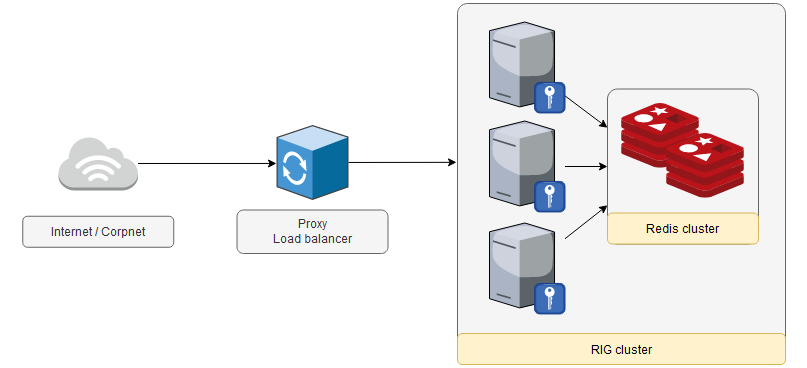
Since nodes need a way of communicating between them and considering the specific target runtime environment, a good approach for this inter-node synchronization is via a common Redis database cluster. Each node connects to this database and is able to save and read data from all the other nodes in a RIG cluster. An ongoing authentication session, for example, will have its data stored by node A in the Redis database, with node B later reading the data for that session and carrying it on.
Requests coming from outside of the RIG cluster reach a proxy service and are then dispatched to one appropriate RIG node. It is up to the proxy to select the right node, but any policy will work fine, as all RIG nodes have the same quality and level of data access, so any one of them could handle a request at any time. Of course, the proxy is responsible for carefully distributing the load on available nodes, but from the point of view of the RIG nodes, the functionality is the same, regardless of the chosen node.
Single-Node Deployment (without Redis)
For smaller deployments or proof-of-concept setups, RIG can be deployed as a single container instance without a Redis database. In this mode, session state is stored in-memory. This is suitable when:
- Only SIM and/or APP authentication methods are used (no OTP)
- High availability and horizontal scaling are not required
This deployment mode significantly reduces infrastructure requirements — only a single RIG container is needed. See the Deployment page for configuration details.
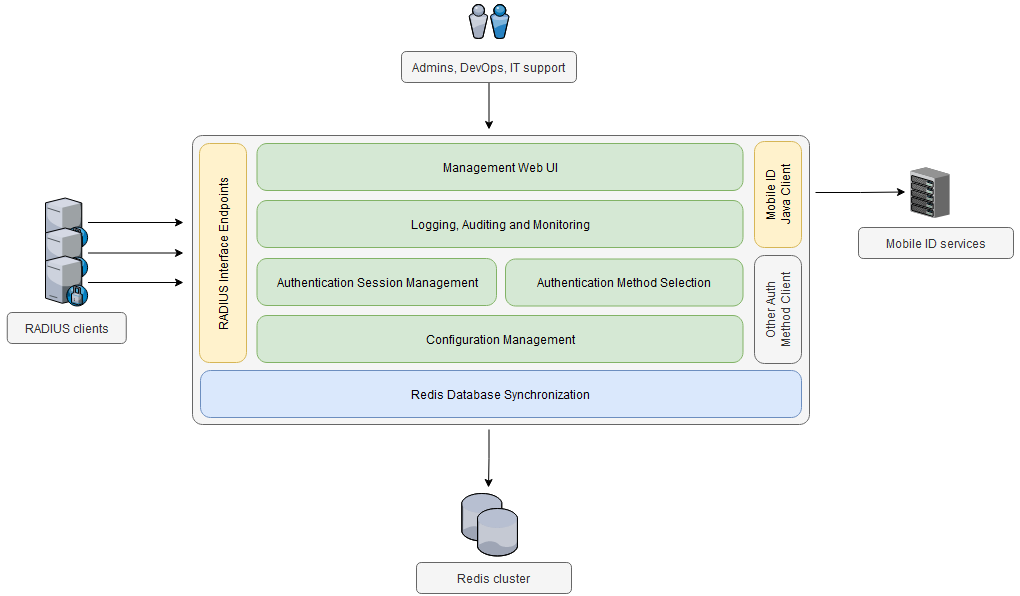
Moving one level down in the architectural view, the following diagram shows the main logical parts of the RIG service:
Authentication Methods
One of the main components of the RIG service is responsible for managing the authentication methods that are available for a client and selecting the right method on a per-user basis.
The following authentication methods are currently supported:
- SIM Digital Signature — The user is prompted to confirm a transaction (RADIUS authentication session) and create a digital signature using his/her Mobile ID-enabled SIM chip.
- App Digital Signature — Like the SIM method above, but the signing "device" is a mobile application with its keys protected by the phone's system protection.
- OTP over Text SMS — An OTP code is generated for each authentication session and sent to the user via an SMS message. A RADIUS Access-Challenge + Access-Request round trip is used to challenge the user to enter the OTP received via SMS.
For each RADIUS client configured for the RIG service, the following parameters need to be specified:
- The available authentication methods
- The default method, in case all other methods are unavailable
During an authentication session, the RIG service loads this configuration and tries to match it to the current state of the user's Mobile ID account.
Each customer account can have its custom list of allowed MFA methods with its own order of priority. An LDAP user attribute may be used to set a preferred MFA option per user (if the configuration parameter UseUserMfaMethod is set to true). This will always override any other configured order of priority.
If a preferred MFA option (from an LDAP user attribute) is not active or not allowed by the customer configuration, the system falls back to the next MFA option according to the configured order of priority.