
The RADIUS Protocol
RADIUS Protocol Overview
The RADIUS protocol, which stands for "Remote Authentication Dial-In User Service," is a network protocol that controls user network access via authentication, authorization, and accounting (AAA or Triple A). It is commonly used for allowing users to access various network devices and services while providing centralized user and permission management.
The protocol is usually hidden inside controlled network and service access software and is not seen directly by end users. It is used only during the session-establishing part of network traffic. The actual point-to-point communication (the network use that the users are requesting) does not flow through the RADIUS server and is not part of the RADIUS protocol.
Ease of use and flexibility are the main characteristics of the RADIUS protocol. It can be easily implemented by network devices, access services, and terminal servers while, at the same time, being extended and enriched with custom validation and authentication schemes. The latter feature fits nicely with the scope of this document.
Protocol Overview
The RADIUS protocol is a binary network protocol, operating on ports 1812 and 1813 and running, with respect to the network stack, in the application layer on top of TCP and UDP. The most common implementations of RADIUS use the UDP network protocol, with TCP connections also being supported.
The protocol is covered by several RFCs, the most important ones being:
- RFC 2865 — Remote Authentication Dial-In User Service (RADIUS)
- RFC 2866 — RADIUS Accounting
- RFC 2869 — RADIUS Extensions
- RFC 6613 — RADIUS over TCP (updated by RFC 7930)
A larger list of related RFCs can be found in the Annexes.
Key Concepts
The following important concepts and terms are used in this document when referring to the RADIUS protocol:
| Element | Description |
|---|---|
| User | The person (or system) that uses a Supplicant to request access to a network service (or other type of service). In the Mobile ID world, this would be a mobile user. |
| Supplicant | The software that the User employs to access the network service. The Supplicant collects the credentials from the User and connects to a NAS for requesting access for the User and establishing the service connection. |
| NAS | Network Access Server. Although it has "server" in its name, the NAS is the network application/equipment that acts as a client to a RADIUS server. Being asked by the Supplicant to authenticate the User and permit network/service access, the NAS connects to a pre-configured RADIUS server and asks for user authentication and authorization. NAS examples include FTP servers, Web servers, Unix login services, VPN servers, remote desktop servers, etc. |
| RADIUS Server | The central server component that decides which Users can access what network services. It is generally one central point in a RADIUS architecture, being connected to all NAS devices that Users can access. |
| Authentication Session | A communication between User → Supplicant → NAS and one or more RADIUS server(s) with the scope of permitting access to the User to a network service. The session is always initiated by the User and can result in permission or rejection. |
Being a binary protocol over UDP, RADIUS packets sent back and forth between the client and the server are composed of bytes with a clearly defined yet flexible structure for representing request or response data. The complete packet structure can be found in RFC 2865, Section 3 — Packet Format.
For the current document, the important aspects of a RADIUS packet are the fields inside and the values that these fields have:
- Code — Identifies the type of RADIUS packet. While the values are in the range of 1 byte (0–255), for the current document we refer to the respective semantic values:
Access-Request,Access-Accept,Access-Reject,Access-Challenge. There are more values that can be used for the Code field, corresponding to other packet types, but for the current discussion, these four are the most important ones. - Identifier — Unique number (1 byte) used for matching requests and responses for the same client source IP address and client source UDP port in a short span of time.
- Authenticator — (16 bytes) Contains the salt-like vector that is used, together with the shared secret and the user's entered password, to create a unique hash that helps the RADIUS server authenticate the calling client.
- Attributes — The attributes of the packet. These depend on the packet type and the service that the user has requested. Logically, they represent the payload of the packet, with the three fields above being the metadata.
The complete reference for the attributes that a packet can contain is available in RFC 2865, Section 5.
Since the structure of a packet is a stream of bytes, the attributes must be encoded in a Type–Length–Value (TLV) form. For the current discussion and to ease the formatting of packet content, the attributes are represented as a list of name and values, with just the most relevant attributes being included in each snippet.
Here is a list of attributes used in the next chapters of this document:
- User-Name — The name of the user to be authenticated. It must be sent in Access-Request packets.
- User-Password — The password of the user to be authenticated. It is only used in Access-Request packets.
- Reply-Message — Indicates a text that may be displayed to the user. It can be used in Access-Accept (the success message), Access-Reject (the failure message), or Access-Challenge (a text to be presented to the user for the challenge).
- State — Three or more characters representing a correlation token that must be sent back unchanged when the client needs to send a response to an Access-Challenge request.
With these fields and attributes defined, here are examples of typical RADIUS packets.
An Access-Request packet:
Code: Access-Request
Identifier: 10
Authenticator: A23B55123DB54103
Attributes:
  - NAS-Identifier: digitec-vpn
  - User-Name: john
  - User-Password: md5("secret"+Authenticator)
A subsequent Access-Accept packet:
Code: Access-Accept
Identifier: 10
Authenticator: b4a88417b3d0170d754c647c30b7216a
Attributes:
  - Login-Service: Telnet
  - Login-TCP-Port: 8080
  - Reply-Message: Authentication successful!
And, finally, an Access-Reject packet:
Code: Access-Reject
Identifier: 10
Authenticator: b4a88417b3d0170d754c647c30b7216a
Attributes:
  - Reply-Message: Invalid credentials!
Basic Flow Description
A typical RADIUS authentication session is initiated by the user, requesting a specific service to a device or software that is installed on, or accessible from, the user's machine. Such software, called the Supplicant, collects the credentials of the user (username and password; these might also be stored for future use, so that the user does not need to enter them each time) and sends them via its own protocol to a Network Access Server (NAS) component, capable of providing the requested service. This NAS component is configured to use RADIUS for user authentication, so it creates a RADIUS Access-Request packet, containing the following:
- The user credentials (User-Name, User-Password)
- An encrypted form of the shared secret between it and the destination RADIUS server
- The NAS client IP and port
- The service type that the user requested
- Any additional attributes that might be needed for proper user authorization
The diagram below presents this exchange:
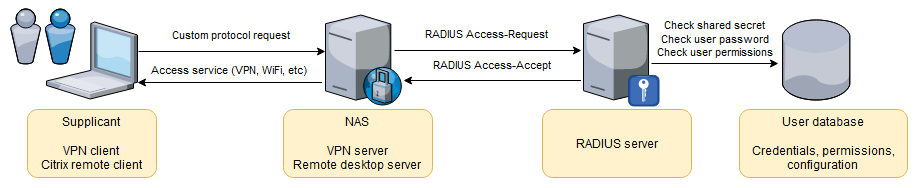
The configured RADIUS server receives the packet and proceeds to check the validity of the data and authenticate the user. At this point, the behavior depends on the configuration of the RADIUS server and the process that is required for authenticating and authorizing the user. The RADIUS server might contact other servers to complete the authentication and authorization process and decide on a positive (accept) or negative (reject) response.
In the diagram above, the RADIUS server decided to inform the NAS client that the user's request is OK and that the requested service can be provided. For this, the RADIUS server sends back a RADIUS packet with code 2 (Access-Accept). Should it decide to reject the user's request, the RADIUS server would send back to the NAS client a packet with code 3 (Access-Reject).
As the final step in our flow, the NAS client receives the response packet from the RADIUS server and, if it has an Access-Accept code, it moves on to providing the requested service (e.g. establishing a VPN connection).
Challenge and Response
Based on the configuration for a user and during an authentication session, the RADIUS server can decide to perform a challenge/response authentication. This flow introduces a few more steps in the standard RADIUS flow:
- After the RADIUS server receives the first RADIUS Access-Request, it sends back to the RADIUS client an Access-Challenge response (instead of an Access-Accept or Access-Reject). The response packet contains a challenge code that the user is expected to enter in a security device (smart card or software application) and obtain a response.
- The RADIUS client receives the Access-Challenge response and uses its custom protocol with the Supplicant application to transfer this challenge and present it to the user.
- The Supplicant application (e.g. VPN client application) displays the challenge to the user and instructs him/her to enter the challenge code into the security device, calculate the response code, and enter that code back in the UI.
- The user performs the computation and enters the code back.
- The Supplicant application sends the response code back to the RADIUS client which, in turn, creates a new RADIUS Access-Request packet, this time with the User-Password field set to the challenge response.
- The RADIUS server identifies the ongoing authentication session, checks the challenge response, and decides whether to accept the request or not. Depending on the decision, the RADIUS server sends back either an
Access-Accept(request accepted), anAccess-Reject(request rejected), or anotherAccess-Challenge(more challenge round trips are required). - Finally, the Supplicant application and the RADIUS client act together based on the response from the RADIUS server: either give the user access to the service, reject the user, or challenge further.
The diagram below depicts the Challenge/Response flow:
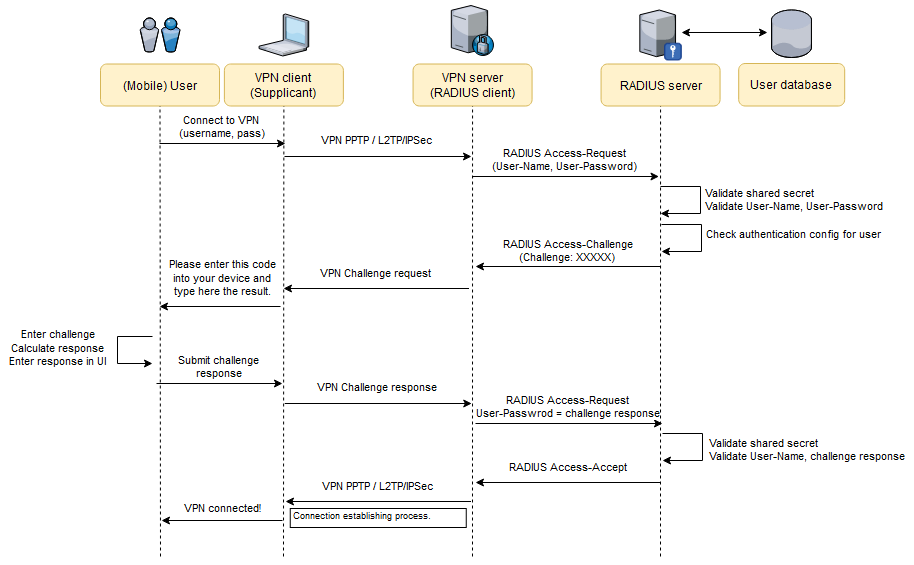
The goal of the RADIUS Challenge/Response flow is to increase the strength of the authentication process by using a two-factor authentication: User-Name + User-Password (something the user knows) and the challenge code calculation (something the user has — the security device).
RADIUS via Proxies
The RADIUS protocol allows network architectures where certain RADIUS server components act as proxies between a RADIUS client and a remote (final) RADIUS server. Whether this is for roaming/federation purposes or for enhancing an authentication session with input from more than one RADIUS server, using RADIUS proxies is an easy and transparent way of assembling a custom authentication flow:
- The authentication session starts as usual, with the user requesting a particular service to a Supplicant application. The request is sent via a specific protocol to the backend service that acts as a RADIUS client in this case.
- The RADIUS client assembles an Access-Request packet and sends it to the configured RADIUS server.
- Based on the configuration for this RADIUS client or user, the RADIUS server decides to proxy the request, so it sends the Access-Request to the next RADIUS server. For the diagram below, this server is again a proxy, so this step is repeated once more.
- The Access-Request packet finally lands on the remote RADIUS server. After the due security checks and authorizations, the remote RADIUS server can issue any of an Access-Accept, Access-Reject, or Access-Challenge.
- The response travels back, from service to service, in reverse order, until it reaches the RADIUS client. At this point, the client acts based on the received response type (accepts or rejects the service or takes the user through a challenge).
The following diagram depicts this scenario:
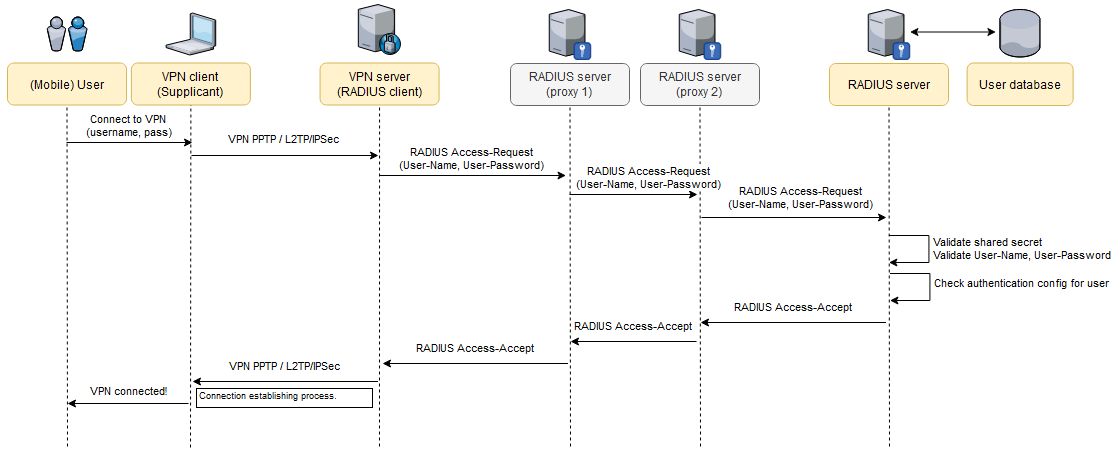
The Proxy scenario is a good asset for assembling a RADIUS-based network. It allows administrators to change the topology of the network without affecting existing RADIUS clients (e.g. VPN server endpoints), existing applications installed on users' machines, or the users' current behavior.