
Mobile ID Passkeys: Phishing-Resistant Authentication for Browser Scenarios
NIST AAL and ISO/IEC LoA: Reference Frameworks for Security Levels
Before examining each method in detail, a shared understanding of security levels is essential. In practice, two reference frameworks are commonly used: NIST SP 800-63B (now in revision 4) with three Authenticator Assurance Levels (AAL1-AAL3), and ISO/IEC 29115:2013 with four Levels of Assurance (LoA1-LoA4). Both describe the same underlying principle: how high the assurance and security level of an authentication is. What can be confusing is that the scales use different names and different numbering. The highest level is therefore either AAL3 or LoA4, depending on which framework is being referenced.
AAL1 requires only single-factor authentication. Passwords, SMS OTPs or simple tokens satisfy this level. The security level is low.
AAL2 requires two different factors. In addition, a phishing-resistant option must be offered for online services. Cloud-synced Passkeys, TOTP generators, Mobile Push (such as Mobile ID SIM or App) and multi-factor OTP devices meet AAL2.
AAL3 is the highest NIST level. It requires phishing-resistant public-key cryptography with a non-exportable private key, along with stricter hardware, cryptographic and re-authentication requirements. Only a few authenticators fully meet these requirements: FIPS-certified security keys (e.g. YubiKey 5 FIPS Series), certain smartcards and hardware security modules.
What Are Passkeys?
Passkeys are a user-friendly implementation of the FIDO2 standard and the WebAuthn API. They replace passwords with cryptographic key pairs and enable login via biometrics in under 3 seconds. The core principle: the private key never leaves the user's device. Instead, the authenticator signs a challenge that the server verifies with the public key.
What makes Passkeys special is origin binding: the key is cryptographically bound to the domain of the service. Even if a user lands on a perfectly replicated phishing site, authentication fails because the browser detects the wrong domain and refuses to release the key.
Passkey Types: Convenience vs. Maximum Security
Not all Passkeys are created equal. Different types are used depending on the level of protection required. The choice directly affects the achievable security level.
Cloud-Synced Passkeys
Cloud-synced Passkeys are synchronized via the platform provider's cloud infrastructure: Apple iCloud Keychain, Google Password Manager or third-party managers such as 1Password. In mainstream consumer ecosystems, cloud synchronization has become the default user experience because it maximizes recovery and cross-device convenience.
The major advantage: Passkeys are available across all devices within the same ecosystem. If a device is lost, access is retained through other devices. Synchronization uses end-to-end encryption. Cloud-synced Passkeys can also be shared with family members or friends, which also means they can end up on untrusted devices.
Security level: AAL2. Since the keys are exportable and reside in cloud infrastructures (which are subject to the US CLOUD Act), they do not meet the requirements for AAL3.
Device-Bound Passkeys
With device-bound Passkeys, the private key never leaves the security hardware. Typical examples are FIPS-certified security keys such as the YubiKey 5 FIPS Series (FIPS 140-2 Cert #3907, approx. CHF 100 at Digitec). These offer the highest security and are AAL3-compliant.
Important to know: standard YubiKeys (without FIPS certification) are not sufficient for AAL3. In September 2024, a severe vulnerability was also discovered in the YubiKey 5 Series that cannot be fixed via firmware update but requires a physical replacement of the token. This illustrates a fundamental problem with physical tokens: security flaws can be expensive and cumbersome to resolve.
Security level: AAL3 (only with FIPS 140-2 certification and firmware 5.7 or newer).
Platform Authenticators
Platform authenticators are security modules built directly into the device, such as Windows Hello (TPM), Apple Touch ID/Face ID (Secure Enclave) or the Titan M2 chip in Google Pixel devices. Depending on configuration, they can function as cloud-synced or device-bound.
AAL3 is only achievable if the key is not synchronized to the cloud and the hardware component is FIPS-validated. In practice, this requires a device-bound configuration or an external authenticator that keeps the private key outside a cloud-synced credential store.
3rd-Party Passkey Providers
Since iOS 17 and Android 14, third-party providers can register as Passkey providers. The Credential Manager API (Android) and AuthenticationServices (iOS) allow authentication apps to create and manage Passkeys without relying on the system's built-in Passkey store.
This is the technical foundation for the planned Mobile ID Passkey Vault: the Mobile ID App itself becomes a Passkey provider and can manage device-bound Passkeys at AAL3 level, without requiring physical hardware tokens.
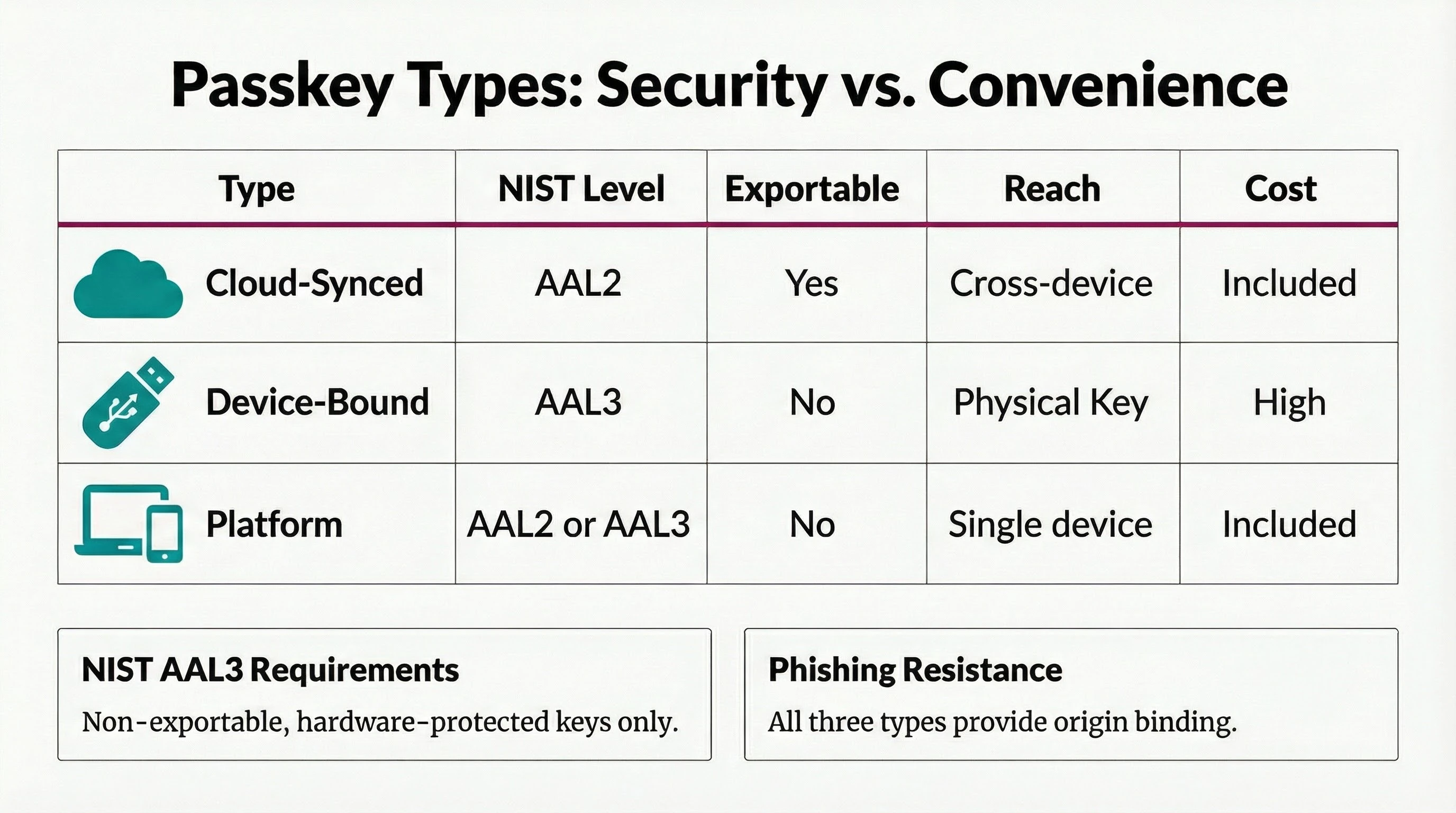
- Convenient & available everywhere
- Exportable
- Best user experience
- Highest security
- Non-exportable
- Hardware token required
- Built-in & practical
- Device-bound
- No accessories needed
- Device-bound as app
- Scalable without tokens
- Swiss Sovereignty
Passkey Integration: Simple for Users, Complex for Enterprises
Passkeys promise a simple user experience. The technical reality behind the scenes, however, is demanding. A complete Passkey infrastructure requires:
A WebAuthn backend with FIDO2 server library, attestation validation, credential management and secure key storage. A credential lifecycle management system for registration, deactivation, recovery and managing multiple Passkeys per user. Fallback mechanisms for users without a Passkey-capable device or when authentication fails. Compliance checks for regulated industries, including AAGUID validation against the FIDO Metadata Service (MDS) database and FIPS certification verification.
Mobile ID resolves this complexity: Relying Parties do not integrate the Passkey infrastructure themselves but rather the Mobile ID OIDC Service. Passkey registration and management takes place centrally on mobileid.ch. A Passkey is registered once and can then be used across all connected Relying Parties.
For enterprises, this means a standard OIDC integration with configurable ACR values, automatic fallback to SIM, App or SMS, and the assurance of a partner like Swisscom that uses these solutions itself to protect highly critical infrastructures.
Security Profile by Usage Context
All Mobile ID methods provide strong authentication. The optimal choice depends on the use case scenario. The key distinction: is this an open browser scenario with a freely chosen URL, or a closed journey?
Browser Journeys: Open URLs and Phishing Risk
In the browser, the user navigates freely. They can click links in emails, type URLs manually or reach pages via search engines. This is where phishing risk is greatest: attackers can spoof domains and replicate login pages with near-perfect accuracy.
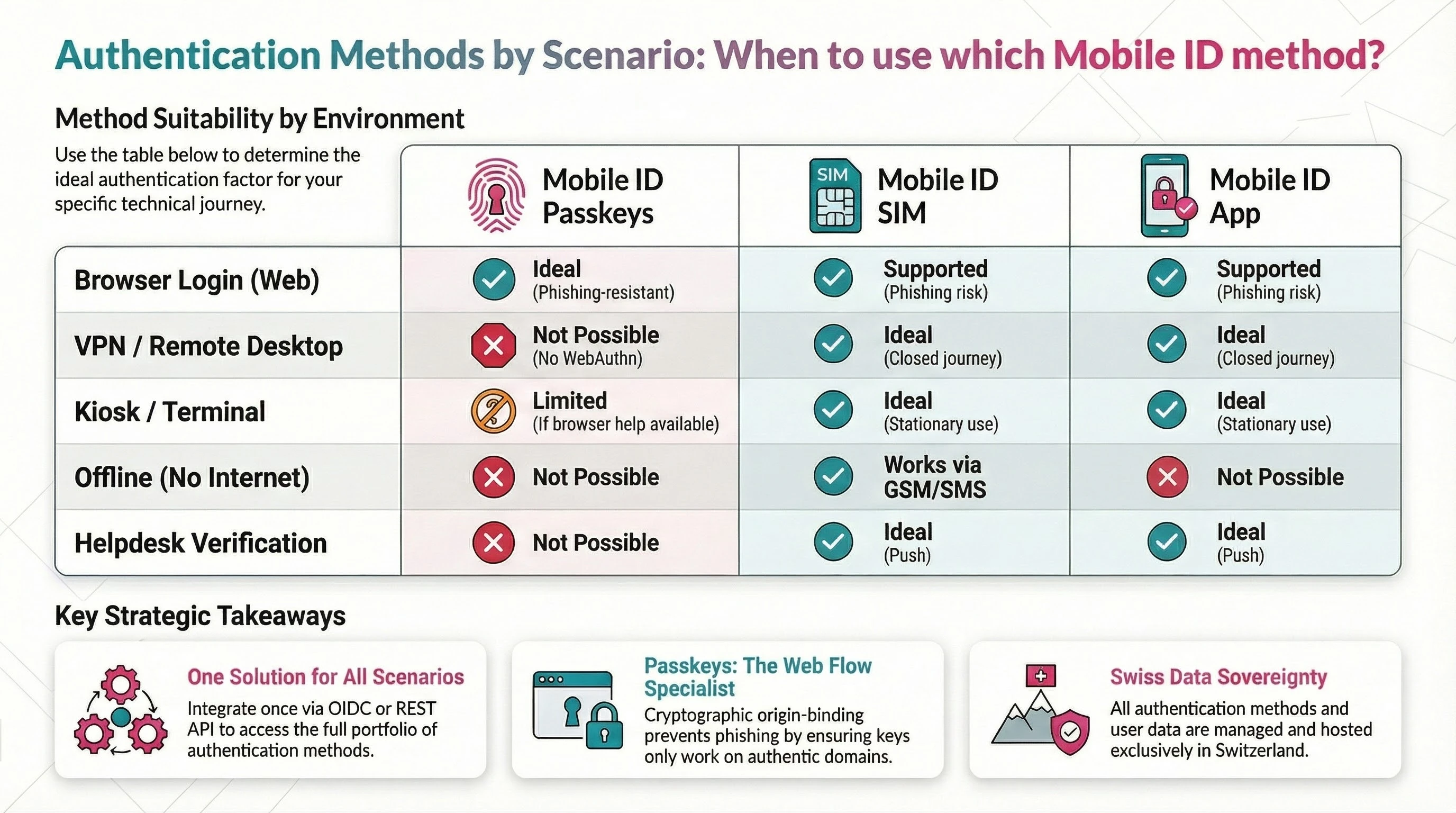
Passkeys offer a systemic advantage in this scenario. Through cryptographic origin binding, the key is firmly tied to the authentic domain. The browser automatically checks whether the requesting domain matches the registered one. A phishing site on m0bileid.ch cannot access a Passkey registered for mobileid.ch. This makes Passkeys the first choice for pure web logins.
Important: Passkeys are not free from attack vectors either. Malware on the platform, compromised browser extensions or social engineering at the operating system level can affect any method. Passkeys specifically eliminate the URL spoofing problem.
Closed Journeys: VPN, Remote Desktop, Kiosk, Native Apps
For logins via VPN clients, remote desktop/VDI environments, kiosk terminals, native app-to-app transitions or helpdesk callbacks, other protection mechanisms apply. In these scenarios there is no freely chosen URL. The connection is controlled by the client or the infrastructure. URL spoofing is not an attack vector.
Mobile ID SIM and App provide strong security here through hardware binding (EAL5+), number matching, transaction signing, and geofencing in supported scenarios. App-based geofencing uses GPS plus device-integrity signals; supported SIM geofencing uses mobile-network location data. Passkeys are often not usable in many of these scenarios: WebAuthn is a browser technology, and VPN clients or remote desktop sessions (no BLE channel to the authenticator!) frequently do not support them.
SIM and App Also Usable in the Browser
SIM and App can also be used for browser logins. Not every use case requires maximum phishing resistance in the browser. For many applications, the proven push-based authentication via SIM or App is a pragmatic and secure solution. Mobile ID covers all scenarios with OIDC and REST API.
Why SIM and App Remain Indispensable
Passkeys are a strong addition for browser scenarios. SIM and App leverage their unique strengths where WebAuthn reaches its limits.
Mobile ID SIM
The SIM-based method uses the Mobile ID enabled SIM card (or eSIM) as a secure hardware token. Over 6 million Swiss SIM cards from Swisscom, Sunrise, UPC and Salt are Mobile ID enabled. The cryptographic keys are stored directly on the SIM, which is certified under the protection profile EAL5+ (ISO/IEC 15408) and Evaluation Level E3 (ITSEC).
The SIM method requires no app installation and has no app store dependency. The authentication prompt is displayed as a SIM Toolkit overlay directly on top of the business application. It works on any mobile device, including devices without a smartphone operating system, and over the GSM channel. Via SMS-over-IP and WiFi, the SIM method is also usable when there is no cellular connection.
When switching devices, the user simply moves the SIM. The account remains intact, without re-registration. SIM-based location verification is particularly trustworthy because the position within the mobile network is difficult to manipulate.
Mobile ID App
The Mobile ID App (iOS and Android) offers, alongside biometric authentication, a broad range of app-specific advantages that cannot be replicated with Passkeys alone:
Push-based authentication with biometrics or passcode as the second factor. App-based geofencing with GPS-based location determination and built-in jailbreak and mock service detection, making GPS spoofing more difficult. Number matching and transaction signing remain available across both Mobile ID SIM and Mobile ID App; on the App, they are combined with biometric approval and richer smartphone-native UX. App-to-app transitions enable automated switching between the business application and the Mobile ID App and back in banking scenarios.
The app is based on technology from Futurae (ETH Zurich spin-off) and uses the device's Trusted Execution Environment (TEE). It is available worldwide in approved countries via the App Store.
Passkeys-Plus: The Hybrid Auth Flow for Near AAL3
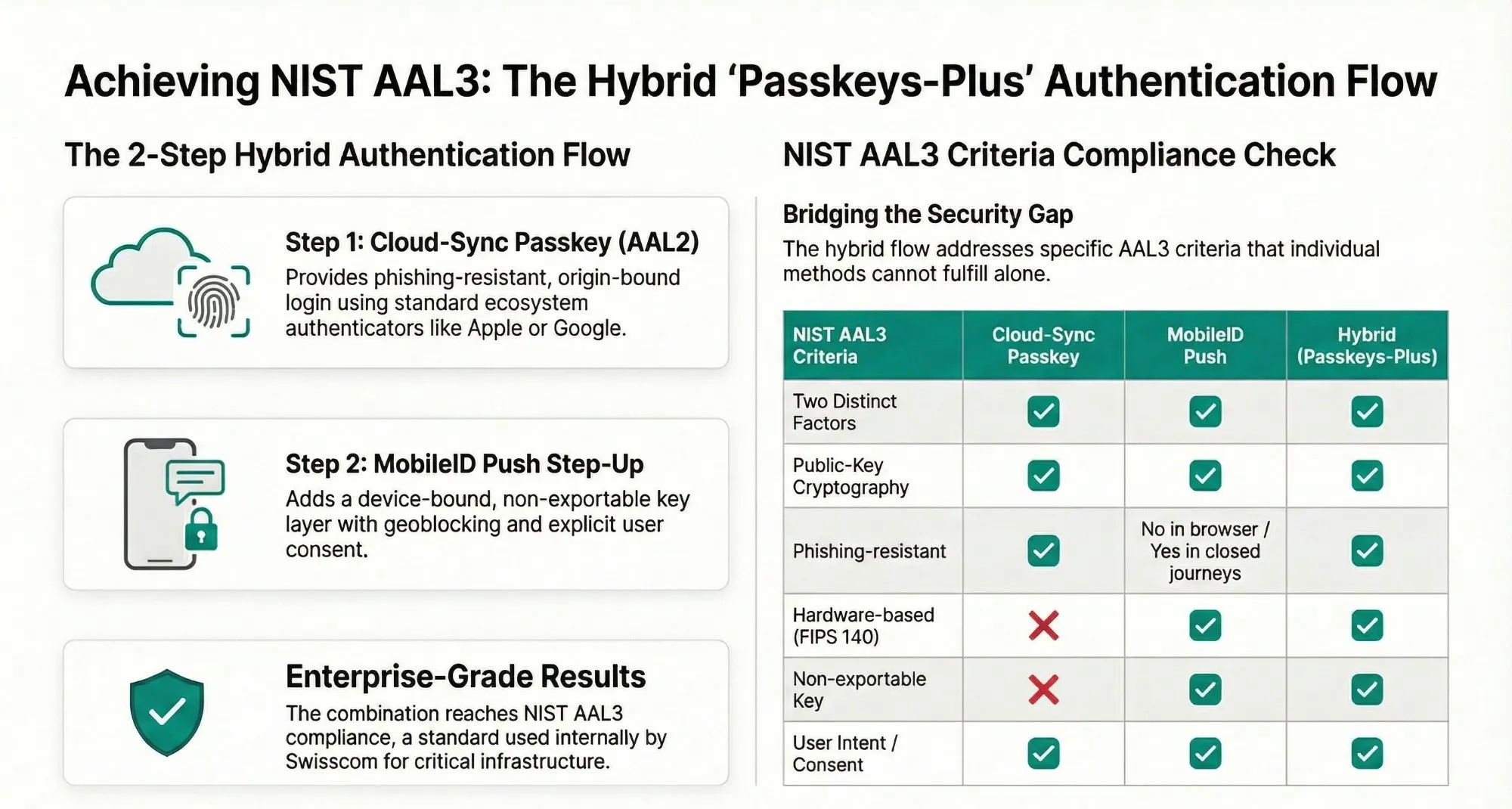
NIST AAL3 is an extremely high security standard. True AAL3 requires, among other things, a FIPS 140-2 validated hardware module, which depends on the specific device configuration. For highly critical systems, Swisscom already uses the Passkeys-Plus model internally, which targets a very high security level.
The approach combines two already existing components into a Hybrid Auth Flow:
Step 1: Cloud-Sync Passkey (AAL2). The user authenticates in the browser with a Passkey. This provides broad ecosystem support and phishing-resistant origin binding.
Step 2: Mobile ID Push Step-Up. The user then receives a push notification on their smartphone. Mobile ID Push uses public-key cryptography with non-exportable, device-bound keys. The user confirms with biometrics or passcode. Geoblocking and user consent display are optionally added.
The combination delivers: origin-bound login plus device-bound, non-exportable key plus explicit user consent plus geolocation. This can reach AAL3 in deployments where the second factor runs on suitable FIPS 140-2 certified hardware. Whether it is recognized as full AAL3 in every regulatory context must still be assessed per use case, hardware basis and compliance framework. Broader FIPS-validated cryptography and device attestation coverage in the Mobile ID Push step will only be fully available after future enhancements.
The push step remains on the smartphone. On desktop, the user authenticates locally with the Passkey, and the step-up occurs out-of-band via the phone.
Mobile ID Authentication Levels: Granular Control via ACR Values
Alongside these external reference frameworks, Mobile ID defines its own Authentication Levels (AL2-AL4) as ACR values in the OIDC Authorization Request. These values determine which authentication methods are allowed for a given login. Mobile ID aligns this model with the four-level logic of ISO/IEC 29115. AL4 therefore represents the highest Mobile ID security level. The full ACR matrix is documented in the OIDC Integration Guide.
mid_al2_anymid_al4_anymid_al4_passkeyIn mid_al4_passkey mode, a Passkey-only authentication is enforced, guaranteeing true phishing resistance without weak fallbacks. For maximum flexibility, mid_al2_any allows all available methods including SMS. With mid_al4_any, Passkey authentication is preferred with a fallback to SIM or App.
While most providers offer Passkeys only as a simple password replacement with insecure recovery paths (Google, PayPal, GitHub and even SBB allow OTP email as a fallback), Mobile ID enables the enforcement of strict security policies and the restriction to FIPS-certified authenticators via AAGUID validation against the FIDO Metadata Service database.
Registration and Login Flows
The technical rollout is straightforward for Relying Parties.
Centralized Registration on mobileid.ch
Users manage their Passkeys via the MyMobileID Dashboard on mobileid.ch/login. A new dashboard tile makes it immediately visible where Passkeys can be registered and maintained centrally. The Passkeys are stored on the domain m.mobileid.ch and are subsequently available across all connected Relying Parties.
The new dashboard views highlight both the entry point and the central management experience at a glance:
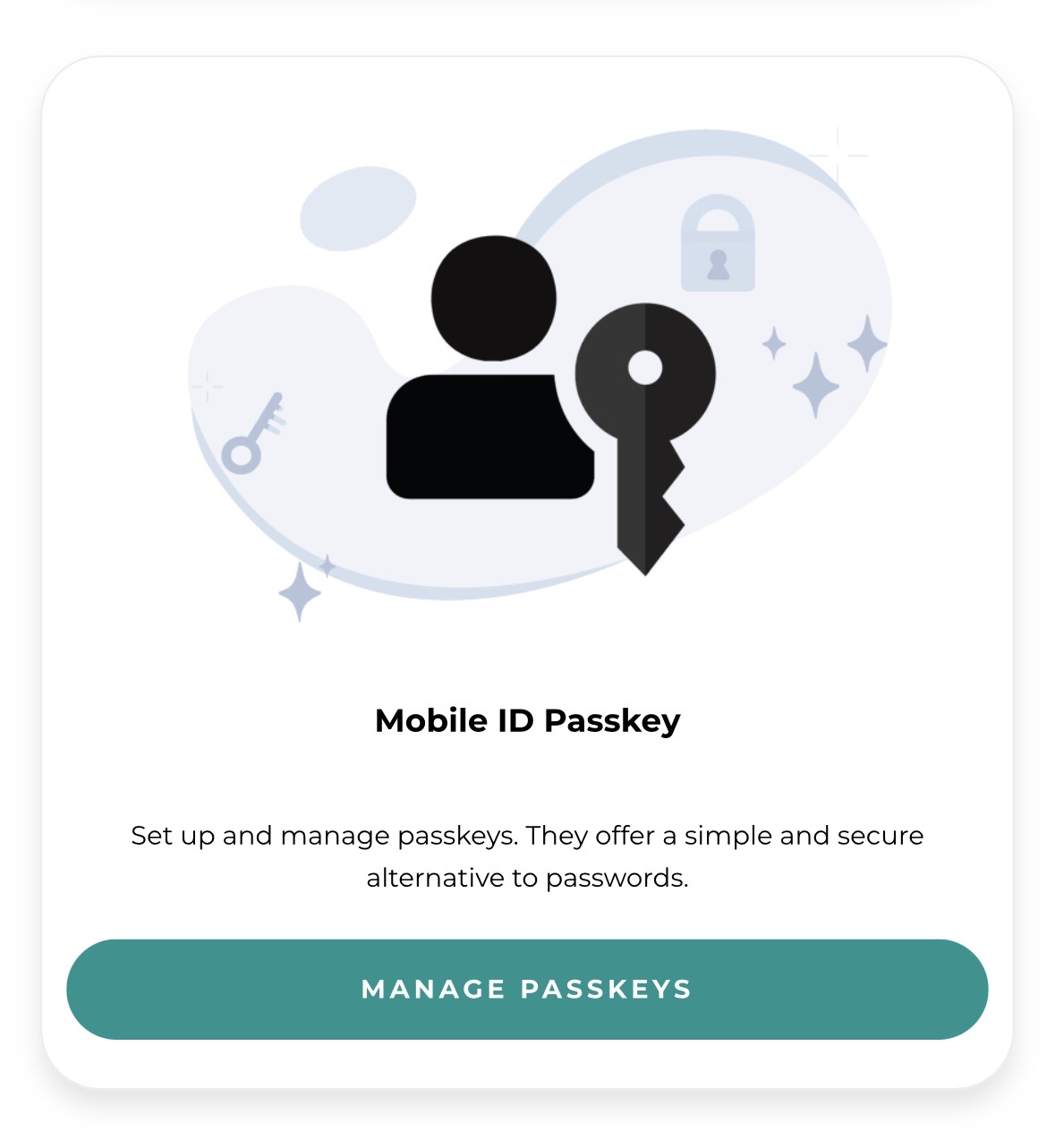
The Manage Passkeys tile is the central entry point for the new Passkey feature in MyMobileID. This is where users start registering and managing their Passkeys.
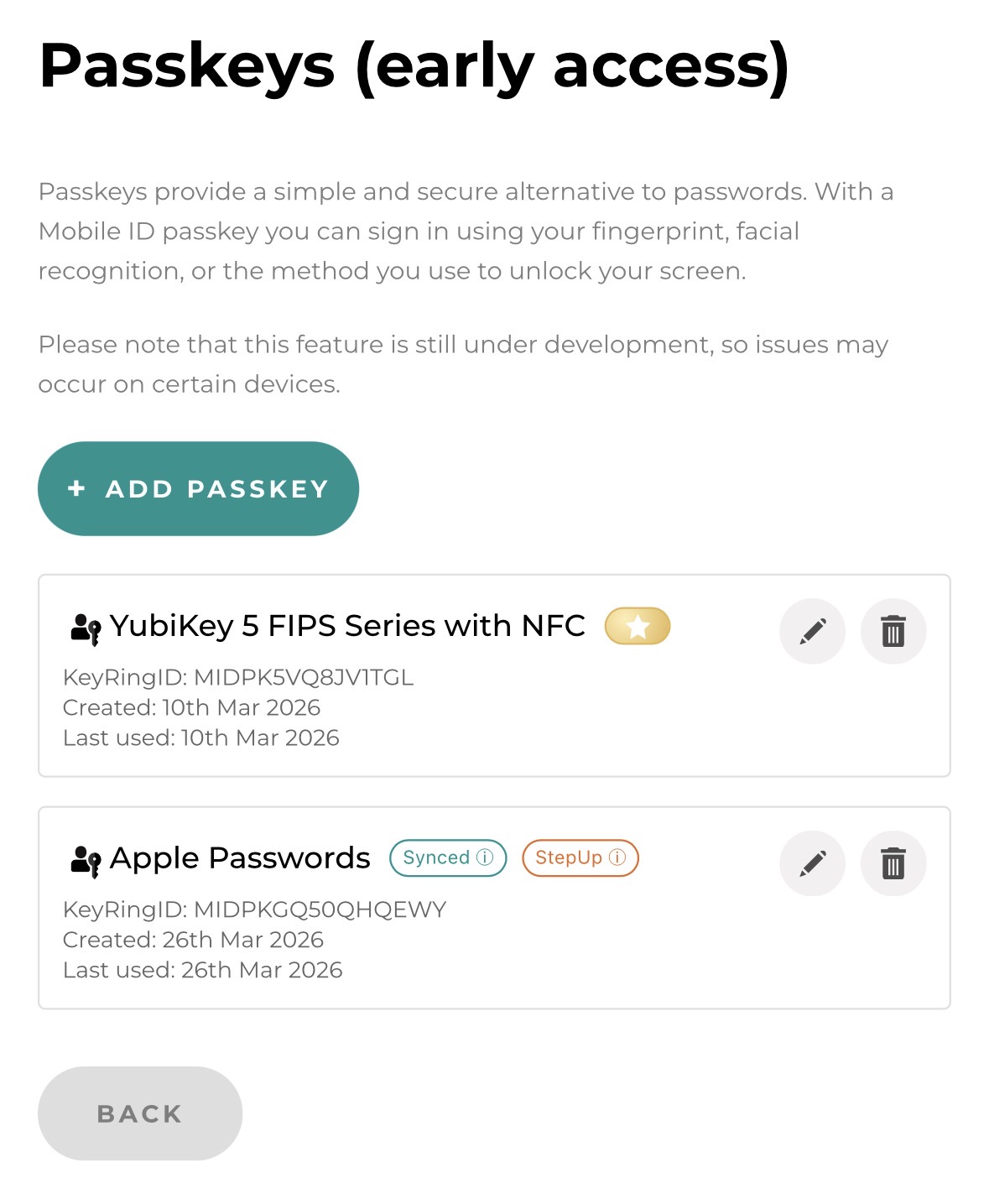
Once opened, users see their already registered Passkeys in a clear management view and can expand or maintain their Passkey portfolio as needed.
RP Login via OIDC
For typical login scenarios at a Relying Party, the dashboard now also includes the Mobile ID Check. It allows users to test their activated Mobile ID methods in a realistic authentication use case:
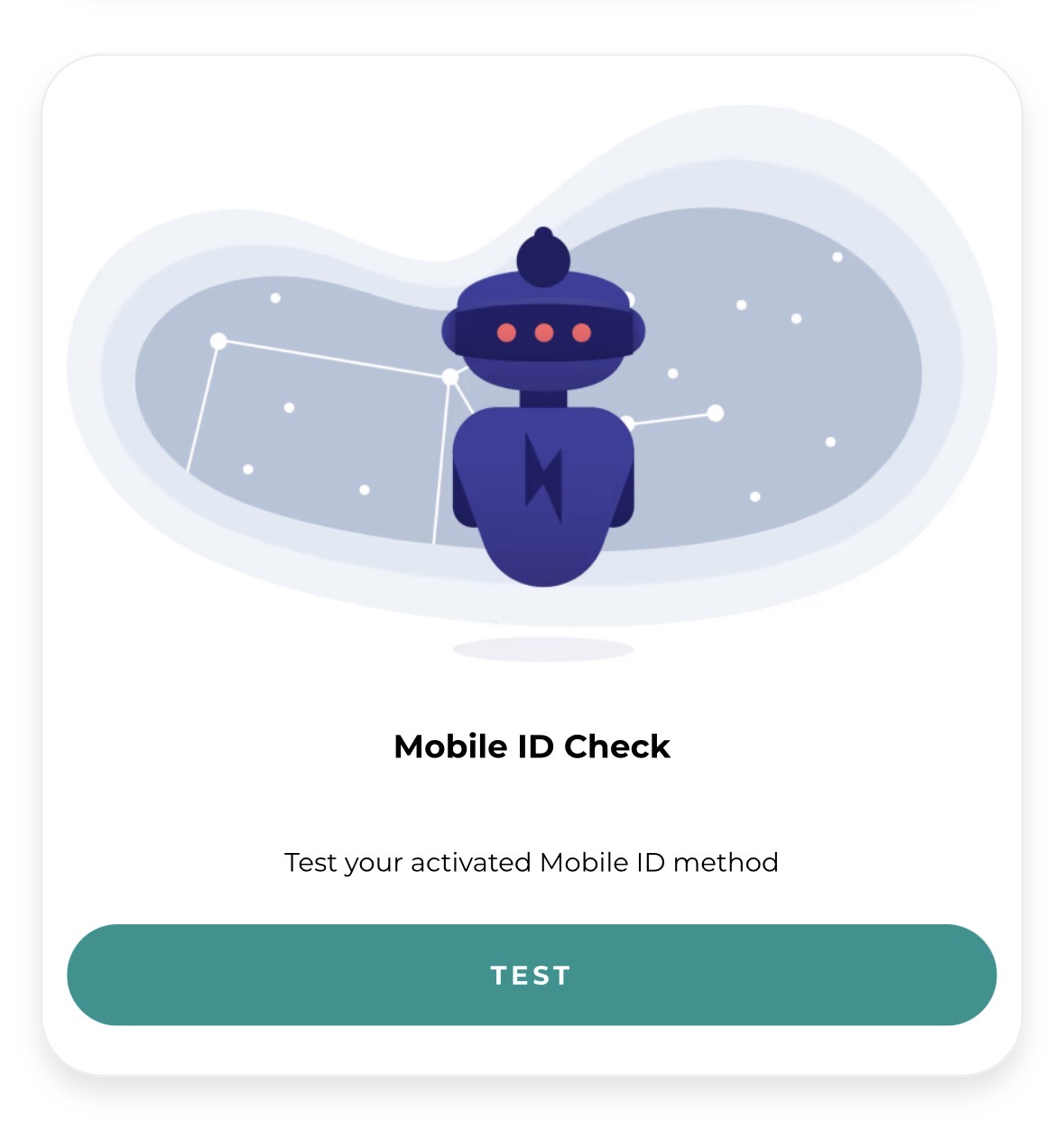
The Mobile ID Check tile provides a simple entry point to test available Mobile ID methods such as SIM, App and now also Passkey directly from the dashboard.
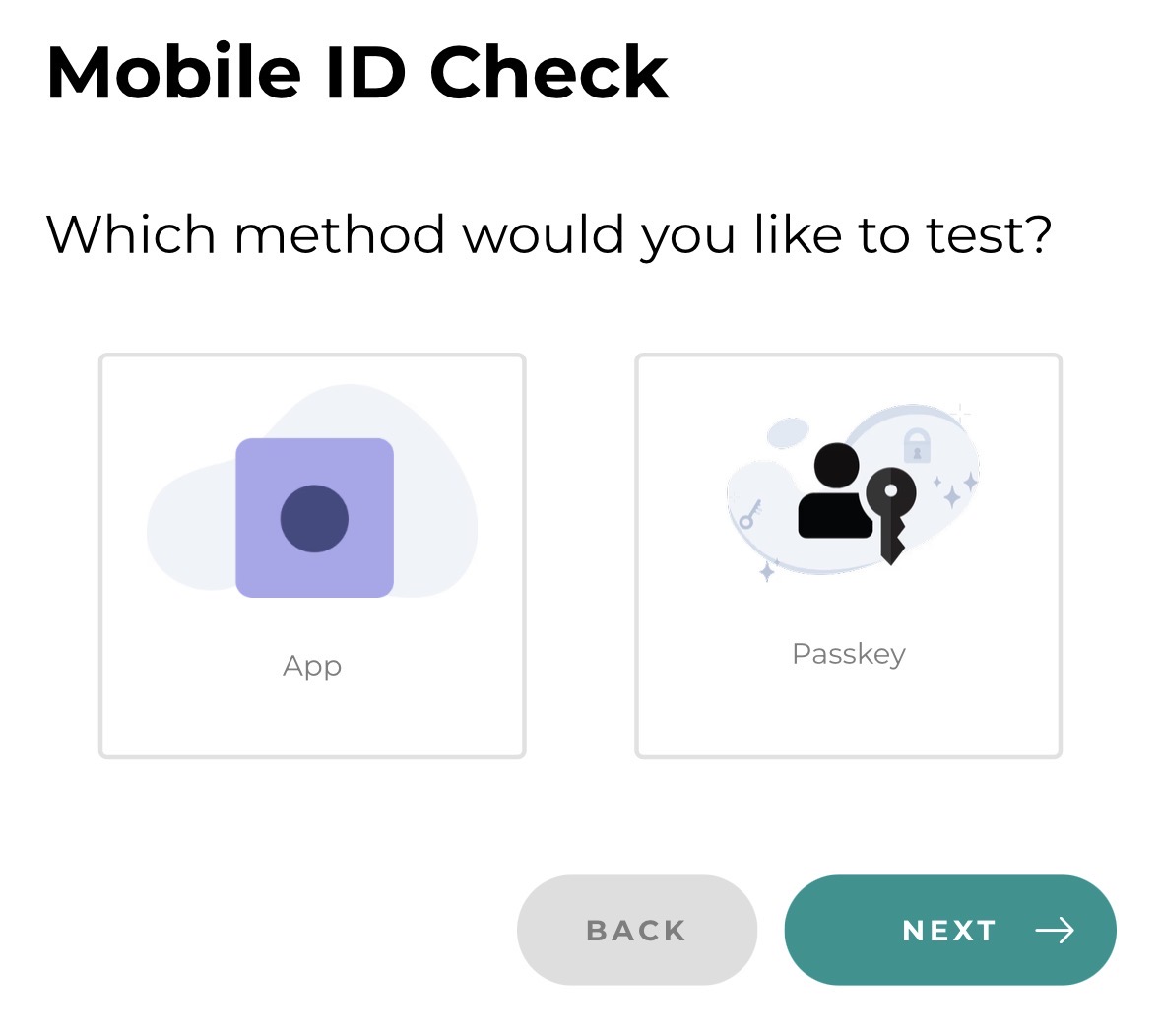
If at least one Passkey has already been registered, Passkey appears as a selectable method. This allows the new login option to be validated quickly in a typical [login flow](/oidc-integration-guide/passkey-authentication#authentication-flow-oidc) before productive use.
Depending on the configured ACR value, the appropriate flow is triggered. With mid_al4_passkey, only a Passkey is accepted. With mid_al2_any, the user can choose between Passkey, SIM, App or SMS. In case of errors or missing Passkeys, the RP can allow a secure fallback to other methods.
Roadmap: The Mobile ID Passkey Vault
With the Mobile ID Passkey Vault, Mobile ID has a roadmap solution in development that is designed to enable AAL3 with the Mobile ID App. The aim is an authenticator that meets the stringent AAL3 requirements and operates on the same security level as a FIPS-certified hardware key, while remaining fully integrated into the Mobile ID ecosystem.
Compared with physical hardware keys, the Passkey Vault offers clear operational advantages: passkey login can be combined directly with geoblocking and explicit user consent, and the authenticator can be rolled out and scaled far more easily and cost-effectively than expensive hardware tokens.
The Mobile ID App thus evolves into a scalable software authenticator that complements SIM-based authentication with push-based MFA, passkey capabilities and a richer smartphone-native UX for transaction signing and consent.
Conclusion: Everything from a Single Source
With the introduction of Passkeys, Mobile ID solidifies its position as a unique ecosystem that unites all relevant authentication methods under one roof. Passkeys for phishing-resistant browser logins. SIM for the highest hardware security without app installation, including supported mobile-network-based geofencing. App for GPS-based geofencing, biometrics and worldwide usability. Number matching and transaction signing can be used with both SIM and App. And with the Hybrid Auth Flow, a solution that achieves near AAL3 level without every user needing to own a hardware token.
Enterprises benefit from a standard OIDC integration, Swiss data residency and the assurance of a partner that uses these solutions itself to protect highly critical infrastructures.
The customer decides which method best fits their use case. Mobile ID provides the flexibility to make it happen.
Mobile ID: the right method for every scenario. Everything from one ecosystem.
For questions about Mobile ID integrations, reach out to Backoffice.Security@swisscom.com. For general information about the service, visit mobileid.ch.