
Root CA Certificates
There are two different scenarios (described in the two chapters below) to consider, where x.509 certificates are involved. Since they do not have the same root CA, you must ensure that your client's TrustStore contains all involved "Root CA" certificates.
X509 Server Certificate
As described in Section Mutual Authentication, the Mobile ID server's x.509 certificate that is used in the mutual SSL/TLS authentication process is a SwissSign certificate.
You can download the "SwissSign Gold CA - G2" certificate from the SwissSign site: https://www.swisssign.com/en/support/faq.html
| SHA-1 Fingerprint |
|---|
| D8 C5 38 8A B7 30 1B 1B 6E D4 7A E6 45 25 3A 6F 9F 1A 27 61 |
User X509 Certificate
As described in Section MSS Signature, the main scenario is a strong authentication, where the AP receives a signature response, which includes the signature object and the mobile user's x.509 certificate (public key). The AP should validate the signature as well as the x.509 certificate's trust chain.
The figure below depicts the Mobile ID Certificate Chain. The User Certificate (End Entity Certificate) is issued by the Intermediate Certificate. The Intermediate Certificate is issued by the Root Certificate.
Usually, a client's TrustStore contains the Root Certificate only, the so-called trust anchor. Having the root certificate in the client's TrustStore, the whole certificate chain can be validated, including the Mobile ID user's end entity certificate.
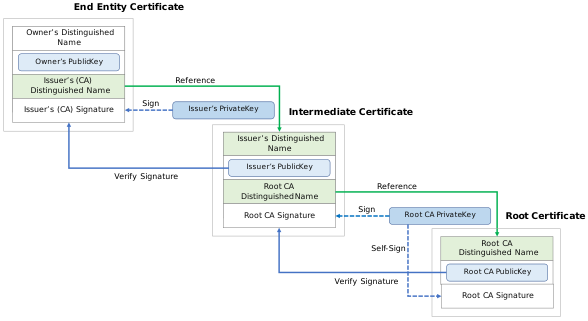
The Mobile ID End Entity Certificate is either based on the Root Certificate Swisscom Root CA 4 or on the older Root Certificate Swisscom Root CA 2.
You can download the "Swisscom Root CA 4" certificate from the Swisscom Digital Certificate Service site: https://aia.swissdigicert.ch/sdcs-root4.crt
| SHA-1 Fingerprint |
|---|
| B9 82 1B 0C 87 7D 30 24 DD 6A 8F 6E 44 3E F5 38 8E 53 16 1B |
You can download the "Swisscom Root CA 2" certificate from the Swisscom Digital Certificate Service site: https://aia.swissdigicert.ch/sdcs-root2.crt
| SHA-1 Fingerprint |
|---|
| 77 47 4F C6 30 E4 0F 4C 47 64 3F 84 BA B8 C6 95 4A 8A 41 EC |
Important
Please ensure that your Mobile ID client's TrustStore contains both the old Root Certificate Swisscom Root CA 2 as well as the new Root Certificate Swisscom Root CA 4.