
Auto Activation
Introduction
Auto Activation is an optional feature for Application Providers (APs) that can greatly improve the user experience for Mobile ID SIM authentications.
- Applicable to: SIM authentication only (not relevant for Mobile ID App authentications).
- Default state: Disabled by default, but can be enabled per Application Provider.
How it works
Usually, a brand new Mobile ID SIM card must be activated once on the MyMobileID Portal. During this activation, the user sets their personal Mobile ID PIN and a signing key is created on the SIM card.
With Auto Activation enabled, a Signature Request to a user with an inactive Mobile ID SIM will invoke an implicit activation process during the ongoing signature transaction. This achieves:
- A successful Mobile ID activation and
- A successful authentication (Signature Response) at the same time
From the AP perspective, the user simply has a successful authentication -- there is no difference whether the user was auto-activated during the transaction or not.
TIP
Auto Activation feature can successfully prevent a fault sub-code 404 (this fault code means that the user did not yet activate their Mobile ID SIM card) which can happen when an AP attempts to do a Mobile ID authentication with a user that has an inactive Mobile ID SIM card.
How to implement this feature
To enable the Auto Activation feature for an Application Provider (AP), the AP must ensure that the user has accepted the Mobile ID specific terms & conditions prior to proceeding with the auto activation steps.
An AP may use the Profile Query Extensions (see Section MSS Profile Query) to know if a signature request to a user will invoke auto activation or not. However, an AP does not necessarily need to know that.
Please speak to your Swisscom contact if you wish to get this feature enabled for your AP account. Optionally we can also setup specific test SIM cards, which allows an AP to test this feature (because those test SIM cards will be configured to always trigger the auto activation).
User Perspective
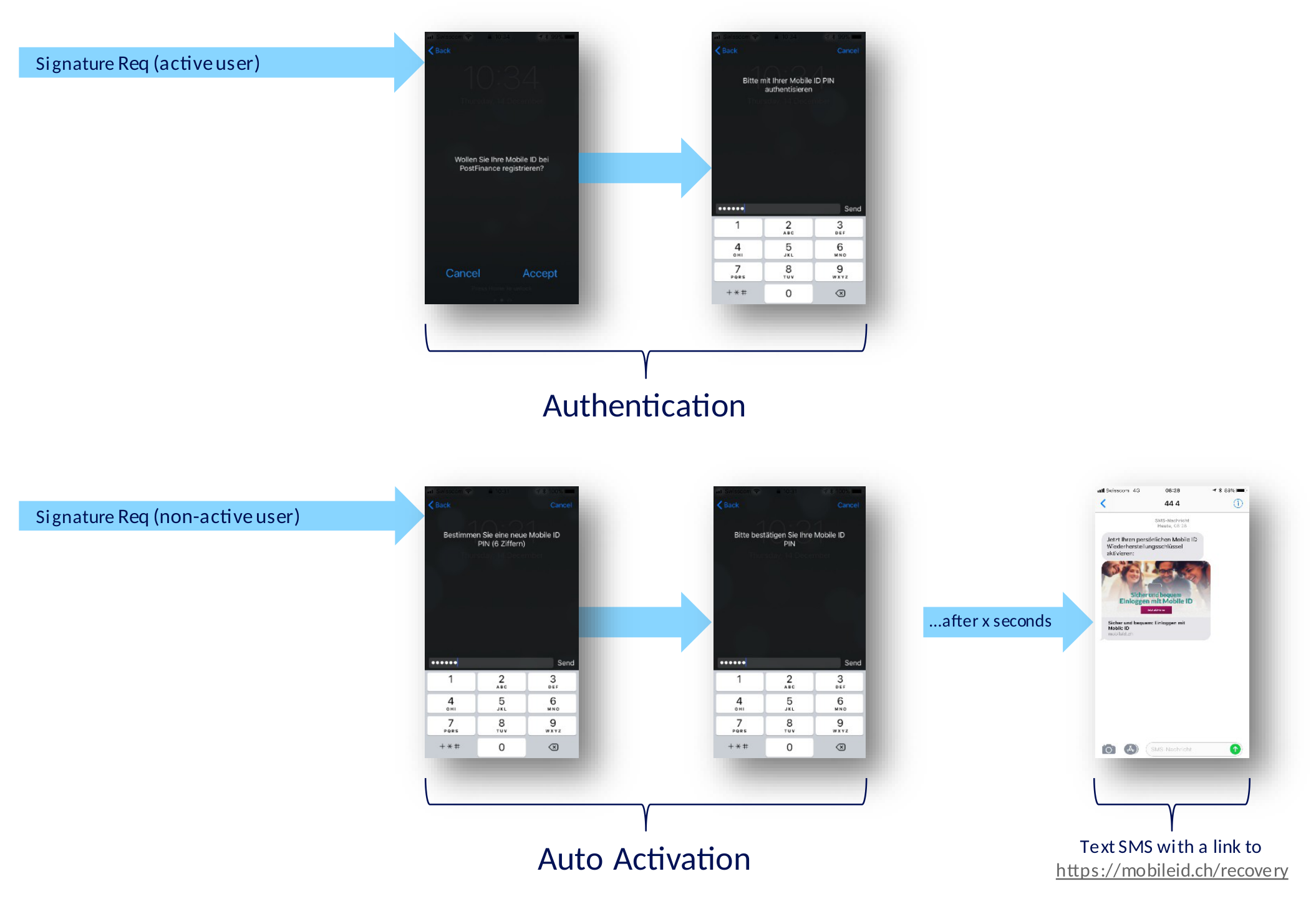
From a user perspective, the steps displayed on the mobile device look very similar, if you compare the signature process of an active Mobile ID SIM vs. the process of an inactive Mobile ID SIM.
INFO
In case of a successful auto activation, the Mobile ID server sends a Text SMS to the user, to remind the user to create a Mobile ID recovery code 24.
References and Footnotes
- Each time a user completes the Mobile ID activation process, they will receive a code that enables them to recover Mobile ID and maintain their existing pairings to service providers, if you lose your phone, change SIM cards or switch to an e-SIM card. See https://mobileid.ch/recovery ↩