
Mobile ID API
The Mobile ID service exposes a web API available via both SOAP and RESTful (JSON) interfaces. Refer to Application Provider Client Integration for a detailed description of these interfaces, including download links for the corresponding WSDL and YAML files that describe the service definitions.
The OpenAPI specification for the RESTful API is also available here: API Specification
HTTP/1.1 Header
HTTP Request
You can send signature requests using the HTTP/1.1 POST method over either the SOAP or RESTful interface. The RESTful interface uses JavaScript Object Notation (JSON) as its media type.
Required HTTP Header Fields:
| Header Field | SOAP | RESTful / JSON |
|---|---|---|
Content-Type | text/xml;charset=UTF-8 | application/json;charset=UTF-8 |
Accept | – | application/json |
HTTP Response
If the request succeeds, the Mobile ID server responds with:
HTTP/1.1 200 OKIf an error occurs while processing the request (for example:
USER_CANCEL,EXPIRED_TRANSACTION,UNKNOWN_CLIENT, etc. — see Status and Fault Codes), the Mobile ID server responds with:HTTP/1.1 500 Internal Server ErrorThe response will include a message containing a Fault element that describes the processing error. This behavior applies to both the SOAP and RESTful interfaces.
MSS Signature
Endpoint
<Base-URL>/rest/service/sign<Base-URL>/soap/services/MSS_SignaturePortSignature Profiles
For every authentication request, an AP can select the SIM or App authentication method by selecting a specific SignatureProfile-value in the MSS Signature request.
This will give all the required flexibility for an AP to handle different use cases. For example, an AP may use an MSS Profile Query (MSS Profile Query) request to silently check the user’s authentication method capabilities before an MSS Signature request (MSS Signature Request) is sent. In other scenarios, the AP may want to force a specific authentication method.
Signature Profile Values
| Signature Profile Value | Description | AP Authorization¹ |
|---|---|---|
http://mid.swisscom.ch/MID/v1/AuthProfile1 | Deprecated. Should no longer be used. By default, this signature profile is mapped to http://mid.swisscom.ch/STK-LoA4. | Any AP is authorized. |
http://mid.swisscom.ch/Any-LoA4 | Mobile ID backend will automatically choose SIM or App authentication based on the user’s configured methods: – The SIM method is always preferred. – The App method is only selected if it is the only active method for that user. The response will indicate which authentication method was chosen. | By default, an AP is not authorized to use this profile. Please contact Swisscom if you intend to use it. |
http://mid.swisscom.ch/STK-LoA4 | Forces SIM authentication method. | By default, an AP is not authorized to use this profile. Please ask Swisscom if you intend to use it. |
http://mid.swisscom.ch/Device-LoA4 | Forces App authentication method. | By default, an AP is not authorized to use this profile. Please ask Swisscom if you intend to use it. |
http://mid.swisscom.ch/Any-Geofencing-LoA4 | Mobile ID backend will choose SIM or App authentication based on both the user’s authentication and geo-location capabilities: – SIM method is preferred but only if the SIM has geo-location capabilities (Swisscom SIM only). – App method is selected if it is the only active method for that user, or if the user’s SIM lacks geo-location capabilities. | By default, an AP is not authorized to use this profile. The AP must have Geofencing Additional Service permission. Please ask Swisscom if you intend to use it. |
Note
If an AP is not authorized to use a specific signature profile, the request is rejected with the fault response.
User Scenario Examples (Signature Profile Handling)
The following examples demonstrate how the Mobile ID backend responds to different signature profile values, depending on the user's active authentication methods (SIM, App, or both).
The table below illustrates several example user scenarios and how the MSSP (Mobile ID backend) responds to a given MSS Signature request, depending on the user’s authentication capabilities and the selected SignatureProfile value.
Please note that these examples are illustrative, not exhaustive.
AP configuration example
- The AP is authorized to use all signature profiles.
- The AP has a signature profile mapping configured so that an incoming signature profile
http://mid.swisscom.ch/MID/v1/AuthProfile1is mapped internally tohttp://mid.swisscom.ch/Any-LoA4. - These examples may not apply to every AP configuration; some APs may not be authorized to use all signature profiles, and others may not have a mapping configured.
MSSP Response Logic per Scenario
| MID User | SIM | App | Request’s Signature Profile | Response’s Signature Profile |
|---|---|---|---|---|
| (No active SIM / App) | ✗ | ✗ | http://mid.swisscom.ch/MID/v1/AuthProfile1 | n/a (Fault 105 / UNKNOWN_CLIENT) |
http://mid.swisscom.ch/Any-LoA4 | n/a (Fault 105 / UNKNOWN_CLIENT) | |||
http://mid.swisscom.ch/STK-LoA4 | n/a (Fault 105 / UNKNOWN_CLIENT) | |||
http://mid.swisscom.ch/Device-LoA4 | n/a (Fault 105 / UNKNOWN_CLIENT) | |||
| Active SIM only | ✓ | ✗ | http://mid.swisscom.ch/MID/v1/AuthProfile1 | http://mid.swisscom.ch/STK-LoA4 |
http://mid.swisscom.ch/Any-LoA4 | http://mid.swisscom.ch/STK-LoA4 | |||
http://mid.swisscom.ch/STK-LoA4 | http://mid.swisscom.ch/STK-LoA4 | |||
http://mid.swisscom.ch/Device-LoA4 | n/a (Fault 109 / UNSUPPORTED_PROFILE) | |||
| Active App only | ✗ | ✓ | http://mid.swisscom.ch/MID/v1/AuthProfile1 | http://mid.swisscom.ch/Device-LoA4 |
http://mid.swisscom.ch/Any-LoA4 | http://mid.swisscom.ch/Device-LoA4 | |||
http://mid.swisscom.ch/STK-LoA4 | n/a (Fault 109 / UNSUPPORTED_PROFILE) | |||
http://mid.swisscom.ch/Device-LoA4 | http://mid.swisscom.ch/Device-LoA4 | |||
| Active SIM and App | ✓ | ✓ | http://mid.swisscom.ch/MID/v1/AuthProfile1 | http://mid.swisscom.ch/STK-LoA4 |
http://mid.swisscom.ch/Any-LoA4 | http://mid.swisscom.ch/STK-LoA4 | |||
http://mid.swisscom.ch/STK-LoA4 | http://mid.swisscom.ch/STK-LoA4 | |||
http://mid.swisscom.ch/Device-LoA4 | http://mid.swisscom.ch/Device-LoA4 |
Note
An AP can use the MSS Profile Query request (see MSS Profile Query) to determine a user’s capabilities. For example, to check whether a particular user supports SIM and/or App-based authentication before sending the signature request.
Signature Messaging Mode
The ETSI TS 102 204 standard has defined the MSS Signature and Swisscom supports both synchronous and asynchronous (client-server) modes. The MSS_Signature method is used to submit the mobile signature request message (MSS_SignatureReq). The result is provided within the signature response message (MSS_SignatureResp). The Mobile ID customer (AP) can decide to call either synchronous or asynchronous signature requests. There are different aspects to consider:
With the synchronous mode, the signature response is immediately processed by the AP after it has been made available by the Mobile ID Service, making the overall authentication transaction faster. If an Application Provider intends to invoke many signature transactions of different users in parallel, it may require more memory because each thread is waiting for its completion.
With the asynchronous client-server mode, the Application Provider needs to implement a polling mechanism (query the transaction status every x seconds until the signature has been made available by the Mobile ID Service).
Synchronous MSS Signature
The following steps describe a typical synchronous (MessagingMode="synch") Mobile ID authentication transaction:
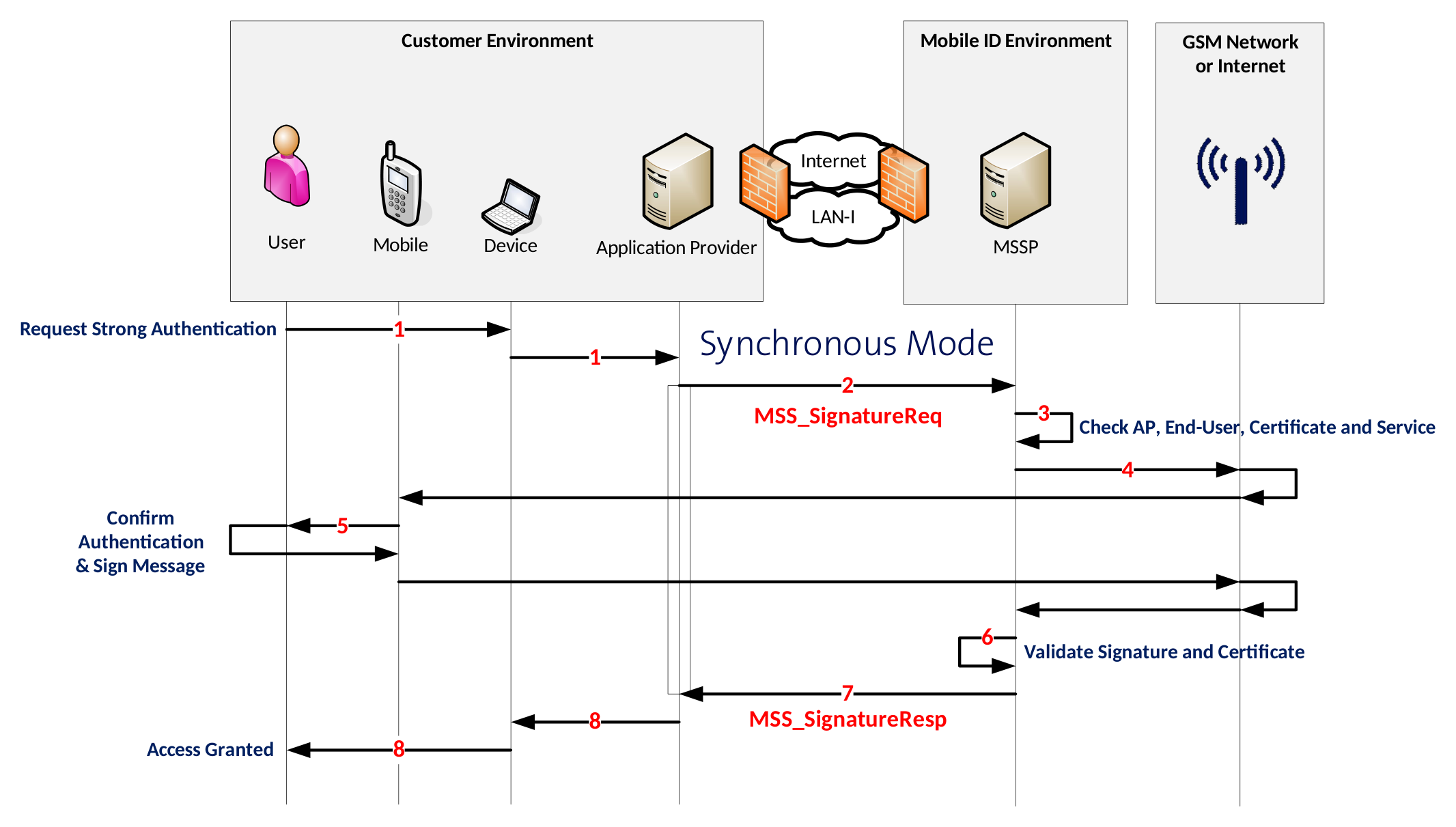
End-User Action The end-user uses an application that initiates an authentication request.
Application Provider (AP) Request The AP receives the authentication request and sends an
MSS_SignatureReqmessage with parameterMessagingMode="synch"to the MSSP (Mobile ID backend).AP Credential Validation The Mobile ID backend (MSSP) validates the AP’s credentials and verifies its authorization.
Signature Request to User Device The Mobile ID backend sends a signature request to the mobile device — either to the SIM (STK applet) or to the Mobile ID App, depending on the user’s configured method.
User Authentication & Digital Signature The Mobile ID application on the mobile device prompts the user to enter their Mobile ID secret (PIN, passcode, or biometric factor).
- The user confirms with the correct secret.
- The mobile application digitally signs the authentication payload.
- The resulting digital signature is returned to the Mobile ID backend (MSSP).
Signature Response Received The MSSP receives the signature response and processes it.
Response to Application Provider The Mobile ID backend returns a complete response to the AP, containing:
- The digital signature, and
- The certificate that includes the end-user’s public key.
Access Decision by the AP Based on the Mobile ID response, the AP may grant or deny access to the end-user, depending on the authentication outcome.
Synchronous MSS Signature Request
{
    "MSS_SignatureReq": {
        "AP_Info": {
            "AP_ID": "yourAP_ID",
            "AP_PWD": "not-needed",
            "AP_TransID": "REF0101120000",
            "Instant": "2015-01-01T12:00:00.000+01:00"
        },
        "AdditionalServices": [
            {
                "Description": "http://mss.ficom.fi/TS102204/v1.0.0#userLang",
                "UserLang": {
                    "Value": "LANGUAGE"
                }
            }
        ],
        "DataToBeSigned": {
            "Data": "TEXT_TO_BE_SIGNED",
            "Encoding": "UTF-8",
            "MimeType": "text/plain"
        },
        "MSSP_Info": {
            "MSSP_ID": {
                "URI": "http://mid.swisscom.ch/"
            }
        },
        "MajorVersion": "1",
        "MessagingMode": "synch",
        "MinorVersion": "2",
        "MobileUser": {
            "MSISDN": "MOBILE_NUMBER"
        },
        "SignatureProfile": "SIGNATURE_PROFILE",
        "TimeOut": "80"
    }
}
<soapenv:Envelope soap:encodingStyle="http://schemas.xmlsoap.org/soap/encoding/"
 xmlns:xsi="http://www.w3.org/2001/XMLSchema-instance" xmlns:xsd="http://www.w3.org/2001/XMLSchema"
 xmlns:soapenv="http://www.w3.org/2003/05/soap-envelope"
 xmlns:soap="http://schemas.xmlsoap.org/soap/envelope/">
   <soapenv:Body>
      <MSS_Signature>
         <mss:MSS_SignatureReq MinorVersion="1" MajorVersion="1" MessagingMode="synch" TimeOut="80"
          xmlns:mss="http://uri.etsi.org/TS102204/v1.1.2#" xmlns:fi="http://mss.ficom.fi/TS102204/v1.0.0#">
            <mss:AP_Info AP_ID="yourAP_ID" AP_PWD="not-needed" AP_TransID="REF0101120000"
             Instant="2015-01-01T12:00:00.000+01:00"/>
            <mss:MSSP_Info>
               <mss:MSSP_ID>
                  <mss:URI>http://mid.swisscom.ch/</mss:URI>
               </mss:MSSP_ID>
            </mss:MSSP_Info>
            <mss:MobileUser>
               <mss:MSISDN>MOBILE_NUMBER</mss:MSISDN>
           </mss:MobileUser>
            <mss:DataToBeSigned MimeType="text/plain" Encoding="UTF-8">TEXT_TO_BE_SIGNED</mss:DataToBeSigned>
            <mss:SignatureProfile>
               <mss:mssURI>SIGNATURE_PROFILE</mss:mssURI>
            </mss:SignatureProfile>
             <mss:AdditionalServices>
                <mss:Service>
                  <mss:Description>
                     <mss:mssURI>http://mss.ficom.fi/TS102204/v1.0.0#userLang</mss:mssURI>
                  </mss:Description>
                  <fi:UserLang>LANGUAGE</fi:UserLang>
               </mss:Service>
             </mss:AdditionalServices>
         </mss:MSS_SignatureReq>
      </MSS_Signature>
   </soapenv:Body>
</soapenv:Envelope>
INFO
MinorVersion value must be set to “2” in case of a REST/JSON request message.
Synchronous MSS Signature Response
{
    "MSS_SignatureResp": {
        "AP_Info": {
            "AP_ID": "yourAP_ID",
            "AP_TransID": "REF0101120000",
            "Instant": "2015-01-01T11:00:00.000Z"
        },
        "MSSP_Info": {
            "Instant": "2015-01-01T11:00:00.100Z",
            "MSSP_ID": {
                "URI": "http://mid.swisscom.ch/"
            }
        },
        "MSSP_TransID": "h44okl",
        "MSS_Signature": {
            "Base64Signature": "MIIIdwYJKoZIhvc..."
        },
        "MajorVersion": "1",
        "MinorVersion": "1",
        "MobileUser": {
            "MSISDN": "MOBILE_NUMBER"
        },
        "SignatureProfile": "SIGNATURE_PROFILE",
        "Status": {
            "StatusCode": {
                "Value": "500"
            },
            "StatusMessage": "SIGNATURE"
        }
    }
}<soapenv:Envelope xmlns:soapenv="http://www.w3.org/2003/05/soap-envelope"
xmlns:xsd="http://www.w3.org/2001/XMLSchema" xmlns:xsi="http://www.w3.org/2001/XMLSchema-instance">
<soapenv:Body>
<MSS_SignatureResponse>
<mss:MSS_SignatureResp MajorVersion="1" MinorVersion="1" MSSP_TransID="h4dhx"
xmlns:mss="http://uri.etsi.org/TS102204/v1.1.2#" xmlns:fi="http://mss.ficom.fi/TS102204/v1.0.0#">
<mss:AP_Info AP_ID="yourAP_ID" AP_PWD="not-needed" AP_TransID="REF0101120000"
Instant="2015-01-01T12:00:00.000+01:00"/>
<mss:MSSP_Info Instant="2015-01-01T12:00:00.100+01:00">
<mss:MSSP_ID>
<mss:URI>http://mid.swisscom.ch/</mss:URI>
</mss:MSSP_ID>
</mss:MSSP_Info>
<mss:MobileUser>
<mss:MSISDN>MOBILE_NUMBER</mss:MSISDN>
</mss:MobileUser>
<mss:MSS_Signature>
<mss:Base64Signature>MIIIdwYJKoZIhvc...</mss:Base64Signature>
</mss:MSS_Signature>
<mss:SignatureProfile>
<mss:mssURI>SIGNATURE_PROFILE</mss:mssURI>
</mss:SignatureProfile>
<mss:Status>
<mss:StatusCode Value="500"/>
<mss:StatusMessage>SIGNATURE</mss:StatusMessage>
</mss:Status>
</mss:MSS_SignatureResp>
</MSS_SignatureResponse>
</soapenv:Body>
</soapenv:Envelope>The Base64Signature content is a base 64 encoded CMS (which is an extension of PKCS#7) signature object. It contains the DTBD message that has been signed by the SIM- or mobile application on the mobile device. In addition, it includes the mobile user certificate and all related intermediate certificates. Therefore, the AP will always be able to fully validate the signature response. Note that the response contains the signature profile value to indicate what authentication method was chosen, which is helpful in case the request signature profile was http://mid.swisscom.ch/Any-LoA4.
Fault Response
This is an example fault response in case of an illegal MSISDN value. Each fault response contains a (sub-)code value, reason text and detail text. Refer to section 6 for a list of status and error codes.
{
    "Fault": {
        "Code": {
            "SubCode": {
                "Value": "_101",
                "ValueNs": "http://uri.etsi.org/TS102204/v1.1.2#"
            },
            "Value": "Sender",
            "ValueNs": "http://www.w3.org/2003/05/soap-envelope"
        },
        "Detail": "Illegal msisdn",
        "Reason": "WRONG_PARAM"
    }
}
<soapenv:Envelope xmlns:soapenv="http://www.w3.org/2003/05/soap-envelope"
 xmlns:xsd="http://www.w3.org/2001/XMLSchema" xmlns:xsi="http://www.w3.org/2001/XMLSchema-instance">
   <soapenv:Body>
      <soapenv:Fault>
         <soapenv:Code>
            <soapenv:Value>soapenv:Sender</soapenv:Value>
            <soapenv:Subcode xmlns:mss="http://uri.etsi.org/TS102204/v1.1.2#"
             xmlns:fi="http://mss.ficom.fi/TS102204/v1.0.0#">
               <soapenv:Value>mss:_101</soapenv:Value>
            </soapenv:Subcode>
         </soapenv:Code>
         <soapenv:Reason>
            <soapenv:Text xml:lang="en">WRONG_PARAM</soapenv:Text>
         </soapenv:Reason>
         <soapenv:Detail>
            <ns1:detail xmlns:ns1="http://kiuru.methics.fi/mssp">Illegal msisdn</ns1:detail>
         </soapenv:Detail>
      </soapenv:Fault>
   </soapenv:Body>
</soapenv:Envelope>
Asynchronous MSS Signature
In the asynchronous mode, the AP initiates the signature request by calling MSS_Signature method and an acknowledgment response is sent back immediately by the MID to AP. The AP client then starts poll-ing using MSS_StatusQuery service to receive the response as depicted below.
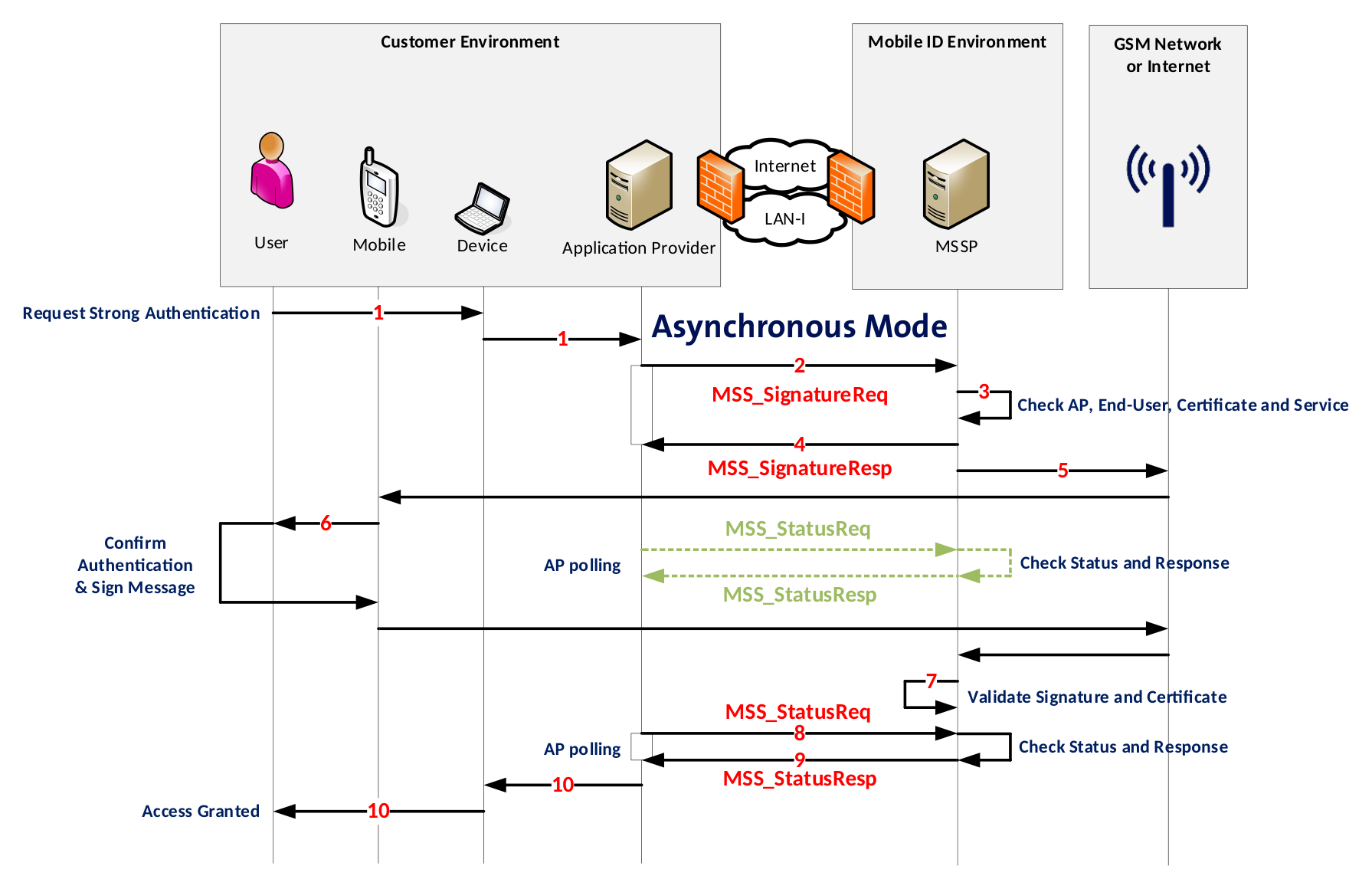
- End-User uses an application that sends an authentication request.
- AP receives the request and sends an asynchronous MSS_SignatureReq request message to MSSP.
- MID backend validates the AP credentials.
- MID responds to AP with MSS_SignatureResp7 message (acknowledgment).
- MID sends a signature request to the application on the mobile device (either SIM or App).
- The mobile application (STK applet or Mobile App) prompts the End-User to enter the Mobile ID secret (PIN, passcode, biometry). End-User confirms with the correct secret and the application digitally signs the request and sends the signature back to the Mobile ID backend (MSSP).
INFO
Meanwhile the AP sends MSS_StatusReq requests to MID. The MID replies with MSS_StatusResp (status code “504 OUTSTANDING_TRANSACTION”, which means that the AP will need to call again the status method).
- Mobile ID backend (MSSP) receives the signature response.
- AP sends next MSS_StatusReq request message to MID.
- MID sends a complete response (signature + certificate containing the end-user's public key) to the AP as MSS_StatusResp Response.
- Depending on the response of MID, the AP may grant or deny access to the End-User.
Asynchronous MSS Signature Request
In pink the differences compared to the sync mode. This value isn’t the same for SOAP and REST.
{
    "MSS_SignatureReq": {
        "AP_Info": {
            "AP_ID": "yourAP_ID",
            "AP_PWD": "not-needed",
            "AP_TransID": "REF0101120000",
            "Instant": "2015-01-01T12:00:00.000+01:00"
        },
        "AdditionalServices": [
            {
                "Description": "http://mss.ficom.fi/TS102204/v1.0.0#userLang",
                "UserLang": {
                    "Value": "LANGUAGE"
                }
            }
        ],
        "DataToBeSigned": {
            "Data": "TEXT_TO_BE_SIGNED",
            "Encoding": "UTF-8",
            "MimeType": "text/plain"
        },
        "MSSP_Info": {
            "MSSP_ID": {
                "URI": "http://mid.swisscom.ch/"
            }
        },
        "MajorVersion": "1",
        "MessagingMode": "asynch",
        "MinorVersion": "2",
        "MobileUser": {
            "MSISDN": "MOBILE_NUMBER"
        },
        "SignatureProfile": "SIGNATURE_PROFILE",
        "TimeOut": "80"
    }
}
<soapenv:Envelope soap:encodingStyle="http://schemas.xmlsoap.org/soap/encoding/"
 xmlns:xsi="http://www.w3.org/2001/XMLSchema-instance" xmlns:xsd="http://www.w3.org/2001/XMLSchema"
 xmlns:soapenv="http://www.w3.org/2003/05/soap-envelope"
 xmlns:soap="http://schemas.xmlsoap.org/soap/envelope/">
   <soapenv:Body>
      <MSS_Signature>
         <mss:MSS_SignatureReq MinorVersion="1" MajorVersion="1" MessagingMode="asynchClientServer"
          TimeOut="80" xmlns:mss="http://uri.etsi.org/TS102204/v1.1.2#"
          xmlns:fi="http://mss.ficom.fi/TS102204/v1.0.0#">
            <mss:AP_Info AP_ID="yourAP_ID" AP_PWD="not-needed" AP_TransID="REF0101120000"
             Instant="2015-01-01T12:00:00.000+01:00"/>
            <mss:MSSP_Info>
               <mss:MSSP_ID>
                  <mss:URI>http://mid.swisscom.ch/</mss:URI>
               </mss:MSSP_ID>
            </mss:MSSP_Info>
            <mss:MobileUser>
               <mss:MSISDN>MOBILE_NUMBER</mss:MSISDN>
           </mss:MobileUser>
            <mss:DataToBeSigned MimeType="text/plain" Encoding="UTF-8">TEXT_TO_BE_SIGNED</mss:DataToBeSigned>
            <mss:SignatureProfile>
               <mss:mssURI>SIGNATURE_PROFILE</mss:mssURI>
            </mss:SignatureProfile>
             <mss:AdditionalServices>
                <mss:Service>
                  <mss:Description>
                     <mss:mssURI>http://mss.ficom.fi/TS102204/v1.0.0#userLang</mss:mssURI>
                  </mss:Description>
                  <fi:UserLang>LANGUAGE</fi:UserLang>
               </mss:Service>
             </mss:AdditionalServices>
         </mss:MSS_SignatureReq>
      </MSS_Signature>
   </soapenv:Body>
</soapenv:Envelope>
INFO
MinorVersion value must be set to “2” in case of a REST/JSON request message.
Asynchronous MSS Signature Response
{
    "MSS_SignatureResp": {
        "AP_Info": {
            "AP_ID": "yourAP_ID",
            "AP_TransID": "REF0101120000",
            "Instant": "2015-01-01T11:00:00.000Z"
        },
        "MSSP_Info": {
            "Instant": "2015-01-01T11:00:00.100Z",
            "MSSP_ID": {
                "URI": "http://mid.swisscom.ch/"
            }
        },
        "MSSP_TransID": "h4iof",
        "MajorVersion": "1",
        "MinorVersion": "1",
        "MobileUser": {
            "MSISDN": "MOBILE_NUMBER"
        },
        "SignatureProfile": "SIGNATURE_PROFILE",
        "Status": {
            "StatusCode": {
                "Value": "100"
            },
            "StatusMessage": "REQUEST_OK"
        }
    }
}
<soapenv:Envelope xmlns:soapenv="http://www.w3.org/2003/05/soap-envelope"
 xmlns:xsd="http://www.w3.org/2001/XMLSchema" xmlns:xsi="http://www.w3.org/2001/XMLSchema-instance">
   <soapenv:Body>
      <MSS_SignatureResponse>
         <mss:MSS_SignatureResp MajorVersion="1" MinorVersion="1" MSSP_TransID="h4iof"
          xmlns:mss="http://uri.etsi.org/TS102204/v1.1.2#" xmlns:fi="http://mss.ficom.fi/TS102204/v1.0.0#">
            <mss:AP_Info AP_ID="yourAP_ID" AP_PWD="not-needed" AP_TransID="REF0101120000"
             Instant="2015-01-01T12:00:00.000+01:00"/>
            <mss:MSSP_Info Instant="2015-01-01T12:00:00.100+01:00">
               <mss:MSSP_ID>
                  <mss:URI>http://mid.swisscom.ch/</mss:URI>
               </mss:MSSP_ID>
            </mss:MSSP_Info>
            <mss:MobileUser>
               <mss:MSISDN>MOBILE_NUMBER</mss:MSISDN>
            </mss:MobileUser>
            <mss:SignatureProfile>
               <mss:mssURI>SIGNATURE_PROFILE</mss:mssURI>
            </mss:SignatureProfile>
            <mss:Status>
               <mss:StatusCode Value="100"/>
               <mss:StatusMessage>REQUEST_OK</mss:StatusMessage>
            </mss:Status>
         </mss:MSS_SignatureResp>
      </MSS_SignatureResponse>
   </soapenv:Body>
</soapenv:Envelope>
INFO
The response contains the signature profile value to indicate what authentication method was chosen, which is helpful in case the request signature profile was http://mid.swisscom.ch/Any-LoA4.
Additional Services (AS)
The MSS Signature supports additional services that may be requested in the request message. Some of them are mandatory and some are optional.
User Language
The UserLang is a mandatory service for all Signature Requests. One of the supported languages (EN, DE, FR, IT) must be defined. Please refer to section Synchronous MSS Signature Request or Asynchronous MSS Signature for an example. It should correspond to the language of the DataToBeDisplayed (DTBT) text message. Example usage (code snippet from the MSS Signature Request):
"AdditionalServices": [
  {
    "Description": "http://mss.ficom.fi/TS102204/v1.0.0#userLang"
  }
]
<mss:AdditionalServices>
  <mss:Service>
    <mss:Description>
      <mss:mssURI>http://mss.ficom.fi/TS102204/v1.0.0#userLang</mss:mssURI>
    </mss:Description>
  </mss:Service>
</mss:AdditionalServices>
Geofencing
Geofencing is an optional service that enables Application Providers to define geographical boundaries. They can decide who can access what within that barrier, based on the user’s location data at the moment of the Mobile ID authentication. This technology can help Application Providers to lock an application use to a specific geographic location and block any Mobile ID authentication requests outside of the fencing area.
With the geofencing service, any authorized Application Provider (AP) may request the user’s location data in an MSS Signature request.
Geofencing can be requested with the MSS Signature's additional service URI set to http://mid.swisscom.ch/as#geofencing.
Geofencing Policy Enforcement
There are three different ways to enforce a Geofencing policy.
- The AP requests the Geofencing additional service by adding the URI http://mid.swisscom.ch/as#geofencing to the MSS Signature request:
"AdditionalServices": [
  {
    "Description": "http://mid.swisscom.ch/as#geofencing"
  }
]
A successful MSS Signature response will contain the geolocation data:
"MSS_SignatureResp": {
  …
  "ServiceResponses": [ {
    "Description": "http://mid.swisscom.ch/as#geofencing",
    "Geofencing": {
      "Accuracy": "16",
      "Country": "CH",
      "DeviceConfidence="0.9",
      "LocationConfidence="0.85",
      "Timestamp": "2021-01-01T11:00:00.000+01:00"
    }
  } ]
  …
}
The AP parses the Service Response and implements the authorization accordingly.
- In addition to the 1st example, the AP adds a Geofencing Policy to the MSS Signature request:
"AdditionalServices":[
  {
    "Description":"http://mid.swisscom.ch/as#geofencing",
    "GeoFencingRequest":{
      "countrywhitelist":[
        "CH",
        "DE",
        "AT"
      ],
      "countryblacklist":[
      ],
      "mindeviceconfidence":"0.7",
      "minlocationconfidence":"0.7",
      "maxtimestampminutes":"600",
      "maxaccuracymeters":"1000"
    }
  }
]
The policy may contain a country-based whitelist or blacklist and minimum threshold values for the confidence scores, timestamp and accuracy. The Mobile ID server will enforce the policy.
- A custom Geofencing Policy is set on the Mobile ID server. Here's an example, how a Geofencing Policy can be set on the Mobile ID server (of course the values can be adjusted according to the AP's need):
{
   "enabled":"true",
   "verbose":"false",
   "countrywhitelist":[
      "CH",
      "DE",
      "AT"
   ],
   "countryblacklist":[
   ],
   "mindeviceconfidence":"0.7",
   "minlocationconfidence":"0.7",
   "maxtimestampminutes":"600",
   "maxaccuracymeters":"1000"
}
The policy may contain a country-based whitelist or blacklist and minimum threshold values for the confidence scores, timestamp and accuracy. In this case, the AP can request the Geofencing service as shown in the 1st example. The Mobile ID server will enforce the custom Geofencing Policy that has been set for the AP.
Geofencing Service Data and Confidence Scores
| Key | Value Example | Format | Description |
|---|---|---|---|
| Country | CH | ISO 3166-1 alpha-2 | A two-letter country code of the current SIM or Device location. Based on the currently registered mobile cell (SIM) or reverse geocoding of the device's GPS coordinates (App). |
| Accuracy | 16 | Integer | Accuracy of the Device GPS, in meters. For SIM authentications, accuracy is always 0. For App authentications, it is the sum of the GPS accuracy and distance to the nearest geocoding data point. |
| DeviceConfidence | 0.99 | Float (0–1.00) | Trust level in the user device and OS version. Value 1.0 represents the highest possible trust. Based on internal checks including root/jailbreak detection. |
| LocationConfidence | 0.85 | Float (0–1.00) | Trust level in the user location data, which includes device confidence in its calculation. Value 1.0 represents the highest possible trust. Score decreases by 0.01 every hour if location data is not updated. |
| Timestamp | 2021-01-01T11:00:00.000+01:00 | yyyy-MM-dd'T'HH:mm:ss.SSS'Z' | The timestamp of the location information. |
Recommendations per Service Data Key
- Country: Allow or block access based on the country code returned in this response.
- Accuracy: For Mobile ID App authentications, the accuracy depends on various factors. When the user is inside buildings or underground, the GPS is sometimes inaccurate. On latest iOS and Android, the user may also disable location precision, which will cause a high value for accuracy.
- DeviceConfidence: A score below 0.5 is an indication that the user's device may be rooted or jailbroken.
- LocationConfidence: Typically, a location confidence of 0.7 or higher can be considered as a sufficient trust level. Please also refer to the confidence score interpretation below.
- Timestamp: Mobile Session (registered cell) information or GPS location data may not be up-to-date and may require action from the mobile user. Turning on and off the Device FlightMode feature will help to have up-to-date location data.
Recommendations for Confidence Score Checks
Usually it is sufficient if a client implements a minimum threshold check for the Location Confidence Score since the Location Confidence Score includes the Device Confidence Score in its calculation. Here’s a rationale regarding the Location Confidence Score:
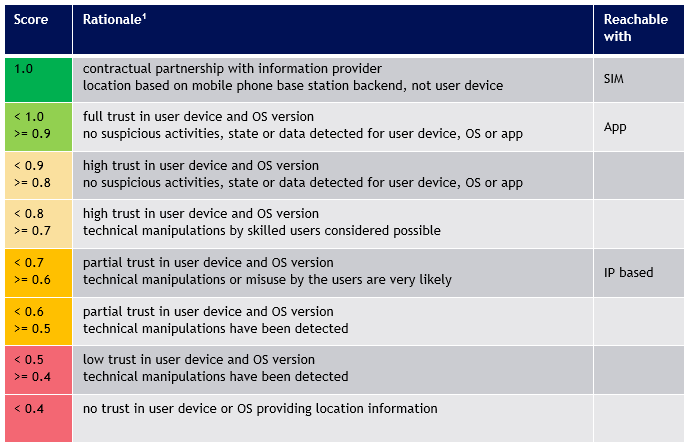
- A score of
1.0as minimum target threshold is recommended for extremely critical services only! It requires the user to have a Swisscom SIM and up-to-date SIM location data (not older than 1 hour). Turning on and off the Device FlightMode feature will help to have up-to-date location data. - A score of
0.8as minimum target threshold can be considered as a very high trust score and is a recommended target threshold for most critical services. - A score of
0.7as minimum target threshold is still a better confidence score than IP based location solutions and therefore a recommended target threshold for most standard services.
Low Location Confidence Score
In case a user has a too low location confidence score, the following points should be checked by the user:
Timestamp value indicates that location data is older than 1 hour:
- Turn on and off the FlightMode, which usually helps to have up-to-date location data.
Location- and Device Confidence Score are very low:
- User must not use a rooted or jailbroken device.
Location Confidence Score too low:
- User must have Developer Mode disabled.
- User must uninstall any 3rd party app that use Mock Location capabilities.
Geofencing Service Limitations
- Geofencing information is given without any guarantee and with the exclusion of any legal liability.
- At the time of writing only MobileID App or Swisscom Mobile ID SIM cards support location data.
- MobileID App geofencing uses GPS-based location together with device and OS integrity signals. For the MobileID App, the user must have the geofencing toggle enabled and location services permitted. Both Android and iOS App version 1.2.0 or higher support geofencing.
- Supported Swisscom Mobile ID SIM scenarios use mobile-network location data. Availability depends on SIM support and on current network-provided location information.
MSS Signature Request incl. Geofencing
{
    "MSS_SignatureReq": {
        "AP_Info": {
            "AP_ID": "yourAP_ID",
            "AP_PWD": "not-needed",
            "AP_TransID": "REF0101120000",
            "Instant": "2015-01-01T12:00:00.000+01:00"
        },
        "AdditionalServices": [
            {
                "Description": "http://mid.swisscom.ch/as#geofencing"
            },
            {
                "Description": "http://mss.ficom.fi/TS102204/v1.0.0#userLang",
                "UserLang": {
                    "Value": "LANGUAGE"
                }
            }
        ],
        "DataToBeSigned": {
            "Data": "TEXT_TO_BE_SIGNED",
            "Encoding": "UTF-8",
            "MimeType": "text/plain"
        },
        "MSSP_Info": {
            "MSSP_ID": {
                "URI": "http://mid.swisscom.ch/"
            }
        },
        "MajorVersion": "1",
        "MessagingMode": "synch",
        "MinorVersion": "1",
        "MobileUser": {
            "MSISDN": "MOBILE_NUMBER"
        },
        "SignatureProfile": "http://mid.swisscom.ch/MID/v1/AuthProfile1",
        "TimeOut": "80"
    }
}
      <MSS_Signature>
         <mss:MSS_SignatureReq MinorVersion="1" MajorVersion="1" MessagingMode="synch" TimeOut="80"
          xmlns:mss="http://uri.etsi.org/TS102204/v1.1.2#" xmlns:fi="http://mss.ficom.fi/TS102204/v1.0.0#">
            <mss:AP_Info AP_ID="yourAP_ID" AP_PWD="not-needed" AP_TransID="REF0101120000"
             Instant="2015-01-01T12:00:00.000+01:00"/>
            <mss:MSSP_Info>
               <mss:MSSP_ID>
                  <mss:URI>http://mid.swisscom.ch/</mss:URI>
               </mss:MSSP_ID>
            </mss:MSSP_Info>
            <mss:MobileUser>
               <mss:MSISDN>MOBILE_NUMBER</mss:MSISDN>
           </mss:MobileUser>
            <mss:DataToBeSigned MimeType="text/plain" Encoding="UTF-8">TEXT_TO_BE_SIGNED</mss:DataToBeSigned>
            <mss:SignatureProfile>
               <mss:mssURI>http://mid.swisscom.ch/MID/v1/AuthProfile1</mss:mssURI>
            </mss:SignatureProfile>
             <mss:AdditionalServices>
                <mss:Service>
                  <mss:Description>
                     <mss:mssURI>http://mss.ficom.fi/TS102204/v1.0.0#userLang</mss:mssURI>
                  </mss:Description>
                  <fi:UserLang>LANGUAGE</fi:UserLang>
               </mss:Service>
               <mss:Service>
                  <mss:Description>
                     <mss:mssURI>http://mid.swisscom.ch/as#geofencing</mss:mssURI>
                  </mss:Description>
               </mss:Service>
             </mss:AdditionalServices>
         </mss:MSS_SignatureReq>
      </MSS_Signature>
MSS Signature Response incl. Geofencing Location Data
{
    "MSS_SignatureResp": {
        "AP_Info": {
            "AP_ID": "yourAP_ID",
            "AP_TransID": "REF0101120000",
            "Instant": "2021-01-01T11:00:00.000Z"
        },
        "MSSP_Info": {
            "Instant": "2021-01-01T11:00:00.000Z",
            "MSSP_ID": {
                "URI": "http://mid.swisscom.ch/"
            }
        },
        "MSSP_TransID": "h44okl",
        "MSS_Signature": {
            "Base64Signature": "MIIIdwYJKoZIhvc..."
        },
        "MajorVersion": "1",
        "MinorVersion": "1",
        "MobileUser": {
            "MSISDN": "MOBILE_NUMBER"
        },
        "ServiceResponses": [ {
            "Description": "http://mid.swisscom.ch/as#geofencing",
            "Geofencing": {
               "Accuracy": "16",
               "Country": "CH",
               "DeviceConfidence="1.0",
               "LocationConfidence="1.0",
               "Timestamp": "2021-01-01T11:00:00.000+01:00"
            }
        } ],
        "SignatureProfile": "SIGNATURE_PROFILE",
        "Status": {
            "StatusCode": {
                "Value": "500"
            },
            "StatusMessage": "SIGNATURE"
        }
    }
}
<soapenv:Envelope xmlns:soapenv="http://www.w3.org/2003/05/soap-envelope"
 xmlns:xsd="http://www.w3.org/2001/XMLSchema" xmlns:xsi="http://www.w3.org/2001/XMLSchema-instance">
   <soapenv:Body>
      <MSS_SignatureResponse>
         <mss:MSS_SignatureResp MajorVersion="1" MinorVersion="1" MSSP_TransID="h4dhx"
          xmlns:mss="http://uri.etsi.org/TS102204/v1.1.2#" xmlns:fi="http://mss.ficom.fi/TS102204/v1.0.0#">
            <mss:AP_Info AP_ID="yourAP_ID" AP_PWD="not-needed" AP_TransID="REF0101120000"
             Instant="2021-01-01T11:00:00.000+01:00"/>
            <mss:MSSP_Info Instant="2021-01-01T11:00:00.000+01:00">
               <mss:MSSP_ID>
                  <mss:URI>http://mid.swisscom.ch/</mss:URI>
               </mss:MSSP_ID>
            </mss:MSSP_Info>
            <mss:MobileUser>
               <mss:MSISDN>MOBILE_NUMBER</mss:MSISDN>
            </mss:MobileUser>
            <mss:MSS_Signature>
               <mss:Base64Signature>MIIIdwYJKoZIhvc...</mss:Base64Signature>
            </mss:MSS_Signature>
            <mss:SignatureProfile>
               <mss:mssURI>SIGNATURE_PROFILE</mss:mssURI>
            </mss:SignatureProfile>
            <mss:Status>
               <mss:StatusCode Value="500"/>
               <mss:StatusMessage>SIGNATURE</mss:StatusMessage>
               <mss:StatusDetail>
                  <fi:ServiceResponses>
                     <fi:ServiceResponse>
                        <fi:Description>
                           <mss:mssURI>http://mid.swisscom.ch/as#geofencing</mss:mssURI>
                        </fi:Description>
                        <ns1:GeoFencing country="CH"
                                        accuracy="16"
                                        timestamp="2021-01-01T11:00:00.000+01:00"
                                        deviceconfidence="1.0"
                                        locationconfidence="1.0"
                                        xmlns:ns1="http://mid.swisscom.ch/TS102204/as/v1.0"/>
                     </fi:ServiceResponse>
                  </fi:ServiceResponses>
               </mss:StatusDetail>
            </mss:Status>
         </mss:MSS_SignatureResp>
      </MSS_SignatureResponse>
   </soapenv:Body>
</soapenv:Envelope>
MSS Signature Response incl. Geofencing Fault Code
{
    "MSS_SignatureResp": {
        "AP_Info": {
            "AP_ID": "yourAP_ID",
            "AP_TransID": "REF0101120000",
            "Instant": "2021-01-01T11:00:00.000Z"
        },
        "MSSP_Info": {
            "Instant": "2021-01-01T11:00:00.000Z",
            "MSSP_ID": {
                "URI": "http://mid.swisscom.ch/"
            }
        },
        "MSSP_TransID": "h44okl",
        "MSS_Signature": {
            "Base64Signature": "MIIIdwYJKoZIhvc..."
        },
        "MajorVersion": "1",
        "MinorVersion": "1",
        "MobileUser": {
            "MSISDN": "MOBILE_NUMBER"
        },
        "ServiceResponses": [ {
            "Description": "http://mid.swisscom.ch/as#geofencing",
            "Geofencing": {
               "ErrorCode": "100",
               "ErrorMessage": "Geofencing feature disabled"
            }
        } ],
        "SignatureProfile": "SIGNATURE_PROFILE",
        "Status": {
            "StatusCode": {
                "Value": "500"
            },
            "StatusMessage": "SIGNATURE"
        }
    }
}
<soapenv:Envelope xmlns:soapenv="http://www.w3.org/2003/05/soap-envelope"
 xmlns:xsd="http://www.w3.org/2001/XMLSchema" xmlns:xsi="http://www.w3.org/2001/XMLSchema-instance">
   <soapenv:Body>
      <MSS_SignatureResponse>
         <mss:MSS_SignatureResp MajorVersion="1" MinorVersion="1" MSSP_TransID="h4dhx"
          xmlns:mss="http://uri.etsi.org/TS102204/v1.1.2#" xmlns:fi="http://mss.ficom.fi/TS102204/v1.0.0#">
            <mss:AP_Info AP_ID="yourAP_ID" AP_PWD="not-needed" AP_TransID="REF0101120000"
             Instant="2021-01-01T11:00:00.000+01:00"/>
            <mss:MSSP_Info Instant="2021-01-01T11:00:00.000+01:00">
               <mss:MSSP_ID>
                  <mss:URI>http://mid.swisscom.ch/</mss:URI>
               </mss:MSSP_ID>
            </mss:MSSP_Info>
            <mss:MobileUser>
               <mss:MSISDN>MOBILE_NUMBER</mss:MSISDN>
            </mss:MobileUser>
            <mss:MSS_Signature>
               <mss:Base64Signature>MIIIdwYJKoZIhvc...</mss:Base64Signature>
            </mss:MSS_Signature>
            <mss:SignatureProfile>
               <mss:mssURI>SIGNATURE_PROFILE</mss:mssURI>
            </mss:SignatureProfile>
            <mss:Status>
               <mss:StatusCode Value="500"/>
               <mss:StatusMessage>SIGNATURE</mss:StatusMessage>
               <mss:StatusDetail>
                  <fi:ServiceResponses>
                     <fi:ServiceResponse>
                        <fi:Description>
                           <mss:mssURI>http://mid.swisscom.ch/as#geofencing</mss:mssURI>
                        </fi:Description>
                        <ns1:GeoFencing errorcode="100"
                                        errormessage="Geofencing feature disabled"
                                        xmlns:ns1="http://mid.swisscom.ch/TS102204/as/v1.0"/>
                     </fi:ServiceResponse>
                  </fi:ServiceResponses>
               </mss:StatusDetail>
            </mss:Status>
         </mss:MSS_SignatureResp>
      </MSS_SignatureResponse>
   </soapenv:Body>
</soapenv:Envelope>
Geofencing Error Codes
Click to expand the full list of Geofencing error codes
The table below contains all error codes that the geofencing additional service may return. Note that the exact error message may vary for a given error code.
| Code | Message |
|---|---|
| 100 | The geofencing feature option in the "More" menu is currently disabled. |
| 101 | The app failed to retrieve the user's location possibly due to insufficient resources (network, GPS, etc.) or a timeout. |
| 102 | The user has not yet responded to the dialog that grants the app permission to access location services. |
| 103 | The user has explicitly denied the app permission to access location services. |
| 104 | This is on iOS only. The user cannot enable location services possibly due to active restrictions such as parental controls, corporate policy etc. being in place. |
| 105 | The user has turned off location services device-wide (for all apps) from the system settings. |
| 106 | Location services are unavailable because the device is in Airplane mode. |
| 120 | Location failed to the app for an unspecified reason. |
| 121 | MSSP internal error (misconfiguration etc.). |
| 122 | AP is not authorized to use Geofencing additional service. |
| 123 | User has a non-Swisscom SIM card. |
| 200 | No location returned from mobile app. |
| 201 | App outdated, geofencing not supported. |
App to App - Mobile Only Authentication
We strongly recommend making use of this service if you intend to invoke the Mobile ID authentication from your own App. The Mobile ID App2App service allows an Application Provider to automatically switch from their App to the Mobile ID App (and the Mobile ID App to automatically switch back to the originating App) as shown in step 10 and 18 in the sequence below. This will greatly improve the usability for the App user.
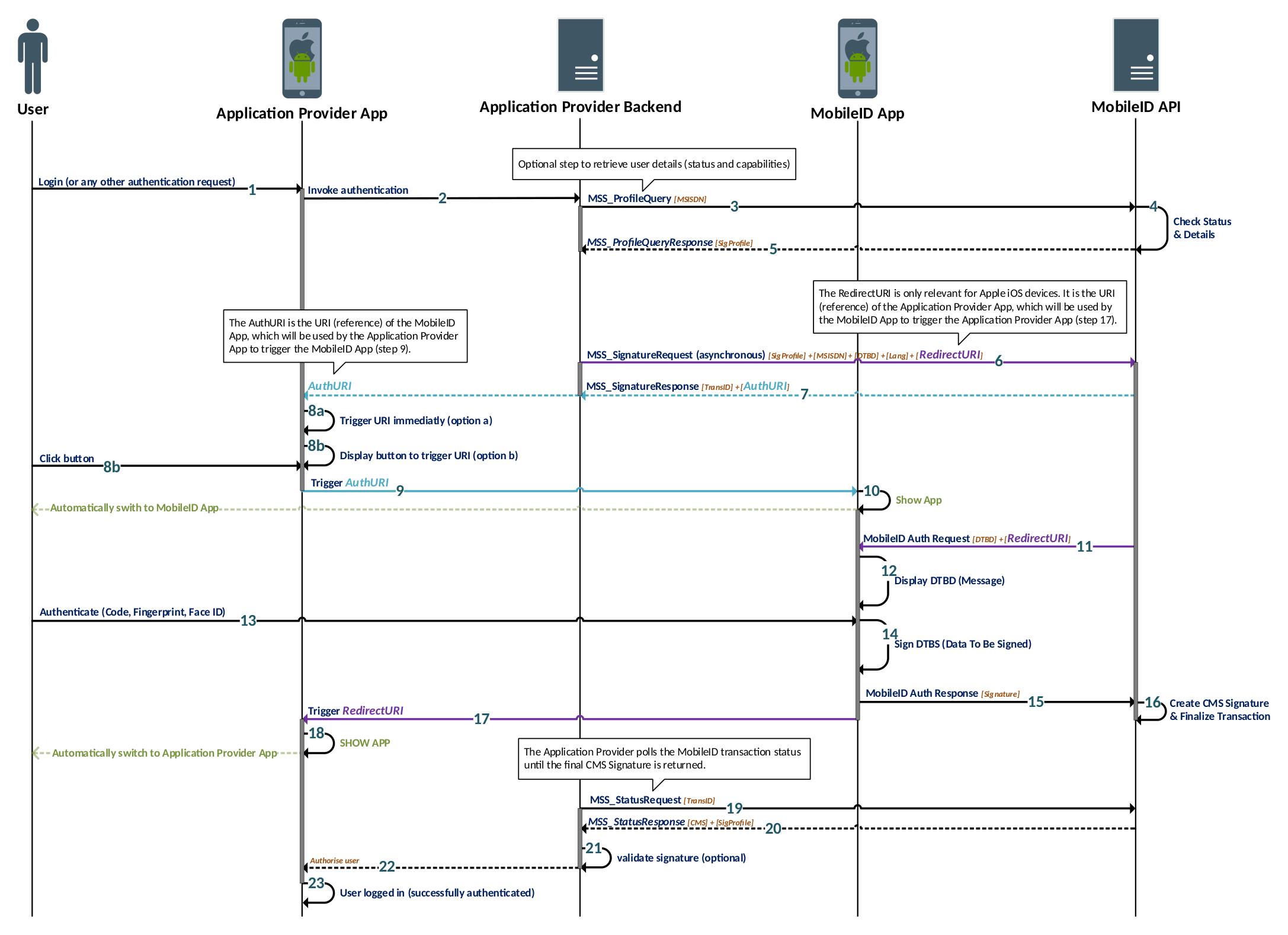
Setup Phase (Steps 1–5)
- While being in the Application Provider App, the user performs an action that requires authentication
- The Application Provider App informs the Application Provider backend
- Optional: The Application Provider backend can request the Mobile ID capabilities of the user
- Optional: Mobile ID backend checks the user’s capabilities and provides the response
- Optional: Application Provider gets all user details to know if the user has an active Mobile ID App
Authentication Phase (Steps 6–16)
- The Application Provider sends an asynchronous signature request that includes the App2App service request. The URI value of the Application Provider App is provided as RedirectURI parameter.
- Mobile ID API responds immediately with a Signature Response, which contains the AuthURI parameter. This is the URI value of the Mobile ID App.
- The Application Provider App can either immediately trigger the Mobile ID App (step 8a) or display a button, which will trigger the Mobile ID App (step 8b)
- The AuthURI is triggered by the Application Provider App
- The Mobile ID App is automatically opened on the user’s smartphone
- The Mobile ID backend invokes the authentication request on the Mobile ID App
- The Mobile ID authentication message is shown on the Mobile ID App
- The user confirms the authentication request with their 2nd factor (Passcode or Biometry)
- The Mobile ID App signs the message with the private key stored on the device
- The Mobile ID App sends the signed data (signature) to the Mobile ID backend
- The Mobile ID backend completes the transaction
Completion Phase (Steps 17–22)
- The RedirectURI is triggered by the Mobile ID App
- The Application Provider App is automatically opened on the user’s smartphone
- The Application Provider polls the Mobile ID transaction status by sending a MSS Status Request
- The Status Response returns the final Mobile ID Signature (if outstanding, step 19 is repeated)
- Optional: The Application Provider validates the CMS Signature to ensure that the Signature is valid
- The Application Provider forwards the successful Mobile ID authentication result to their App
Example usage (code snippet from the MSS Signature Request):
"AdditionalServices": [
  {
    "Description": "http://mid.swisscom.ch/as#app2app",
    "App2App": {
      "RedirectUri": "myapp://example"
    }
  }
]
<mss:AdditionalServices>
  <mss:Service>
    <mss:Description>
      <mss:mssURI>http://mid.swisscom.ch/as#app2app</mss:mssURI>
    </mss:Description>
    <mss:App2App>
      <ns1:RedirectUri xmlns:ns1="http://mid.swisscom.ch/TS102204/as/v1.0">myapp://example</ns1:RedirectUri>
    </mss:App2App>
  </mss:Service>
</mss:AdditionalServices>
Best Practice Guidelines
- It is highly recommended for an Application Provider to implement the App2App service as it will greatly improve the usability for any user that uses the Mobile ID App as authentication method.
- Both Android and iOS are supported for the automatic App2App switch.
- This service can only be used with the asynchronous MSS Signature. In case a synchronous MSS Signature with App2App service is attempted, Mobile ID API will respond with a fault (WRONG_PARAM).
- In case this service is requested, there will be no Mobile ID push notification triggered. That’s because a push notification is not required if the Mobile ID App is automatically opened.
- Please refer also to the official documentation from Apple and Android about how to implement custom URL schemes in your app.
MSS Signature Request incl. App2App service
{
    "MSS_SignatureReq": {
        "AP_Info": {
            "AP_ID": "yourAP_ID",
            "AP_PWD": "not-needed",
            "AP_TransID": "REF0101120000",
            "Instant": "2015-01-01T12:00:00.000+01:00"
        },
        "AdditionalServices": [
            {
                "Description": "http://mss.ficom.fi/TS102204/v1.0.0#userLang",
                "UserLang": {
                    "Value": "DE"
                }
            },
            {
                "Description": "http://mid.swisscom.ch/as#app2app",
                "App2App": {
                    "RedirectUri": "myapp://example"
                }
            }
        ],
        "DataToBeSigned": {
            "Data": "TEXT_TO_BE_SIGNED",
            "Encoding": "UTF-8",
            "MimeType": "text/plain"
        },
        "MSSP_Info": {
            "MSSP_ID": {
                "URI": "http://mid.swisscom.ch/"
            }
        },
        "MajorVersion": "1",
        "MessagingMode": "asynch",
        "MinorVersion": "2",
        "MobileUser": {
            "MSISDN": "MOBILE_NUMBER"
        },
        "SignatureProfile": "http://mid.swisscom.ch/Device-LoA4",
        "TimeOut": "80"
    }
}<MSS_Signature>
<mss:MSS_SignatureReq MinorVersion="1" MajorVersion="1" MessagingMode="asynchClientServer" TimeOut="80"
xmlns:mss="http://uri.etsi.org/TS102204/v1.1.2#" xmlns:fi="http://mss.ficom.fi/TS102204/v1.0.0#">
<mss:AP_Info AP_ID="yourAP_ID" AP_PWD="not-needed" AP_TransID="REF0101120000"
Instant="2015-01-01T12:00:00.000+01:00"/>
<mss:MSSP_Info>
<mss:MSSP_ID>
<mss:URI>http://mid.swisscom.ch/</mss:URI>
</mss:MSSP_ID>
</mss:MSSP_Info>
<mss:MobileUser>
<mss:MSISDN>MOBILE_NUMBER</mss:MSISDN>
</mss:MobileUser>
<mss:DataToBeSigned MimeType="text/plain" Encoding="UTF-8">TEXT_TO_BE_SIGNED</mss:DataToBeSigned>
<mss:SignatureProfile>
<mss:mssURI>http://mid.swisscom.ch/Device-LoA4</mss:mssURI>
</mss:SignatureProfile>
<mss:AdditionalServices>
<mss:Service>
<mss:Description>
<mss:mssURI>http://mss.ficom.fi/TS102204/v1.0.0#userLang</mss:mssURI>
</mss:Description>
<fi:UserLang>LANGUAGE</fi:UserLang>
</mss:Service>
<mss:Service>
<mss:Description>
<mss:mssURI>http://mid.swisscom.ch/as#app2app</mss:mssURI>
</mss:Description>
<mss:App2App>
<ns1:RedirectUri xmlns:ns1="http://mid.swisscom.ch/TS102204/as/v1.0">myapp://example</ns1:RedirectUri>
</mss:App2App>
</mss:Service>
</mss:AdditionalServices>
</mss:MSS_SignatureReq>
</MSS_Signature>MSS Signature Response incl. App2App service response
{
    "MSS_SignatureResp": {
        "AP_Info": {
            "AP_ID": "yourAP_ID",
            "AP_TransID": "REF0101120000",
            "Instant": "2015-01-01T11:00:00.000Z"
        },
        "MSSP_Info": {
            "Instant": "2015-01-01T11:00:00.100Z",
            "MSSP_ID": {
                "URI": "http://mid.swisscom.ch/"
            }
        },
        "MSSP_TransID": "h4iof",
        "MajorVersion": "1",
        "MinorVersion": "2",
        "MobileUser": {
            "MSISDN": "MOBILE_NUMBER"
        },
        "ServiceResponses": [
          {
            "App2App": {
              "AuthUri": "mobileid://auth?mobile_auth_redirect_uri=myapp%3A%2F%2Fapp.open%23access_token%3DABCD&
                          session_token=32ffc297-0N5F0yEk2ArMZjFhBWPb4Uifwbk1f3p9ciAURd_QhUQ9e&user_id=32ffc297-
                          ac33-4be2-b3f4-42588502ea0f"
            },
            "Description": "http://mid.swisscom.ch/as#app2app"
          }
        ],
        "SignatureProfile": "http://mid.swisscom.ch/Device-LoA4",
        "Status": {
            "StatusCode": {
                "Value": "100"
            },
            "StatusMessage": "REQUEST_OK"
        }
    }
}
<soapenv:Envelope xmlns:soapenv="http://www.w3.org/2003/05/soap-envelope"
xmlns:xsd="http://www.w3.org/2001/XMLSchema" xmlns:xsi="http://www.w3.org/2001/XMLSchema-instance">
<soapenv:Body>
<MSS_SignatureResponse>
<mss:MSS_SignatureResp MajorVersion="1" MinorVersion="1" MSSP_TransID="h4iof"
xmlns:mss="http://uri.etsi.org/TS102204/v1.1.2#" xmlns:fi="http://mss.ficom.fi/TS102204/v1.0.0#">
<mss:AP_Info AP_ID="yourAP_ID" AP_PWD="not-needed" AP_TransID="REF0101120000"
Instant="2015-01-01T12:00:00.000+01:00"/>
<mss:MSSP_Info Instant="2015-01-01T12:00:00.100+01:00">
<mss:MSSP_ID>
<mss:URI>http://mid.swisscom.ch/</mss:URI>
</mss:MSSP_ID>
</mss:MSSP_Info>
<mss:MobileUser>
<mss:MSISDN>MOBILE_NUMBER</mss:MSISDN>
</mss:MobileUser>
<mss:SignatureProfile>
<mss:mssURI>http://mid.swisscom.ch/Device-LoA4</mss:mssURI>
</mss:SignatureProfile>
<mss:Status>
<mss:StatusCode Value="100"/>
<mss:StatusMessage>REQUEST_OK</mss:StatusMessage>
<mss:StatusDetail>
<fi:ServiceResponses>
<fi:ServiceResponse>
<fi:Description>
<mss:mssURI>http://mid.swisscom.ch/as#app2app</mss:mssURI>
</fi:Description>
<fi:App2App>
<ns1:AuthUri xmlns:ns1="http://mid.swisscom.ch/TS102204/as/v1.0">
mobileid://auth?mobile_auth_redirect_uri=myapp%3A%2F%2Fapp.open%23access_
token%3DABCD&session_token=32ffc297-0YLukZtgoRVz_wbJJfLnViViEhzk9aXM8
dkHoOnhqf158&user_id=32ffc297-ac33-4be2-b3f4-42588502ea0f
</ns1:AuthUri>
</fi:App2App>
</fi:ServiceResponse>
</fi:ServiceResponses>
</mss:StatusDetail>
</mss:Status>
</mss:MSS_SignatureResp>
</MSS_SignatureResponse>
</soapenv:Body>
</soapenv:Envelope>Message Formats on the Mobile ID App
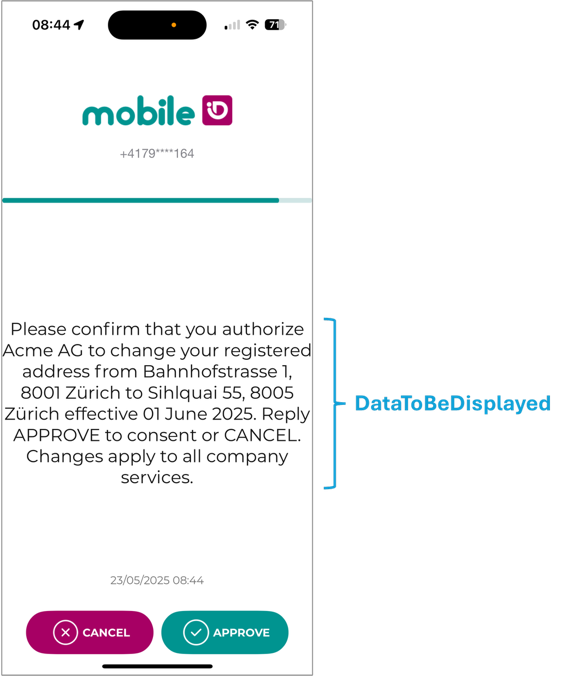
Mobile ID App screens can present the Data-To-Be-Displayed (DTBD) in two formats. Use Classic DTBD for short confirmations and when you must support SIM users. Keep messages concise and always include the “DTBD Prefix” (refer to chapter 2.1). Use Transaction Approval when readability matters (e.g., PSD2 payments, contract consent, step up login verification). This is an App-specific presentation format, not the only way to do transaction signing with Mobile ID. Force the App method with Device LoA4, keep within byte limits, and generate the escaped JSON programmatically.
- Classic DTBD (single text line) uses plain UTF-8 string that is also signed (DTBS).
Supported by SIM and App methods.
Length limited and no formatting options.
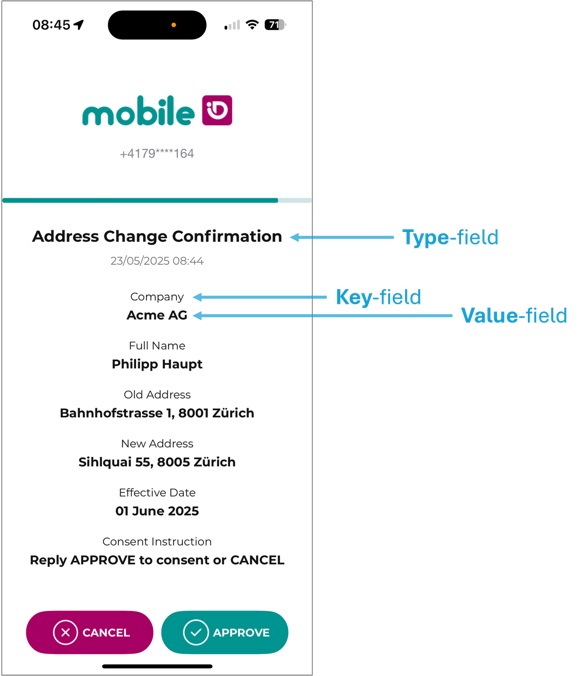
- Transaction Approval (key/value pairs) is a structured App-only presentation format that renders a title (type) and one or more key and value rows for improved readability. SIM users can still perform transaction signing with the classic DTBD format.
Approve/Cancel becomes active only after the user scrolls to the end if content exceeds one screen.
Classic DTBD (single-line text)
A single UTF-8 string shown on the device. It is the format used throughout the guide’s MSS Signature examples. The classic DTBD must include the AP-specific DTBD prefix (e.g., Bank ACME:) and is support-ed by both SIM and App methods. Keep the DTBD short. Maximum 239 characters; if any character falls outside the GSM 03.38 set, effec-tive maximum is 119 characters.
Use MimeType = "text/plain" and place the “DTBD Prefix”.
Example Payload / Classic DTBD:
"DataToBeSigned": {
  "MimeType": "text/plain",
  "Encoding": "UTF-8",
  "Data": "Bank ACME: Please confirm that you authorize Acme AG to change your registered
           address from Bahnhofstrasse 1, 8001 Zürich to Sihlquai 55, 8005 Zürich
           effective 01 June 2025. Reply APPROVE to consent or CANCEL. Changes
           apply to all company services."
},<mss:DataToBeSigned MimeType="text/plain" Encoding="UTF-8">
Bank ACME: Please confirm that you authorize Acme AG to change your registered
address from Bahnhofstrasse 1, 8001 Zürich to Sihlquai 55, 8005 Zürich
effective 01 June 2025. Reply APPROVE to consent or CANCEL. Changes
apply to all company services.
</mss:DataToBeSigned>Transaction Approval (key/value pairs)
A structured DTBD that the Mobile ID App renders as a title and rows of key/value pairs. This section describes the App-specific Transaction Approval presentation format; the broader transaction-signing capability also exists for SIM via classic DTBD. If content overflows, the user must scroll to the bottom; only then are Approve/Cancel enabled.
SIM does not support this format. Always select an App profile (e.g., Device-LoA4).
Rules:
- MimeType:
application/vnd.mobileid.txn-approval - Payload structure (DataToBeSigned.Data): A single-line JSON string (escaped) with:
{
  "type": "Title to display",
  "dtbd": [
    { "key": "Label 1", "value": "Value 1" },
    { "key": "Label 2", "value": "Value 2" }
  ]
}- DTBD Prefix: Your prefix must appear in the
valueof the first key/value pair. - Size limits:
- type ≤ 100 bytes
- ≤ 20 pairs
- each key ≤ 100 bytes
- each value ≤ 2 000 bytes
- sum of all keys+values ≤ 2 000 bytes.
- Signature profile: Force App method with
http://mid.swisscom.ch/Device-LoA4
Signed content (what the App actually signs): The App normalizes and signs only the array content, not the type. Example transformation: Input: {"type":"Login","dtbd":[{"key":"Company","value":"Test"}]}
Signed: {"for-mat_version":1,"content_string":"[{\"key\":\"Company\",\"value\":\"Test\"}]"}
WARNING
type is not signed. If the title/category matters for your process (e.g., “PSD2 Payment”), add a dedicated dtbd row for it (e.g., {"key":"Category","value":"PSD2 Payment"}).
Example Payload / Transaction Approval:
"DataToBeSigned": {
  "MimeType": "application/vnd.mobileid.txn-approval",
  "Encoding": "UTF-8",
  "Data": "{\"type\":\"Address Change Confirmation\",\"dtbd\":[{\"key\":\"Company\",\"value\":\"Acme AG\"},{\"key\":\"Full Name\",\"value\":\"Philipp Haupt\"},{\"key\":\"Old Address\",\"value\":\"Bahnhofstrasse 1, 8001 Zürich\"},{\"key\":\"New Address\",\"value\":\"Sihlquai 55, 8005 Zürich\"},{\"key\":\"Effective Date\",\"value\":\"01 June 2025\"},{\"key\":\"Consent Instruction\",\"value\":\"Reply APPROVE to consent or CANCEL\"}]}"
}<mss:DataToBeSigned MimeType="application/vnd.mobileid.txn-approval" Encoding="UTF-8">
{\"type\":\"Address Change Confirmation\",\"dtbd\":[
{\"key\":\"Company\",\"value\":\"Acme AG\"},
{\"key\":\"Full Name\",\"value\":\"Philipp Haupt\"},
{\"key\":\"Old Address\",\"value\":\"Bahnhofstrasse 1, 8001 Zürich\"},
{\"key\":\"New Address\",\"value\":\"Sihlquai 55, 8005 Zürich\"},
{\"key\":\"Effective Date\",\"value\":\"01 June 2025\"},
{\"key\":\"Consent Instruction\",\"value\":\"Reply APPROVE to consent or CANCEL\"}
]}
</mss:DataToBeSigned>TIP
Generate the escaped string programmatically (e.g. JSON.stringify / json.dumps / jq -c) and never hand-craft escapes. If MimeType is TXN-Approval but the payload isn’t valid, the server flags INVALID_TXNAPPROVAL_PAYLOAD and can return a Fault.
Side by side comparison:
| Aspect | Classic DTBD (single line) | Transaction Approval (key/value) |
|---|---|---|
| Supported channel | SIM & App | App only |
| DataToBeSigned.MimeType | text/plain | application/vnd.mobileid.txn-approval |
| Data content | Plain UTF-8 string | Escaped single line JSON with type and dtbd |
| DTBD prefix requirement | Prefix must be present in the text (e.g., Acme AG: …). | Prefix must be present in value of the 1st pair. |
| Size limits | 239 chars (119 if non-GSM chars). | type ≤ 100 B; ≤ 20 pairs; each key ≤ 100 B; each value ≤ 2,000 B; sum of all keys+values ≤ 2,000 B. |
| UI behavior | Single text block. | Title + rows; must scroll to bottom to enable Approve/Cancel. |
| Signed bytes | The visible string (DTBD/DTBS). | Normalized JSON containing the dtbd array only (format_version, content_string); type not signed. |
MSS Status Query
In case of an asynchronous MSS Signature, the AP needs to poll the status of an ongoing signature transaction by sending MSS Status Query requests.
Endpoint
<Base-URL>/rest/service/status<Base-URL>/soap/services/MSS_StatusQueryPortMSS Status Query Request
With the MSS Status Query an AP can poll the final MSS Signature result. At this point in time, AP has received the MSS_SignatureResp with the MSSP_TransID="h4iof". The AP must take the received MSSP_TransID="h4iof" and use it in the MSS_StatusReq.
{
  "MSS_StatusReq": {
    "MajorVersion": "1",
    "MinorVersion": "1",
    "AP_Info": {
      "AP_ID": "yourAP_ID",
      "AP_PWD": "not-needed",
      "Instant":"2015-01-01T12:00:00.000+01:00",
      "AP_TransID":"REF0101120000"
    },
    "MSSP_Info": {
      "MSSP_ID": {
        "URI": "http://mid.swisscom.ch/"
      }
    },
    "MSSP_TransID": "h4iof"
  }
}<soapenv:Envelope xmlns:xsi="http://www.w3.org/2001/XMLSchema-instance"
xmlns:xsd="http://www.w3.org/2001/XMLSchema" xmlns:soapenv="http://www.w3.org/2003/05/soap-envelope">
<soapenv:Body>
<MSS_StatusQuery>
<mss:MSS_StatusReq MinorVersion="1" MajorVersion="1" MSSP_TransID="h4iof"
xmlns:mss="http://uri.etsi.org/TS102204/v1.1.2#">
<mss:AP_Info AP_ID="yourAP_ID" AP_PWD="not-needed" AP_TransID="REF0101120000"
Instant="2015-01-01T12:00:00.000+01:00"/>
<mss:MSSP_Info>
<mss:MSSP_ID>
<mss:URI>http://mid.swisscom.ch/</mss:URI>
</mss:MSSP_ID>
</mss:MSSP_Info>
</mss:MSS_StatusReq>
</MSS_StatusQuery>
</soapenv:Body>
</soapenv:Envelope>MSS Status Query Response
Here is an example Status Response with the final MSS Signature result (status 500/SIGNATURE).
{
    "MSS_StatusResp": {
        "AP_Info": {
            "AP_ID": "yourAP_ID",
            "AP_TransID": "REF0101120000",
            "Instant": "2015-01-01T11:00:00.000Z"
        },
        "MSSP_Info": {
            "Instant": "2015-01-01T11:00:00.100Z",
            "MSSP_ID": {
                "URI": "http://mid.swisscom.ch/"
            }
        },
        "MSS_Signature": {
            "Base64Signature": "MIIIdwYJKoZIhvc..."
        },
        "MajorVersion": "1",
        "MinorVersion": "1",
        "MobileUser": MOBILE_NUMBER,
        "Status": {
            "StatusCode": {
                "Value": "500"
            },
            "StatusMessage": "SIGNATURE"
        }
    }
}<soapenv:Envelope xmlns:soapenv="http://www.w3.org/2003/05/soap-envelope"
xmlns:xsd="http://www.w3.org/2001/XMLSchema" xmlns:xsi="http://www.w3.org/2001/XMLSchema-instance">
<soapenv:Body>
<MSS_StatusQueryResponse>
<mss:MSS_StatusResp MajorVersion="1" MinorVersion="1"
xmlns:mss="http://uri.etsi.org/TS102204/v1.1.2#" xmlns:fi="http://mss.ficom.fi/TS102204/v1.0.0#">
<mss:AP_Info AP_ID="yourAP_ID" AP_PWD="not-needed" AP_TransID="REF0101120000"
Instant="2015-01-01T12:00:00.000+01:00"/>
<mss:MSSP_Info Instant="2015-01-01T12:00:00.100+01:00">
<mss:MSSP_ID>
<mss:URI>http://mid.swisscom.ch/</mss:URI>
</mss:MSSP_ID>
</mss:MSSP_Info>
<mss:MobileUser>
<mss:MSISDN>MOBILE_NUMBER</mss:MSISDN>
</mss:MobileUser>
<mss:MSS_Signature>
<mss:Base64Signature>MIIIdwYJKoZIhvc...</mss:Base64Signature>
</mss:MSS_Signature>
<mss:Status>
<mss:StatusCode Value="500"/>
<mss:StatusMessage>SIGNATURE</mss:StatusMessage>
</mss:Status>
</mss:MSS_StatusResp>
</MSS_StatusQueryResponse>
</soapenv:Body>
</soapenv:Envelope>INFO
The Status Query response does not contain the signature profile value, as this value was already returned with the asynchronous MSS Signature response.
A typical status code for this method is 504, which means that the transaction is not yet completed, and the AP must call MSS_StatusReq again (polling). Example for an MSS_StatusResp with a 504 Status Code:
        "Status": {
            "StatusCode": {"Value": "504"},
            "StatusMessage": "OUTSTANDING_TRANSACTION"
        }
        <mss:Status>
           <mss:StatusCode Value="504"/>
           <mss:StatusMessage>OUTSTANDING_TRANSACTION</mss:StatusMessage>
        </mss:Status>
MSS Receipt
An AP may use this operation after a successful mobile signature request to provide the End-User with a "receipt" that informs him of the mobile signature transaction status. However, only one receipt per successful signature transaction can be sent. Only synchronous Signature Receipts are supported. There is no support for asynchronous Signature Receipts.
Endpoint
<Base-URL>/rest/service/receipt<Base-URL>/soap/services/MSS_ReceiptPortSynchronous MSS Receipt
In the synchronous mode, the AP initiates the receipt request by calling MSS_ReceiptReq, which is then blocked until the signature has been acknowledged, cancelled or the signing times out occurs. The picture depicted below, shows the successful case.
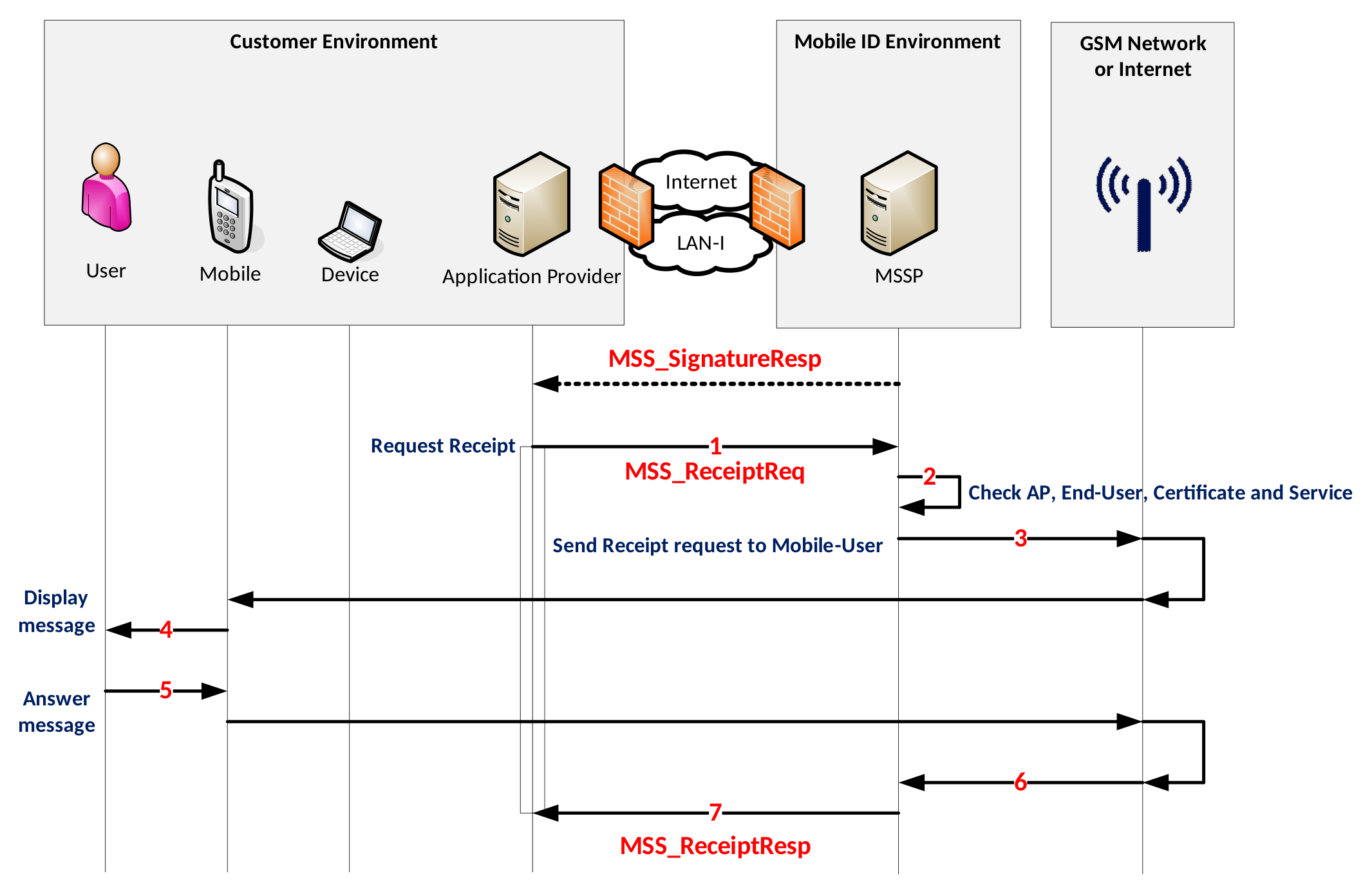
- For each successful MSS_SignatureResp the AP can request an MSS_ReceiptReq by passing the same MSSP_TransID and same MSISDN from the MSS_SignatureResp and defining message to be displayed to the End-User.
- MID backend checks the credentials.
- MID sends a receipt request to the Mobile ID application on the mobile device.
- The Mobile ID application displays the message to the End-User.
- The user press “ok” or “cancel” which trigger MSS Receipt response.
- The Receipt response is sent to Mobile ID.
- MID sends MSS_ReceiptResp to the AP.
MSS Receipt Request
At this point in time, AP has received the MSS_SignatureResp with the MSSP_TransID="h4iof", which is the transaction identifier that need to be set in the MSS_ReceiptReq message. Moreover, the AP must set the LANGUAGE (one of EN, DE, FR, IT) which is usually the same as used in the preceding signature. NOTE: The lines highlighted in pink is an optional extension to get a more detailed receipt response. This extension is currently supported by the SIM method only! Please remove these lines in case of the App method.
{
    "MSS_ReceiptReq": {
        "AP_Info": {
            "AP_ID": "yourAP_ID",
            "AP_PWD": "not-needed",
            "AP_TransID": "REF0101120000",
            "Instant": "2015-01-01T12:00:00.000+01:00"
        },
        "MSSP_Info": {
            "MSSP_ID": {
                "URI": "http://mid.swisscom.ch/"
            }
        },
        "MSSP_TransID": "h4iof",
        "MajorVersion": "1",
        "Message": {
            "Data": "RECEIPT_MESSAGE",
            "Encoding": "UTF-8",
            "MimeType": "text/plain"
        },
        "MinorVersion": "1",
        "MobileUser": {
            "MSISDN": "MOBILE_NUMBER"
        },
        "Status": {
            "StatusCode": {
                "Value": "100"
            },
            "StatusDetail": {
                "ReceiptRequestExtension": {
                    "ReceiptMessagingMode": "synch",
                    "ReceiptProfile": {
                        "Language": "LANGUAGE",
                        "ReceiptProfileURI": "http://mss.swisscom.ch/synch"
                    },
                    "UserAck": "true"
                }
            }
        }
} }<soapenv:Envelope xmlns:xsi="http://www.w3.org/2001/XMLSchema-instance"
xmlns:xsd="http://www.w3.org/2001/XMLSchema" soap:encodingStyle="http://schemas.xmlsoap.org/soap/encoding/"
xmlns:soapenv="http://www.w3.org/2003/05/soap-envelope"
xmlns:soap="http://schemas.xmlsoap.org/soap/envelope/">
<soapenv:Body>
<MSS_Receipt>
<mss:MSS_ReceiptReq MinorVersion="1" MajorVersion="1" MSSP_TransID="h4iof"
xmlns:mss="http://uri.etsi.org/TS102204/v1.1.2#"
xmlns:sco="http://www.swisscom.ch/TS102204/ext/v1.0.0">
<mss:AP_Info AP_ID="yourAP_ID" AP_PWD="not-needed" AP_TransID="REF0101120000"
Instant="2015-01-01T12:00:00.000+01:00"/>
<mss:MSSP_Info>
<mss:MSSP_ID>
<mss:URI>http://mid.swisscom.ch/</mss:URI>
</mss:MSSP_ID>
</mss:MSSP_Info>
<mss:MobileUser>
<mss:MSISDN>MOBILE_NUMBER</mss:MSISDN>
</mss:MobileUser>
<mss:Status>
<mss:StatusCode Value="100"/>
<mss:StatusDetail>
<sco:ReceiptRequestExtension ReceiptMessagingMode="synch" UserAck="true">
<sco:ReceiptProfile Language="LANGUAGE">
<sco:ReceiptProfileURI>http://mss.swisscom.ch/synch</sco:ReceiptProfileURI>
</sco:ReceiptProfile>
</sco:ReceiptRequestExtension>
</mss:StatusDetail>
</mss:Status>
<mss:Message MimeType="text/plain" Encoding="UTF-8">RECEIPT_MESSAGE</mss:Message>
</mss:MSS_ReceiptReq>
</MSS_Receipt>
</soapenv:Body>
</soapenv:Envelope>MSS Receipt Response
INFO
The ReceiptResponseExtension highlighted in pink is an optional extension to get a more detailed receipt response. The response will only contain this part if ReceiptRequestExtension was requested in the Receipt Request message. This extension is currently supported by the SIM method only. The table below describes different ReceiptResponseExtension related scenarios.
| Response scenario | UserAck | User Response | Fault Message |
|---|---|---|---|
| No user response could be received within 80 seconds. It is unknown if the user got the receipt message. | false | N/A | N/A |
| User accepted the receipt message | true | "OK" | N/A |
| User cancelled the receipt message | true | "CANCEL" | "User Cancelled the request" |
| The receipt message was displayed for 60 seconds but user did not respond | true | "TIMEOUT" |
{
    "MSS_ReceiptResp": {
        "AP_Info": {
            "AP_ID": "yourAP_ID",
            "AP_TransID": "REF0101120000",
            "Instant": "2015-01-01T11:00:00.000Z"
        },
        "MSSP_Info": {
            "Instant": "2015-01-01T11:00:00.100Z",
            "MSSP_ID": {
                "URI": "http://mid.swisscom.ch/"
            }
        },
        "MajorVersion": "1",
        "MinorVersion": "1",
        "Status": {
            "StatusCode": {
                "Value": "100"
            },
            "StatusDetail": {
                "ReceiptResponseExtension": {
                    "ClientAck": "false",
                    "NetworkAck": "false",
                    "ReceiptMessagingMode": "synch",
                    "UserAck": "true",
                    "UserResponse": "{\"status\":\"OK\"}"
                }
            },
            "StatusMessage": "REQUEST_OK"
        }
    }
}<soapenv:Envelope
xmlns:soapenv="http://www.w3.org/2003/05/soap-envelope"
xmlns:xsd="http://www.w3.org/2001/XMLSchema"
xmlns:xsi="http://www.w3.org/2001/XMLSchema-instance">
<soapenv:Body>
<MSS_ReceiptResponse>
<mss:MSS_ReceiptResp MajorVersion="1" MinorVersion="1"
xmlns:mss="http://uri.etsi.org/TS102204/v1.1.2#"
xmlns:fi="http://mss.ficom.fi/TS102204/v1.0.0#">
<mss:AP_Info AP_ID="yourAP_ID" AP_PWD="not-needed" AP_TransID="REF0101120000"
Instant="2015-01-01T12:00:00.000+01:00"/>
<mss:MSSP_Info Instant="2015-01-01T12:00:00.100+01:00">
<mss:MSSP_ID>
<mss:URI>http://mid.swisscom.ch/</mss:URI>
</mss:MSSP_ID>
</mss:MSSP_Info>
<mss:Status>
<mss:StatusCode Value="100"/>
<mss:StatusMessage>REQUEST_OK</mss:StatusMessage>
<mss:StatusDetail>
<ns1:ReceiptResponseExtension ReceiptMessagingMode="synch"
UserAck="true"
UserResponse="{"status":"OK"}"
xmlns:ns1="http://www.swisscom.ch/TS102204/ext/v1.0.0"/>
</mss:StatusDetail>
</mss:Status>
</mss:MSS_ReceiptResp>
</MSS_ReceiptResponse>
</soapenv:Body>
</soapenv:Envelope>Encrypted MSS Receipts
Marked as obsolete - We currently no longer support encrypted Signature Receipts.
MSS Profile Query
An AP may use this operation to check the Mobile ID status and signature capabilities of a specific user (MSISDN) without requiring end-user interaction. Typically, an Application Provider would like to get the mobile signature profile capabilities before requesting a signature.
The AP can use a Profile Query request as depicted below.
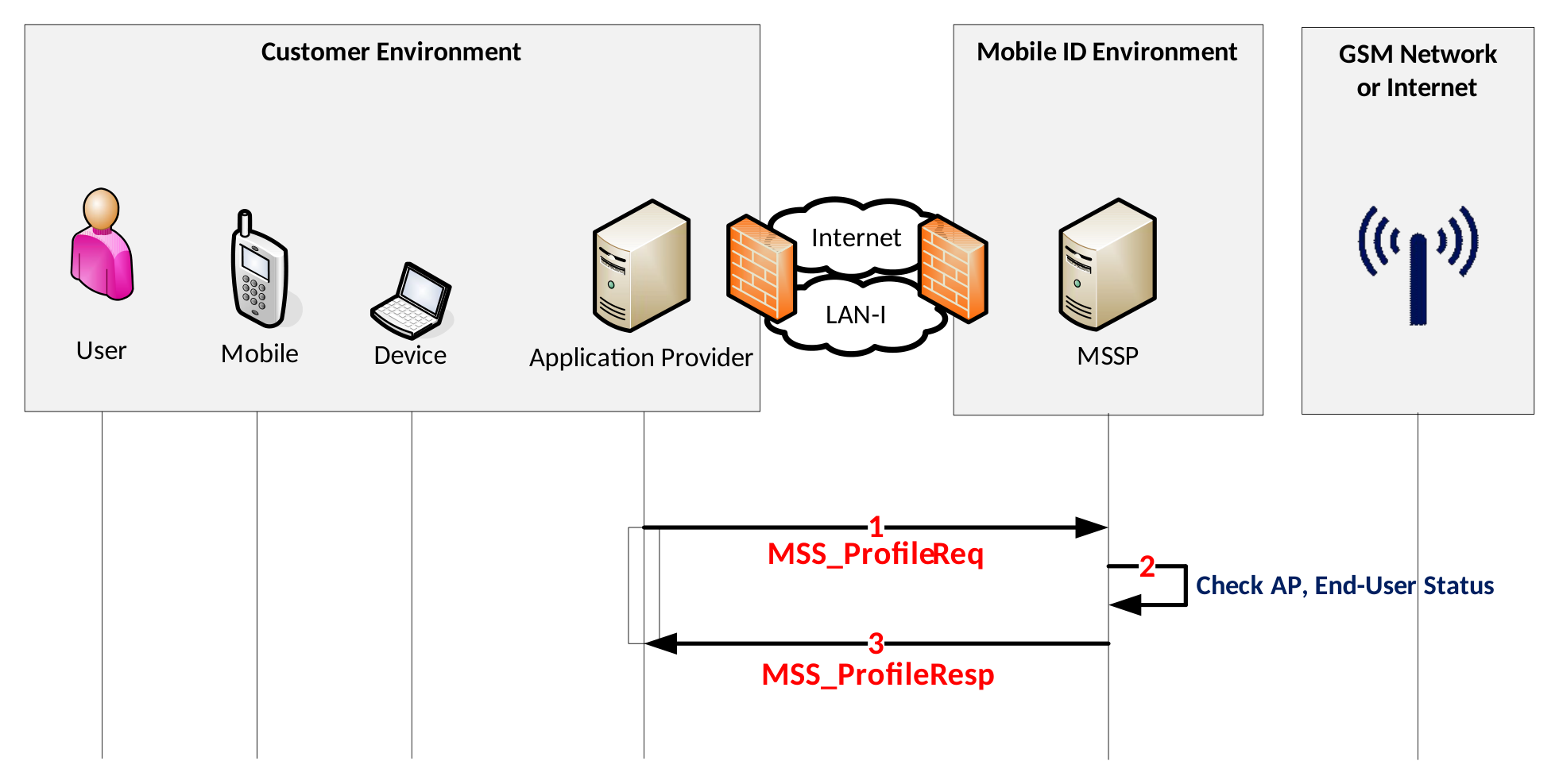
- Before to send a signature request for authentication, the AP validates the status and signature profile capabilities of a Mobile ID user by sending an MSS_ProfileReq request to Mobile ID
- MSSP checks the user status and signature capabilities
- In case of an active user, it retrieves the Signature Profiles of the end-user and sends back an MSS_ProfileResp. Otherwise, if the user is not active, the server sends back a fault response that may contain additional details about the user status.
Endpoint
<Base-URL>/rest/service/profile<Base-URL>/soap/services/MSS_ProfilePortMSS Profile Query Request
The lines highlighted in pink are optional Profile Query Extension parameters (see section MSS Profile Query Request Extensions).
{
    "MSS_ProfileReq": {
        "AP_Info": {
            "AP_ID": "yourAP_ID",
            "AP_PWD": "not-needed",
            "AP_TransID": "REF0101120000",
            "Instant": "2015-01-01T12:00:00.000+01:00"
        },
        "MSSP_Info": {
            "MSSP_ID": {
                "URI": "http://mid.swisscom.ch/"
            }
        },
        "MajorVersion": "2",
        "MinorVersion": "0",
        "MobileUser": {
            "MSISDN": "MOBILE_NUMBER"
        },
        "Params": "sscds state certs pinstatus rcstatus aastatus carddetails"
    }
}
<soap:Envelope xmlns:soap="http://www.w3.org/2003/05/soap-envelope"
 xmlns:ets="http://uri.etsi.org/TS102204/etsi204-kiuru.wsdl"
 xmlns:v1="http://uri.etsi.org/TS102204/v1.1.2#">
   <soap:Body>
      <ets:MSS_ProfileQuery>
         <MSS_ProfileReq MajorVersion="2" MinorVersion="0"
          xmlns:mss="http://uri.etsi.org/TS102204/v1.1.2#"
          xmlns:fi="http://mss.ficom.fi/TS102204/v1.0.0#">
             <mss:AP_Info AP_ID="yourAP_ID" AP_PWD="not-needed" AP_TransID="REF0101120000"
              Instant="2015-01-01T12:00:00.000+01:00"/>
            <mss:MSSP_Info>
               <mss:MSSP_ID>
                  <mss:URI>http://mid.swisscom.ch/</mss:URI>
               </mss:MSSP_ID>
            </mss:MSSP_Info>
            <mss:MobileUser>
               <mss:MSISDN>MOBILE_NUMBER</mss:MSISDN>
            </mss:MobileUser>
            <mss:Params>sscds state certs pinstatus rcstatus aastatus</mss:Params>
         </MSS_ProfileReq>
      </ets:MSS_ProfileQuery>
   </soap:Body>
</soap:Envelope>
MSS Profile Query Request Extensions
Optional Profile Query Extension parameters can be set in the Profile Query request message to get additional information in the Profile Query response message.
| Params value | Profile Query response content |
|---|---|
sscds | A list of all available Secure Signature Creation Devices of the user |
state | User account state details |
certs | X.509 mobile user certificate binary content and details, including subject name. Note: The subject name contains the user's unique MID serial number value. |
pinstatus | Mobile ID SIM card's Mobile ID PIN status |
rcstatus | User's recovery code status (has it been created: true or false) |
aastatus | Auto-Activation status (is it enabled: true or false), see section 5 |
carddetails | Mobile ID SIM card details, for example the Mobile Network Operator |
MSS Profile Query Response
The lines highlighted in pink are optional Profile Query Extension parameters (see section MSS Profile Query Request Extensions)
{
    "MSS_ProfileResp": {
        "AP_Info": {
            "AP_ID": "yourAP_ID",
            "AP_TransID": "REF0101120000",
            "Instant": "2015-01-01T11:00:00.000Z"
        },
        "MSSP_Info": {
            "Instant": "2015-01-01T11:00:00.100Z",
            "MSSP_ID": {
                "URI": "http://mid.swisscom.ch/"
            }
        },
        "MajorVersion": "2",
        "MinorVersion": "0",
        "SignatureProfile": [
            "SIGNATURE_PROFILE_1",
            "SIGNATURE_PROFILE_2",
            "SIGNATURE_PROFILE_3",
            "SIGNATURE_PROFILE_*"
        ],
        "Status": {
            "StatusCode": {
                "Value": "100"
            },
            "StatusDetail": {
                "ProfileQueryExtension": {
                    "MobileUser": {
                        "AutoActivation": false, "RecoveryCodeCreated": true
                    },
                    "Sscds": {
                        "App": [
                            {
                                "MobileUserCertificate": [
                                    {
                                        "Algorithm": "RSA",
                                        "State": "ACTIVE",
                                        "X509Certificate": [
                                            "X509_BASE64_CERT_USER", "X509_BASE64_CERT_CA"
                                        ],
                                        "X509SubjectName": [
                                            "X509_BASE64_SUBJECT_USER", "X509_BASE64_SUBJECT_CA"
                                        ]
                                    }
                                ],
                                "PinStatus": {
                                    "Blocked": false
                                },
                                "State": "ACTIVE"
                            }
                        ],
                        "Sim": {
                            "CardDetails": {
                                "Mcc": "228", "Mnc": "01", "Network": "Swisscom"
                            },
                            "MobileUserCertificate": [
                                {
                                    "Algorithm": "RSA",
                                    "State": "INACTIVE",
                                    "X509Certificate": [
                                        "X509_BASE64_CERT_USER", "X509_BASE64_CERT_CA"
                                    ],
                                    "X509SubjectName": [
                                        "X509_BASE64_SUBJECT_USER", "X509_BASE64_SUBJECT_CA"
                                    ]
                                },
                                {
                                    "Algorithm": "EC",
                                    "State": "INACTIVE",
                                    "X509Certificate": [
                                        "X509_BASE64_CERT_USER", "X509_BASE64_CERT_CA"
                                    ],
                                    "X509SubjectName": [
                                        "X509_BASE64_SUBJECT_USER", "X509_BASE64_SUBJECT_CA"
                                    ]
                                }
                            ],
                            "PinStatus": {
                                "Blocked": false
                            },
                            "State": "INACTIVE"
                        }
                    }
                }
            },
            "StatusMessage": "REQUEST_OK"
        }
    }
}
<soapenv:Envelope xmlns:soapenv="http://www.w3.org/2003/05/soap-envelope"
                  xmlns:xsd="http://www.w3.org/2001/XMLSchema"
                  xmlns:xsi="http://www.w3.org/2001/XMLSchema-instance">
  <soapenv:Body>
    <MSS_ProfileQueryResponse>
      <mss:MSS_ProfileResp xmlns:mss="http://uri.etsi.org/TS102204/v1.1.2#"
                           xmlns:fi="http://mss.ficom.fi/TS102204/v1.0.0#" MajorVersion="2" MinorVersion="0">
        <mss:AP_Info AP_ID="yourAP_ID" AP_PWD="not-needed" AP_TransID="REF0101120000"
             Instant="2015-01-01T12:00:00.000+01:00" xmlns:mss="http://uri.etsi.org/TS102204/v1.1.2#"
             xmlns:fi="http://mss.ficom.fi/TS102204/v1.0.0#"/>
        <mss:MSSP_Info Instant="2020-03-02T13:03:57.456+01:00">
          <mss:MSSP_ID>
            <mss:URI>http://mid.swisscom.ch/</mss:URI>
          </mss:MSSP_ID>
        </mss:MSSP_Info>
        <mss:SignatureProfile>
          <mss:mssURI>SIGNATURE_PROFILE_1</mss:mssURI>
        </mss:SignatureProfile>
        <mss:SignatureProfile>
          <mss:mssURI>SIGNATURE_PROFILE_2</mss:mssURI>
        </mss:SignatureProfile>
        <mss:SignatureProfile>
          <mss:mssURI>SIGNATURE_PROFILE_3</mss:mssURI>
        </mss:SignatureProfile>
        <mss:SignatureProfile>
          <mss:mssURI>SIGNATURE_PROFILE_*</mss:mssURI>
        </mss:SignatureProfile>
        <mss:Status>
          <mss:StatusCode Value="100"/>
          <mss:StatusMessage>REQUEST_OK</mss:StatusMessage>
          <mss:StatusDetail>
            <mcs:ProfileQueryExtension xmlns:mcs=http://www.methics.fi/TS102204/ext/v1.0.0
                                       xmlns:ds="http://www.w3.org/2000/09/xmldsig#">
              <mcs:MobileUser RecoveryCodeCreated="true" AutoActivation="false"/>
              <mcs:Sscds>
                <mcs:Sim>
                  <mcs:State>INACTIVE</mcs:State>
                  <mcs:PinStatus blocked="false"/>
                  <mcs:MobileUserCertificate State="INACTIVE" Algorithm="RSA">
                    <ds:X509Certificate>X509_BASE64_CERT_USER</ds:X509Certificate>
                    <ds:X509SubjectName>X509_BASE64_SUBJECT_USER</ds:X509SubjectName>
                    <ds:X509Certificate>X509_BASE64_CERT_CA</ds:X509Certificate>
                    <ds:X509SubjectName>X509_BASE64_SUBJECT_CA</ds:X509SubjectName>
                  </mcs:MobileUserCertificate>
                  <mcs:MobileUserCertificate State="INACTIVE" Algorithm="EC">
                    <ds:X509Certificate>X509_BASE64_CERT_USER</ds:X509Certificate>
                    <ds:X509SubjectName>X509_BASE64_SUBJECT_USER</ds:X509SubjectName>
                    <ds:X509Certificate>X509_BASE64_CERT_CA</ds:X509Certificate>
                    <ds:X509SubjectName>X509_BASE64_SUBJECT_CA</ds:X509SubjectName>
                  </mcs:MobileUserCertificate>
                  <mcs:CardDetails>
                    <mcs:MCC>228</mcs:MCC>
                    <mcs:MNC>01</mcs:MNC>
                    <mcs:Network>Swisscom</mcs:Network>
                  </mcs:CardDetails>
                </mcs:Sim>
                <mcs:App>
                  <mcs:State>ACTIVE</mcs:State>
                  <mcs:PinStatus blocked="false"/>
                  <mcs:MobileUserCertificate State="ACTIVE" Algorithm="RSA">
                    <ds:X509Certificate>X509_BASE64_CERT_USER</ds:X509Certificate>
                    <ds:X509SubjectName>X509_BASE64_SUBJECT_USER</ds:X509SubjectName>
                    <ds:X509Certificate>X509_BASE64_CERT_CA</ds:X509Certificate>
                    <ds:X509SubjectName>X509_BASE64_SUBJECT_CA</ds:X509SubjectName>
                  </mcs:MobileUserCertificate>
                </mcs:App>
              </mcs:Sscds>
            </mcs:ProfileQueryExtension>
          </mss:StatusDetail>
        </mss:Status>
      </mss:MSS_ProfileResp>
    </MSS_ProfileQueryResponse>
  </soapenv:Body>
</soapenv:Envelope>