
Application Provider Client Integration
This chapter describes how an Application Provider (AP) integrates its backend with the Swisscom Mobile ID signature service. It covers the necessary preconditions, endpoint configuration, and use of mutual TLS authentication.
Preconditions
Before using the Swisscom Mobile ID web service, some initial provisioning steps are required.
The Mobile ID customer (your company) has an agreement with Swisscom:
- Connectivity (Internet or LAN‑I) between the AP and Mobile ID has been established.
- The AP’s public source IP address (or range) must be whitelisted in the Swisscom Firewall.
- The customer has delivered the X.509 client certificate to Swisscom (see Create X509 Client Certificates).
- Connectivity (Internet or LAN‑I) between the AP and Mobile ID has been established.
The Mobile ID customer receives from Swisscom:
- An AP_ID (Application Provider Identifier) value.
- A DataToBeDisplayed (DTBD) Prefix value:
- The DTBD Prefix is an AP‑specific keyword that must be included as a prefix in every Mobile ID request text message sent to a Mobile ID user (the message displayed on the user’s mobile phone).
- Example:
"Bank ACME: "
Endpoint Address
The Swisscom Mobile ID web service is accessible through LAN-I or Internet. If not otherwise specified use the following default access details.
| Environment | URL |
|---|---|
| Internet | https://mobileid.swisscom.com |
| Swisscom LAN‑I | https://195.65.233.218 |
Overview Access
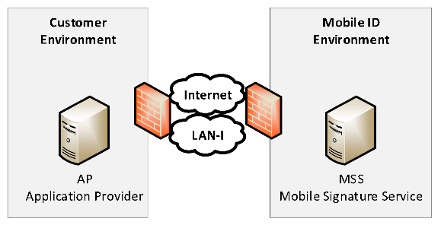
INFO
For accessing the service endpoints the Mobile ID customer can choose between SOAP or RESTful endpoints.
SOAP Endpoint
A description of this interface is available as a WSDL file on GitHub: mobileid.yaml
Endpoints
| Endpoint URL | Description | Reference Section |
|---|---|---|
<Base‑URL>/soap/services/MSS_SignaturePort | MSS Signature | Section 3.2 |
<Base‑URL>/soap/services/MSS_StatusQueryPort | MSS Status Query | Section 0 |
<Base‑URL>/soap/services/MSS_ReceiptPort | MSS Receipt | Section 3.4 |
<Base‑URL>/soap/services/MSS_ProfilePort | MSS Profile Query | Section 3.5 |
REST Endpoint
A description of this interface is available as a YAML file on GitHub: mobileid.yaml
Endpoints
| Endpoint URL | Description | Reference Section |
|---|---|---|
<Base‑URL>/rest/service/sign | MSS Signature | Section 3.2 |
<Base‑URL>/rest/service/status | MSS Status Query | Section 0 |
<Base‑URL>/rest/service/receipt | MSS Receipt | Section 3.4 |
<Base‑URL>/rest/service/profile | MSS Profile Query | Section 3.5 |
Mutual Authentication
A certificate-based mutual authentication when accessing the Mobile ID web service is highly recommended. When using certificate-based mutual authentication, the following actions occur:
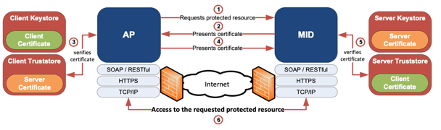
- The client Application Provider (AP) requests access to a protected resource on the Mobile ID (MID) server.
- The MID web server presents its server certificate to the client AP.
- The client AP verifies the MID server certificate.
- If verification is successful, the client AP sends its client certificate to the MID server.
- The MID server verifies the AP client credentials.
- If verification succeeds, the MID server grants access to the protected resource requested by the client AP.
Important Guidelines for Certificate-Based Mutual Authentication
The client must send only its end‑entity certificate.
- Authentication on the MID side does not consider validation of a full client certificate chain or any restrictions on the root CA.
- Authentication is denied if the client sends a bag with the full certificate chain.
The Enhanced Key Usage value of client certificates must include Client Authentication (
1.3.6.1.5.5.7.3.2).- See X509 Client Certificates for examples of creating self‑signed certificates.
All requests to the Mobile ID service must originate only from servers that you control.
- Never send requests directly from client‑side code such as mobile apps or JavaScript, as this may compromise your credentials.
To validate the chain of trust for the Mobile ID server certificate:
- Add the SwissSign Gold CA – G2 root certificate to your client TrustStore.
- The intermediate CAs are returned dynamically by the MID server and may change.
- Refer to Section tbd for more details.
INFO
Get the root certificate from https://www.swisssign.com/en/support/faq.html